XACML Vendor: NextLabs

This is the third in a series of posts where I interview XACML vendors. This time we talk to NextLabs.

Why does the world need XACML? What benefits do your customers realize?

Over the last 20 years IT has focused on building walls around their networks and applications. Now with cross-organizational collaboration, cloud and mobile we are finding that those walls are no longer relevant for protecting critical information.

The world needs XACML to protect critical information in today’s collaborative business and IT environment.

At NextLabs we focus on applying Extensible Access Control Markup Language (XACML) to information protection to enable our customers to accelerate global collaboration while simultaneously protecting their most sensitive intellectual property.

Using Attribute-Based Access Control (ABAC) and externalized authorization we can protect data based on its sensitivity, defined by attributes, across applications and systems. Traditional access control models such as Role-Based Access Control (RBAC) and Access Control Lists (ACLs) simply do not scale to address the information protection problem.

What products do you have in the XACML space?

NextLabs has taken an industry-solution approach to the market. We provide several industry-solutions for regulatory compliance, secure partner collaboration, and intellectual property protection.

Each solution is comprised of pre-built policy libraries that implement industry best-practices, pre-built policy-enforcement-points (PEPs) for critical enterprise applications, our Control Center Information Control Platform based on XACML, and pre-built reporting.

Control Center is our Information Control Platform. It has several components:

  • Control Center Server – the Control Center server includes our Policy Administration Point (PAP) and additional services necessary for information control use cases. These include:
    • Information Classification Services – a compressive set of services that automate information classification such as content-analysis, data tagging, and user driven classification
    • Policy Development and Lifecycle Management Services – Services to govern and simplify the development and management of policy such as delegated administration, approval workflow, testing and validation, audit trail, versioning, and dictionary services. On top of this we provide Policy Studio, a graphical policy integrated development environment (IDE)
    • Policy Deployment and PDP Management Services – services that allow us to reliably deploy policies to distributed PDPs, even over the public internet
    • Audit and Reporting Services – role-based dashboards, analytics, and reporting to provide insights into information activity and policy compliance
  • Control Center Policy Controller – the Policy Controller is our policy-decision-point (PDP). We provide three different editions of the Policy Controller:
    • Endpoint Policy Controller – designed to run on laptops and desktops, even when disconnected
    • Server Policy Controller – designed to run co-located with a server based applications. Can be run as a service/daemon or embedded into an application
    • Policy Controller Service – designed to run as a stand-alone PDP service in J2EE Application Server

NextLabs provides over a dozen pre-built Policy Enforcement Points (PEPs) for common applications and system. These are separated into three product lines:

  • Entitlement Management – pre-built PEPs for server applications, including:
    • Document Management (Microsoft SharePoint, SAP Document Management)
    • SAP Enterprise Resource Planning
    • Product Lifecycle Management (SAP PLM, Dassault Enovia)
    • Collaboration (CIFS and NFS File Servers)
  • Collaborative Rights Management – Collaborative Rights Management (cRM) applies XACML to protect unstructured data (files)
  • Data Protection – Data Protection is a suite of endpoint PEPs for removable devices, networking, email applications, web meeting applications and unified communication applications

What versions of the spec do you support? What optional parts? What profiles?

We support the core 2.0 and 3.0 specifications as well as the SAML, EC-US and IPC profiles.

What sets your product apart from the competition?

At NextLabs we differentiate ourselves through comprehensive industry solutions and our focus on information protection.

XACML is a generic authorization standard and can be applied to many things. Making it useful to the business buyer requires significant work beyond the standard – resources need attributes (i.e. information needs to be classified), PEPs need to be built, obligations/advise need to be implemented and policies need to be designed, developed and tested.

We have addressed this solution gap to make XACML useful for protecting critical information, and that’s what sets us apart.

What customers use your product? What is your biggest deployment?

NextLabs works with leading companies in the Manufacturing, High-Tech, Aerospace and Defense, Chemical, Energy, and Industrial Equipment industries. These companies typically have very high-value or sensitive intellectual property, global operations and are subject to strict global regulations.

We have multiple deployments above 50,000 users and have a project that will soon reach 100,000 users.

We have a few webinars where you can hear how some of our customers like GE and Tyco benefitted from our solutions. Recently one of our customers, BAE Systems, was recognized by CIO magazine for their use of our product.

What programming languages do you support? Will you support the REST profile? And JSON?

We support Java, C#, C++, SOAP, and SAP ABAP. We plan to support the REST and JSON profiles in a future release.

Do you support OpenAz? Spring-Security? Other open source efforts?

NextLabs contributed the C++ implementation of OpenAz and also supports OpenAz in Java.

We are committed to open APIs for authorization since this is critical to the growth of the XACML market and will support any effort that moves the industry forward in this regard.

How easy is it to write a PEP for your product? And a PIP? How long does an implementation of your product usually take?

NextLabs provides over a dozen PEP products and pre-built PIP integrations, which eliminate the need to build PEPs or PIPs for many common commercial applications.

For a custom PEP/PIPs, the time required depends on the nature of the application and the use case you are trying to support. The time can vary from hours to weeks.

Installing the product only takes hours, but the time required to implement a solution to production will vary depending on the number and type of applications and the policy use cases.

Can your product be embedded (i.e. run in-process)?

Yes, our Policy Controller can be embedded into another application.

What optimizations have you made? Can you share performance numbers?

Any latency introduced by external queries to information points (PIP) and evaluating large numbers of policy is a concerns for all customers.

We designed our architecture with the principle of a PDP that can run completely off-line – with the ability to make complex decisions without any network calls. This was a critical requirement for our endpoint products and has the benefit of eliminating latency associated with network roundtrips or external queries to PIPs.

To enable our off-line PDP we developed a patented policy deployment technology, called ICENet, which pre-evaluates multiple dimensions of policy when it is deployed to distributed PDPs.

99% of our policy queries are under 5 milliseconds, with most of those under 1 millisecond.

Building Both Security and Quality In

One of the important things in a Security Development Lifecycle (SDL) is to feed back information about vulnerabilities to developers.

This post relates that practice to the Agile practice of No Bugs.

The Security Incident Response

Even though we work hard to ship our software without security vulnerabilities, we never succeed 100%.

When an incident is reported (hopefully responsibly), we execute our security response plan. We must be careful to fix the issue without introducing new problems.

Next, we should also look for similar issues to the one reported. It’s not unlikely that there are issues in other parts of the application that are similar to the reported one. We should find and fix those as part of the same security update.

Finally, we should do a root cause analysis to determine why this weakness slipped through the cracks in the first place. Armed with that knowledge, we can adapt our process to make sure that similar issues will not occur in the future.

From Security To Quality

The process outlined above works well for making our software ever more secure.

But security weaknesses are essentially just bugs. Security issues may have more severe consequences than regular bugs, but most regular bugs are expensive to fix once the software is deployed as well.

So it actually makes sense to treat all bugs, security or otherwise, the same way.

As the saying goes, an ounce of prevention is worth a pound of cure. Just as we need to build security in, we also need to build quality in general in.

Building Quality In Using Agile Methods

This has been known in the Agile and Lean communities for a long time. For instance, James Shore wrote about it in his excellent book The Art Of Agile Development and Elisabeth Hendrickson thinks that there should be so little bugs that they don’t need triaging.

Some people object to the Zero Defects mentality, claiming that it’s unrealistic.

There is, however, clear evidence of much lower defect rates for Agile development teams. Many Lean implementations also report successes in their quest for Zero Defects.

So there is at least anecdotal evidence that a very significant reduction of defects is possible.

This will require change, of course. Testers need to change and so do developers. And then everybody on the team needs to speak the same language and work together as a single team instead of in silos.

If we do this well, we’ll become bug exterminators that delight our customers with software that actually works.

Signing Java Code

In a previous post, we discussed how to secure mobile code.

One of the measures mentioned was signing code. This post explores how that works for Java programs.

Digital Signatures

The basis for digital signatures is cryptography, specifically, public key cryptography. We use a set of cryptographic keys: a private and a public key.

The private key is used to sign a file and must remain a secret. The public key is used to verify the signature that was generated with the private key. This is possible because of the special mathematical relationship between the keys.

Both the signature and the public key need to be transferred to the recipient.

Certificates

In order to trust a file, one needs to verify the signature on that file. For this, one needs the public key that corresponds to the private key that was used to sign the file. So how can we trust the public key?

This is where certificates come in. A certificate contains a public key and the distinguished name that identifies the owner of that key.

The trust comes from the fact that the certificate is itself signed. So the certificate also contains a signature and the distinguished name of the signer.

When we control both ends of the communication, we can just provide both with the certificate and be done with it. This works well for mobile apps you write that connect to a server you control, for instance.

If you don’t control both ends, then we need an alternative. The distinguished name of the signer can be used to look up the signer’s certificate. With the public key from that certificate, the signature in the original certificate can be verified.

We can continue in this manner, creating a certificate chain, until we reach a signer that we explicitly trust. This is usually a well-established Certificate Authority (CA), like VeriSign or Thawte.

Keystores

In Java, private keys and certificates are stored in a password-protected database called a keystore.

Each key/certificate combination is identified by a string known as the alias.

Code Signing Tools

Java comes with two tools for code signing: keytool and jarsigner.

Use the jarsigner program to sign jar files using certificates stored in a keystore.

Use the keytool program to create private keys and the corresponding public key certificates, to retrieve/store those from/to a keystore, and to manage the keystore.

The keytool program is not capable of creating a certificate signed by someone else. It can create a Certificate Signing Request, however, that you can send to a CA. It can also import the CA’s response into the keystore.

The alternative is to use tools like OpenSSL or BSAFE, which support such CA capabilities.

Code Signing Environment

Code signing should happen in a secure environment, since private keys are involved and those need to remain secret. If a private key falls into the wrong hands, a third party could sign their code with your key, tricking your customers into trusting that code.

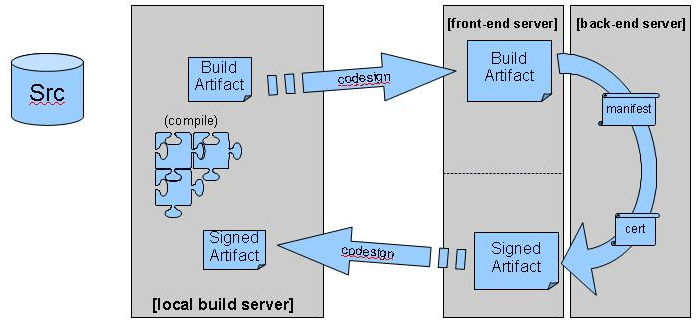
This means that you probably don’t want to maintain the keystore on the build machine, since that machine is likely available to many people. A more secure approach is to introduce a dedicated signing server:

You should also use different signing certificates for development and production.

Timestamping

Certificates are valid for a limited time period only. Any files signed with a private key for which the public key certificate has expired, should no longer be trusted, since it may have been signed after the certificate expired.

We can alleviate this problem by timestamping the file. By adding a trusted timestamp to the file, we can trust it even after the signing certificate expires.

But then how do we trust the timestamp? Well, by signing it using a Time Stamping Authority, of course! The OpenSSL program can help you with that as well.

Beyond Code Signing

When you sign your code, you only prove that the code came from you. For a customer to be able to trust your code, it needs to be trustworthy. You probably want to set up a full-blown Security Development Lifecycle (SDL) to make sure that it is as much as possible.

Another thing to consider in this area is third-party code. Most software packages embed commercial and/or open source libraries. Ideally, those libraries are signed by their authors. But no matter what, you need to take ownership, since customers don’t care whether a vulnerability is found in code you wrote yourself or in a library you used.

On Measuring Code Coverage

In a previous post, I explained how to visualize what part of your code is covered by your tests.

This post explores two questions that are perhaps more important: why and what code coverage to measure.

Why We Measure Code Coverage

What does it mean for a statement to be covered by tests? Well, it means that the statement was executed while the tests ran, nothing more, nothing less.

We can’t automatically assume that the statement is tested, since the bare fact that a statement was executed doesn’t imply that the effects of that execution were verified by the tests.

If you practice Test-First Programming, then the tests are written before the code. A new statement is added to the code only to make a failing test pass. So with Test-First Programming, you know that each executed statement is also a tested statement.

If you don’t write your tests first, then all bets are off. Since Test-First Programming isn’t as popular as I think it should be, let’s assume for the remainder of this post that you’re not practicing it.

Then what good does it do us to know that a statement is executed?

Well, if the next statement is also executed, then we know that the first statement didn’t throw an exception.

That doesn’t help us much either, however. Most statements should not throw an exception, but some statements clearly should. So in general, we still don’t get a lot of value out of knowing that a statement is executed.

The true value of measuring code coverage is therefore not in the statements that are covered, but in the statements that are not covered! Any statement that is not executed while running the tests is surely not tested.

Uncovered code indicates that we’re missing tests.

What Code Coverage We Should Measure

Our next job is to figure out what tests are missing, so we can add them. How can we do that?

Since we’re measuring code coverage, we know the target of the missing tests, namely the statements that were not executed.

If some of those statements are in a single class, and you have unit tests for that class, it’s easy to see that those unit tests are incomplete.

Unit tests can definitely benefit from measuring code coverage.

What about acceptance tests? Some code can easily be related to a single feature, so in those cases we could add an acceptance test.

In general, however, the relationship between a single line of code and a feature is weak. Just think of all the code we re-use between features. So we shouldn’t expect to always be able to tell by looking at the code what acceptance test we’re missing.

It makes sense to measure code coverage for unit tests, but not so much for acceptance tests.

Code Coverage on Acceptance Tests Can Reveal Dead Code

One thing we can do by measuring code coverage on acceptance tests, is find dead code.
Dead code is code that is not executed, except perhaps by unit tests. It lives on in the code base like a zombie.

Dead code takes up space, but that’s not usually a big problem.

Some dead code can be detected by other means, like by your IDE. So all in all, it seems that we’re not gaining much by measuring code coverage for acceptance tests.

Code Coverage on Acceptance Tests May Be Dangerous

OK, so we don’t gain much by measuring coverage on acceptance tests. But no harm, no foul, right?

Well, that remains to be seen.

Some organizations impose targets for code coverage. Mindlessly following a rule is not a good idea, but, alas, such is often the way of big organizations. Anyway, an imposed number of, say, 75% line coverage may be achievable by executing only the acceptance tests.

So developers may have an incentive to focus their tests exclusively on acceptance tests.

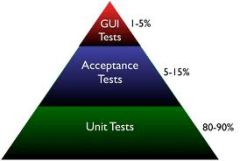
This is not as it should be according to the Test Pyramid.

Acceptance tests are slower, and, especially when working through a GUI, may also be more brittle than unit tests.

Therefore, they usually don’t go much further than testing the happy path. While it’s great to know that all the units integrate well, the happy path is not where most bugs hide.

Some edge and error cases are very hard to write as automated acceptance tests. For instance, how do you test what happens when the network connection drops out?

These types of failures are much easier explored by unit tests, since you can use mock objects there.

The path of least resistance in your development process should lead developers to do the right thing. The right thing is to have most of the tests in the form of unit tests.

If you enforce a certain amount of code coverage, be sure to measure that coverage on unit tests only.

Securing Mobile Java Code

Mobile Code is code sourced from remote, possibly untrusted systems, that are executed on your local system. Mobile code is an optional constraint in the REST architectural style.

This post investigates our options for securely running mobile code in general, and for Java in particular.

Mobile Code

Examples of mobile code range from JavaScript fragments found in web pages to plug-ins for applications like FireFox and Eclipse.

Plug-ins turn a simple application into an extensible platform, which is one reason they are so popular. If you are going to support plug-ins in your application, then you should understand the security implications of doing so.

Types of Mobile Code

Mobile code comes in different forms. Some mobile code is source code, like JavaScript.

Mobile code in source form requires an interpreter to execute, like JägerMonkey in FireFox.

Mobile code can also be found in the form of executable code.

This can either be intermediate code, like Java applets, or native binary code, like Adobe’s Flash Player.

Active Content Delivers Mobile Code

A concept that is related to mobile code is active content, which is defined by NIST as

Electronic documents that can carry out or trigger actions automatically on a computer platform without the intervention of a user.

Examples of active content are HTML pages or PDF documents containing scripts and Office documents containing macros.

Active content is a vehicle for delivering mobile code, which makes it a popular technology for use in phishing attacks.

Security Issues With Mobile Code

There are two classes of security problems associated with mobile code.

The first deals with getting the code safely from the remote to the local system. We need to control who may initiate the code transfer, for example, and we must ensure the confidentiality and integrity of the transferred code.

From the point of view of this class of issues, mobile code is just data, and we can rely on the usual solutions for securing the transfer. For instance, XACML may be used to control who may initiate the transfer, and SSL/TLS may be used to protect the actual transfer.

It gets more interesting with the second class of issues, where we deal with executing the mobile code. Since the remote source is potentially untrusted, we’d like to limit what the code can do. For instance, we probably don’t want to allow mobile code to send credit card data to its developer.

However, it’s not just malicious code we want to protect ourselves from.

A simple bug that causes the mobile code to go into an infinite loop will threaten your application’s availability.

The bottom line is that if you want your application to maintain a certain level of security, then you must make sure that any third-party code meets that same standard. This includes mobile code and embedded libraries and components.

That’s why third-party code should get a prominent place in a Security Development Lifecycle (SDL).

Safely Executing Mobile Code

In general, we have four types of safeguards at our disposal to ensure the safe execution of mobile code:

  • Proofs
  • Signatures
  • Filters
  • Cages (sandboxes)

We will look at each of those in the context of mobile Java code.

Proofs

It’s theoretically possible to present a formal proof that some piece of code possesses certain safety properties. This proof could be tied to the code and the combination is then proof carrying code.

After download, the code could be checked against the code by a verifier. Only code that passes the verification check would be allowed to execute.

Updated for Bas’ comment:
Since Java 6, the StackMapTable attribute implements a limited form of proof carrying code where the type safety of the Java code is verified. However, this is certainly not enough to guarantee that the code is secure, and other approaches remain necessary.

Signatures

One of those approaches is to verify that the mobile code is made by a trusted source and that it has not been tampered with.

For Java code, this means wrapping the code in a jar file and signing and verifying the jar.

Filters

We can limit what mobile content can be downloaded. Since we want to use signatures, we should only accept jar files. Other media types, including individual .class files, can simply be filtered out.

Next, we can filter out downloaded jar files that are not signed, or signed with a certificate that we don’t trust.

We can also use anti-virus software to scan the verified jars for known malware.

Finally, we can use a firewall to filter out any outbound requests using protocols/ports/hosts that we know our code will never need. That limits what any code can do, including the mobile code.

Cages/Sandboxes

After restricting what mobile code may run at all, we should take the next step: prevent the running code from doing harm by restricting what it can do.
We can intercept calls at run-time and block any that would violate our security policy. In other words, we put the mobile code in a cage or sandbox.

In Java, cages can be implemented using the Security Manager. In a future post, we’ll take a closer look at how to do this.

Using a Layered XACML Architecture to Implement Retention

A previous post showed how the security principle of segmentation led to a small adaption of the XACML architecture for use in the cloud.

This post shows how a similar adaptation may be required on-premise.

Segmentation of Retention and Regular Access Control Policies

Even when we don’t live in a cloud world, there may be reasons for segmentation. Take records management, for instance.

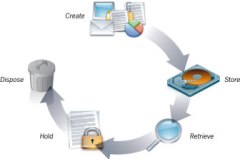
Any piece of data that is marked as a record, may not be deleted until after the end of the retention period (at which point it must be deleted).

This is an access control policy that clearly takes precedence over the regular policies.

A similar situation exists with legal holds.

While it’s certainly possible to achieve that with various policy sets and clever policy combining, the principle of segmentation encourages us to take a different approach. We would like to physically separate the policies into different layers, so that they can never interfere with each other.

Segmenting XACML Policies Using Layered Policy Decision Points

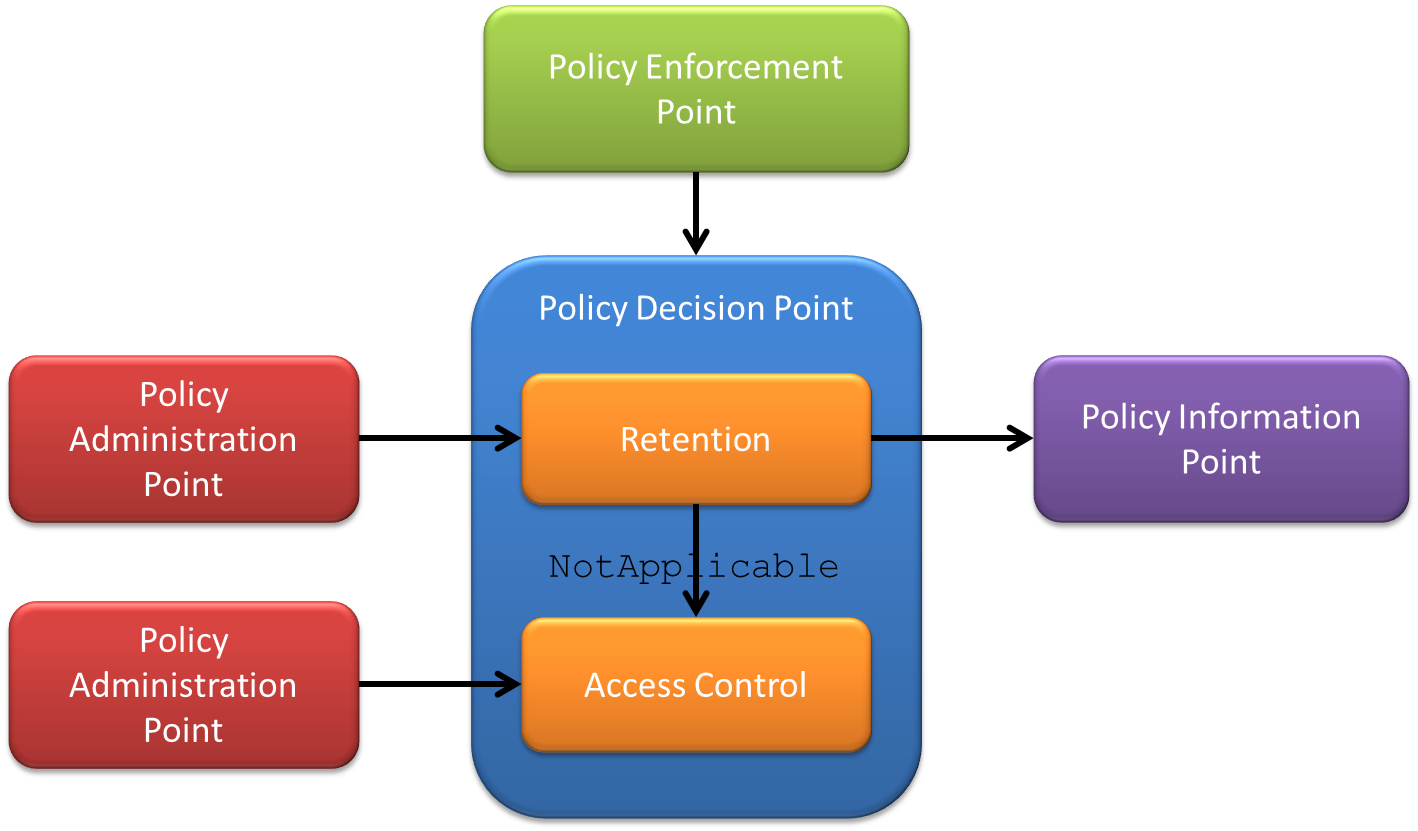
We can create a layered Policy Decision Point (PDP) that wraps smaller PDPs that each deal with a single type of access control policies.

The PDP with retention policies is asked for a decision first. When the decision is NotApplicable it means the resource being accessed is not under retention, and the decision is forwarded to the next PDP, which uses regular access control policies.

The retention policies will probably require a PIP to look up resource attributes, like is-under-retention.

Segmentation Implementation Patterns

While the multi-tenant XACML architecture was an example of a dispatching mechanism, the layered architecture is an example of the Chain of Responsibility pattern.

Supporting Multiple XACML Representations

We’re in the process of registering an XML media type for the eXtensible Access Control Markup Language (XACML). Simultaneously, the XACML Technical Committee is working on a JSON format.

Both media types are useful in the context of another committee effort, the REST profile. This post explains what benefit these profiles will bring once approved, and how to support them in clients and servers.

Media Types Support Content Negotiation

With the REST profile, any application can communicate with a Policy Decision Point (PDP) in a RESTful manner. The media types make it possible to communicate with such a PDP in a manner that is most convenient for the client, using a process called content negotiation.

For instance, a web application that is mainly implemented in JavaScript may prefer to use JSON for communication with the PDP, to avoid having to bring in infrastructure to deal with XML.

Content negotiation is not just a convenience feature, however. It also facilitates evolution.

A server with many clients that understand 2.0 may start also serving 3.0, for instance. The older clients stay functional using 2.0, whereas newer clients can communicate in 3.0 syntax with the same server.

This avoids having to upgrade all the clients at the same time as the server.

So how does a server that supports multiple versions and/or formats know which one to serve to a particular client? The answer is the Accept HTTP header. For instance, a client can send Accept: application/xacml+xml; version=2.0 to get an XACML 2.0 XML format, or Accept: application/xacml+json; version=3.0 to get an XACML 3.0 JSON answer.

The value for the Accept header is a list of media types that are acceptable to the client, in decreasing order of precedence. For instance, a new client could prefer 3.0, but still work with older servers that only support 2.0 by sending Accept: application/xacml+xml; version=3.0, application/xacml+xml; version=2.0.

Supporting Multiple Versions and Formats

So there is value for both servers and clients to support multiple versions and/or formats. Now how does one go about implementing this? The short answer is: using indirection.

The longer answer is to make an abstraction for the version/format combination. We’ll dub this abstraction a representation.

For instance, an XACML request is really not much more than a collection of categorized attributes, while a response is basically a collection of results.

Instead of working with, say, the XACML 3.0 XML form of a request, the client or server code should work with the abstract representation. For each version/format combination, you then add a parser and a builder.

The parser reads the concrete syntax and creates the abstract representation from it. Conversely, the builder takes the abstract representation and converts it to the desired concrete syntax.

In many cases, you can re-use parts of the parsers and builders between representations. For instance, all the XML formats of XACML have in common that they require XML parsing/serialization.

In a design like this, no code ever needs to be modified when a new version of the specification or a new serialization format comes out. All you have to do is add a parser and a builder, and all the other code can stay the way it is.

The only exception is when a new version introduces new capabilities and your code wants to use those. In that case, you probably must also change the abstract representation to accommodate the new functionality.

Software Development and Lifelong Learning

The main constraint in software development is learning. This means that learning is a core skill for developers and we should not think we’re done learning after graduation. This post explores some different ways in which to learn.

Go To Conferences

Conferences are a great place to learn new things, but also to meet new people. New people can provide new ways of looking at things, which helps with learning as well.

You can either go to big and broad conferences, like Java One or the RSA conference, or you can attend a smaller, more focused event. Some of these smaller events may not be as well-known, but there are some real gems nonetheless.

Take XML Amsterdam, for example, a small conference here in the Netherlands with excellent international speakers and attendees (even some famous ones).

Attend Workshops

Learning is as much about doing as it is about hearing and watching. Some conferences may have hands-on sessions or labs, but they’re in the minority. So just going to conferences isn’t good enough.

A more practical variant are workshops. They are mostly organized by specific communities, like Java User Groups.

One particularly useful form for developers is the code retreat. Workshops are much more focused than conferences and still provide some of the same networking opportunities.

Get Formal Training

Lots of courses are being offered, many of them conveniently online. One great (and free) example is Cryptography from Coursera.

Some of these course lead to certifications. The world is sharply divided into those who think certifications are a must and those that feel they are evil. I’ll keep my opinion on this subject to myself for once 😉 but whatever you do, focus on the learning, not on the piece of paper.

Learn On The Job

There is a lot to be learned during regular work activities as well.

You can organize that a bit better by doing something like job rotation. Good forms of job rotation for developers are collective code ownership and swarming.

Pair programming is an excellent way to learn all kinds of things, from IDE shortcuts to design patterns.

Practice in Private

Work has many distractions, though, like Getting a Story Done.

Open source is an alternative, in the sense that it takes things like deadlines away, which can help with learning.

However, that still doesn’t provide the systematic exploration that is required for the best learning. So practicing on “toy problems” is much more effective.

There are many katas that do just that, like the Roman Numerals Kata. They usually target a specific skill, like Test-Driven Development (TDD).

A Classification of Tests

There are many ways of testing software. This post uses the five Ws to classify the different types of tests and shows how to use this classification.
Programmer vs Customer (Who)

Tests exist to give confidence that the software works as expected.

But whose expectations are we talking about? Developers have different types of expectations about their code than users have about the application. Each audience deserves its own set of tests to remain confident enough to keep going.

Functionality vs Performance vs Load vs Security (What)

When not specified, it’s assumed that what is being tested is whether the application functions the way it’s supposed to. However, we can also test non-functional aspects of an application, like security.

Before Writing Code vs After (When)

Tests can be written after the code is complete to verify that it works (test-last), or they can be written first to specify how the code should work (test-first). Writing the test first may seem counter-intuitive or unnatural, but there are some advantages:

  • When you write the tests first, you’ll guarantee that the code you later write will be testable (duh). Anybody who’s written tests for legacy code will surely acknowledge that that’s not a given if you write the code first
  • Writing the tests first can prevent defects from entering the code and that is more efficient than introducing, finding, and then fixing bugs
  • Writing the tests first makes it possible for the tests to drive the design. By formulating your test, in code, in a way that looks natural, you design an API that is convenient to use. You can even design the implementation

Unit vs Integration vs System (Where)


Tests can be written at different levels of abstraction. Unit tests test a single unit (e.g. class) in isolation.

Integration tests focus on how the units work together. System tests look at the application as a whole.

As you move up the abstraction level from unit to system, you require fewer tests.

Verification vs Specification vs Design (Why)

There can be different reasons for writing tests. All tests verify that the code works as expected, but some tests can start their lives as specifications of how yet-to-be-written code should work. In the latter situation, the tests can be an important tool for communicating how the application should behave.

We can even go a step further and let the tests also drive how the code should be organized. This is called Test-Driven Design (TDD).

Manual vs Automated Tests (How)


Tests can be performed by a human or by a computer program. Manual testing is most useful in the form of exploratory testing.

When you ship the same application multiple times, like with releases of a product or sprints of an Agile project, you should automate your tests to catch regressions. The amount of software you ship will continue to grow as you add features and your testing effort will do so as well. If you don’t automate your tests, you will eventually run out of time to perform all of them.

Specifying Tests Using the Classification

With the above classifications we can be very specific about our tests. For instance:

  • Tests in TDD are automated (how) programmer (who) tests that design (why) functionality (what) at the unit or integration level (where) before the code is written (when)
  • BDD scenarios are automated (how) customer (who) tests that specify (why) functionality (what) at the system level (where) before the code is written (when)
  • Exploratory tests are manual (how) customer (who) tests that verify (why) functionality (what) at the system level (where) after the code is written (when)
  • Security tests are automated (how) customer (who) tests that verify (why) security (what) at the system level (where) after the code is written (when)

By being specific, we can avoid semantic diffusion, like when people claim that “tests in TDD do not necessarily need to be written before the code”.

Reducing Risk Using the Classification

Sometimes you can select a single alternative along a dimension. For instance, you could perform all your testing manually, or you could use tests exclusively to verify.

For other dimensions, you really need to cover all the options. For instance, you need tests at the unit and integration and system level and you need to test for functionality and performance and security. If you don’t, you are at risk of not knowing that your application is flawed.

Proper risk management, therefore, mandates that you shouldn’t exclusively rely on one type of tests. For instance, TDD is great, but it doesn’t give the customer any confidence. You should carefully select a range of test types to cover all aspects that are relevant for your situation.