

Adventures in JavaScript: Getting Started

Node.jsOne of the high potentials for a Frictionless Development Environment (FDE) is Cloud9.

It is one of a growing number of web applications that uses JavaScript as the programming language for both front-end and back-end. The latter brought to you by Node.js.

So I thought it was time to start playing around with JavaScript and Node. Here is an account of my very first adventure into this Brave New World.

Preparations: Adding JavaScript Support to Eclipse

To keep the number of changes low, I wanted to keep my trusted old Eclipse. So the first step was to install Nodeclipse and jshint-eclipse.

To support documentation in the Markdown format that Node uses, I installed the Markdown Editor plugin for Eclipse.

This left me with nothing for unit tests. So I installed the JavaScript tools from Eclipse. That gave me some JS support, but nothing for creating unit tests.

Some googling told me there is such a thing as JsUnit, the JS port of my beloved JUnit. Unfortunately it doesn’t seem to come with Eclipse support, even though this thread indicates it does (or did).

JsTestDriverMaybe I’m just doing it wrong. I’d appreciate any hints in the comments.

Some more googling informed me that Orion is using JsTestDriver.

This introduction to JsTestDriver explains in detail how it works.

First Exercise: Roman Numerals

Now that I’m all set up, it’s time to do a little exercise to get my feet wet. For this I picked the Roman Numerals kata.

I started out by following this JsTestDriver example. I created a new JavaScript project in Eclipse, added src/main/js and src/test/js folders, and created the JsTestDriver configuration file:

server: http://localhost:9876

load:
  - src/main/js/*.js
  - src/test/js/*.js

Next, I opened the JsTestDriver window using Window|Show View|Other|JavaScript|JsTestDriver and started the JsTestDriver server. I then opened the client in FireFox at http://127.0.0.1:42442/capture.

The next step was to create a new run configuration: Run|Run Configurations|JsTestDriver Test. I selected the project and the JsTestDriver configuration within the project, and checked Run on Every Save.

Now everything is set up to start the TDD cycle. First a test:

RomanNumeralsTest = TestCase("RomanNumeralsTest");

RomanNumeralsTest.prototype.testArabicToRoman
    = function() {
  var romanNumerals = new TestApp.RomanNumerals();

  assertEquals("i", romanNumerals.arabicToRoman(1));
};

And then the implementation:

TestApp = { };

TestApp.RomanNumerals = function() { };

TestApp.RomanNumerals.prototype.arabicToRoman
    = function (arabic) {
  return null;
};

I completed the rest of the kata as usual.

Reflections

The cool thing about JsTestDriver is that it automatically runs all the tests every time you change something. This shortens the feedback cycle and keeps you in the flow. For Java, InfiniTest does the same.

The problem with my current tool chain is that support for renaming is extremely limited. I got Operation unavailable on the current selection. Select a JavaScript project, source folder, resource, or a JavaScript file, or a non-readonly type, var, function, parameter, local variable, or type variable.

Other refactorings do exist, like Extract Local Variable and Extract Method, but they mess up the formatting. They also give errors, but then work when trying again.

All in all I feel satisfied with the first steps I’ve taken on this journey. I’m a little worried about the stability of the tools. I also realize I have a more to learn about JavaScript prototypes.

Is XACML Dead?

ripXACML is dead. Or so writes Forrester’s Andras Cser.

Before I take a critical look at the reasons underlying this claim, let me disclose that I’m a member of the OASIS committee that defines the XACML specification. So I may be a little biased.

Lack of broad adoption

The first reason for claiming XACML dead is the lack of adoption. Being a techie, I don’t see a lot of customers, so I have to assume Forrester knows better than me.

At last year’s XACML Seminar in the Netherlands, there were indeed not many people who actually used XACML, but the room was filled with people who were at least interested enough to pay to hear about practical experiences with XACML.

I also know that XACML is in use at large enterprises like Bank of America, Bell Helicopter, and Boeing, to name just some Bs. And the supplier side is certainly not the problem.

So there is some adoption, buI grant that it’s not broad.

Inability to serve the federated, extended enterprise

XACML was designed to meet the authorization needs of the monolithic enterprise where all users are managed centrally in AD.

extended-enterpriseI don’t understand this statement at all, as there is nothing in the XACML spec that depends on centrally managed users.

Especially in combination with SAML, XACML can handle federated scenarios perfectly fine.

In my current project, we’re using XACML in a multi-tenant environment where each tenant uses their own identity provider. No problem.

PDP does a lot of complex things that it does not inform the PEP about

The PDP is apparently supposed to tell the PEP why access is denied. I don’t get that: I’ve never seen an application that greyed out a button and included the text “You need the admin role to perform this operation”.

Maybe this is about testing access control policies. Or maybe I just don’t understand the problem. I’d love to learn more about this.

Not suitable for cloud and distributed deployment

CloudSecurityI guess what they mean is that fine-grained access control doesn’t work well in high latency environments. If so, sure.


XACML doesn’t prescribe how fine-grained your policies have to be, however, so I can’t see how this could be XACML’s fault. That’s like blaming my keyboard for allowing me to type more characters than fit in a tweet.

Actually, I’d say that XACML works very well in the cloud. And with the recently approved REST profile and the upcoming JSON profile, XACML will be even better suited for cloud solutions.

Commercial support is non-existent

This is lack of adoption again.

BTW, absolute claims like “there is no software library with PEP support” turn you into an easy target. All it takes is one counter example to prove you wrong.

Refactoring and rebuilding existing in-house applications is not an option

This, I think, is the main reason for slow adoption: legacy applications create inertia. We see the same thing with SSO. Even today, there are EMC internal applications that require me to maintain separate credentials.

The problem is worse for authorization. Authentication is a one-time thing at the start of a session, but authorization happens all the time. There are simply more places in an application that require modification.

There may be some light at the end of the tunnel, however.

Under constant attackHistory shows that inertia can be overcome by a large enough force.

That force might be the changing threat landscape. We’ll see.

OAuth supports the mobile application endpoint in a lightweight manner

OAuth does well in the mobile space. One reason is that mobile apps usually provide focused functionality that doesn’t require fine-grained access control decisions. It remains to be seen whether that continues to be true as mobile apps get more advanced.

Of course, if all your access control needs can be implemented with one yes/no question, then using XACML is overkill. That doesn’t, however, mean there is no place for XACML is the many, many places where life is not that simple.

What do you think?

All in all, I’m certainly not convinced by Forrester’s claim that XACML is dead. Are you? If XACML were buried, what would you use instead?

Update: Others have joined in the discussion and confirmed that XACML is not dead:

  • Gary from XACML vendor Axiomatics
  • Danny from XACML vendor Dell
  • Anil from open source XACML implementation JBoss PicketBox
  • Ian from analyst Gartner

Update 2: More people joined the discussion. One is confused, one is confusing, and Forrester’s Eva Mahler (of SGML and UMA fame) backs her colleague.

Update 3: Another analyst joins the discussion: KuppingerCole doesn’t think XACML is dead either.

Update 4: CA keeps supporting XACML in their SiteMinder product.

Bridging the Client-Server Divide

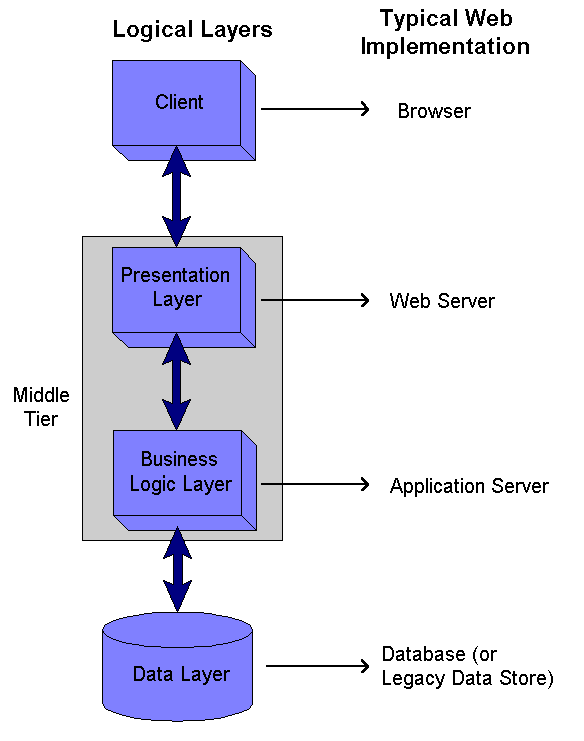
webapp-architectureMost software these days is delivered in the form of web applications, and the move towards cloud computing will only emphasize this trend.

Web apps consist of client and server parts, where the client part has been getting bigger lately to deliver a richer user experience.

This split has implications for developers, because the technologies used on the client and server parts are often different.

The client is ruled by HTML, CSS, and JavaScript, while the server is most often developed using JVM or .NET based languages like Java and C#.

Disadvantages of Different Client and Server Technologies

Developers of web applications risk becoming either specialists confined to a single part of the stack or polyglot programmers.

Polyglot programming is the practice of knowing and using many programming languages. There are both advantages and disadvantages associated with polyglot programming. I believe the overriding disadvantage is the context switching involved, which degrades productivity and opens the doors to extra bugs.

Being a specialist has advantages and disadvantages as well. A big disadvantage I see is the “us versus them”, or “not my problem” culture that can arise. In general, Agile teams prefer generalists.

Bringing Server Technologies to the Client

Many attempts have been made at bridging the gap between client and server. Most of these attempts were about bringing server-side technologies to the client.

GWTJava on the client has failed to reached widespread adoption, and now that many people advice to disable Java applets altogether because of security reasons it seems increasingly unlikely that it ever will.

Bringing .NET to the client has likewise failed as Silverlight adoption continues to drop.

Another idea is to translate from server to client technologies. Many languages can now be compiled to JavaScript. The most mature effort is Google Web Toolkit (GWT), which translates from Java. The main problem with GWT is that it supports only a small subset of Java.

All in all I don’t feel there currently is a satisfactory way of using server technologies on the client.

Bringing Client Technologies to the Server

So what about the reverse? There is really only one client-side technology worth looking at today: JavaScript. The only other rival, Flash, is losing out quickly due to lack of support from Apple and the rise of HTML5.

Node.jsJavaScript on the server is starting to make inroads, thanks to the Node.js platform.

It is used by the Cloud9 IDE, for example, and supported by Platform-as-a-Service providers like CloudFoundry and Heroku.

What do you think?

If I had to put my money on any unification approach, it would be Node.js.

Do you agree? What needs to happen to make this a common way of developing web apps? Please let me know your thoughts in the comments.

Data Classification In the Cloud

Whenever a bug report comes in, I subconsciously classify it according to how it impacts the customer’s ability to derive value from the product.

Many software development companies have policies that formalize such classifications, e.g. into critical, high, medium, and low priority.

One can take that very far, like the Common Weakness Scoring System (CWSS) for classifying security vulnerabilities.

Data classification

Classifications are useful, because they compress a vast set of possibilities into a small set of categories. This makes it easier to decide what to do.

Classification applied to data stored in computer systems is called data classification. There are different reasons for classifying data.

One is to determine appropriate access control policies. It is wasteful to protect all your information at the highest level, so you want to divide up your data into a small number of buckets and take measures that are appropriate for each bucket.

Another important use case of data classification is to drive compliance efforts. If you process health care data, for instance, you may have to comply with the Health Insurance Portability and Accountability Act (HIPAA). This data requires different controls to be put in place than credit card data that is covered by PCI DSS.

Data in the Cloud

Things get more interesting in the cloud.

As a cloud user, you are still subject to the same laws and regulations as before, but now you’ve given away part of the control to your cloud provider. This means you have to make sure that they implement the required controls.

If the regulations you must comply with come with assessments, then those must extend to the cloud provider. Many cloud providers will not allow you to come in and do such assessments yourself, but they may allow assessments from third parties, like TRUSTe for a Safe Harbor assessment.

As a cloud provider, you will want to implement as many controls as possible, to support the maximum number of laws and regulations that your customers must comply with.

Both parties benefit from clear contracts. Part of such a contract may be a Data Protection Agreement that lists the duties of both parties in classifying and properly protecting data to meet security requirements and regulations.

If you’re unsure how to do all of this right, then you may want to look for guidance from the Cloud Security Alliance (CSA).

Likely Candidates for Frictionless Development Environments

Last time I reviewed the book on Consumption Economics, which explains how technology companies and their products will have to change to survive the brave new world that we’re entering.

So what would we find if we take the lessons from the book and apply them to our own software development environment? I think the answer would be surprisingly close to what I’ve called a Frictionless Development Environment (FDE) before.

To be honest, I’ve only started thinking more systematically about FDEs after reading Consumption Economics. In Five Essential Components of a Frictionless Development Environment, I’ve laid out the major building blocks of an FDE: cloud computing, big data analytics, recommendation engines, plug-in architecture, and open source.

It may be to soon to expect existing solutions to have all of those, but let’s see where we stand. There are already some cloud development environments. Most of these are geared towards web developers, and offer limited languages (mostly JavaScript). Some offer a big enough range to be interesting to a wide range of developers.

Big data analytics and recommendation engines are big features that are probably not there yet, but could always be added later. What’s more important is to look for a plug-in architecture and particularly for open source. These are fundamental architectural and business decisions.

Using open source as a criterion reduces our list to Cloud9 and Orion. Both have a plug-in architecture. The latter is an Eclipse project, but the former seems more mature. Be sure to follow both Cloud9 and Orion.

So what do you think? Would any of these cloud IDEs work for you? What other open source cloud IDEs are out there?

How To Remove Friction From Your Version Control Experience

ErrorLast week, I spend several days fixing a bug that only surfaced in a distributed environment.

I felt pressure to fix it quickly, because our continuous integration build was red, and we treat that as a “stop the line” event.

Then I came across a post from Tomasz Nurkiewicz who claims that breaking the build is not a crime.

Tomasz argues that a better way to organize software development is to make sure that breaking changes don’t affect your team mates. I agree.

Broken Builds Create Friction

Breaking changes from your co-workers are a form of friction, since they take away time and focus from your job. Tomasz’ setup has less friction than ours.

But I feel we can do better still. In a perfect Frictionless Development Environment (FDE), all friction is removed. So what would that look like with regard to version control?

With current version control systems, there is lots of friction. I complained about Perforce before because of that.

Git is much better, but even then there are steps that have to be performed that take away focus from the real goal you’re trying to achieve: solving the customer’s problem using software.

For instance, you still have to create a new topic branch to work on. And you have to merge it with the main development line. In a perfect world, we wouldn’t have to do that.

Frictionless Version Control

version-controlSo how would a Frictionless Development Environment do version control for us?

Knowing when to create a branch is easy.

All work happens on a topic branch, so every time you start to work on something, the FDE could create a new branch.

The problem is knowing when to merge. But even this is not as hard as it seems.

You’re done with your current work item (user story or whatever you want to call it) when it’s coded, all the tests pass, and the code is clean.

So how would the FDE know when you’re done thinking of new tests for the story?

Well, if you practice Behavior-Driven Development (BDD), you start out with defining the behavior of the story in automated tests. So the story is functionally complete when there is a BDD test for it, and all scenarios in that test pass.

Now we’re left with figuring out when the code is clean. Most teams have a process for deciding this too. For instance, code is clean when static code analysis tools like PMD, CheckStyle, and FindBugs give no warnings.

Some people will argue that we need a minimum amount of code coverage from our tests as well. Or that the code needs to be reviewed by a co-worker. Or that Fortify must not find security vulnerabilities. That’s fine.

pipelineThe basic point is that we can formally define a pipeline of processes that we want to run automatically.



At each stage of the pipeline can we reject the work. Only when all stages complete successfully, are we done.

And then the FDE can simply merge the branch with the main line, and delete it. Zero friction from version control.

What do you think?

Would you like to lubricate your version control experience? Do you think an automated branching strategy as outlined above would work?

How To Secure an Organization That Is Under Constant Attack

Battle of GeonosisThere have been many recent security incidents at well-respected organizations like the Federal Reserve, the US Energy Department, the New York Times, and the Wall Street Journal.


If these large organizations are incapable of keeping unwanted people off their systems, then who is?

The answer unfortunately is: not many. So we must assume our systems are compromised. Compromised is the new normal.

This has implications for our security efforts:

  1. We need to increase our detection capabilities
  2. We need to be able to respond quickly, preferably in an automated fashion, when we detect an intrusion

Increasing Intrusion Detection Capabilities with Security Analytics

There are usually many small signs that something fishy is going on when an intruder has compromised your network.

For instance, our log files might show that someone is logging in from an IP address in China instead of San Francisco. While that may be normal for our CEO, it’s very unlikely for her secretary.

Another example is when someone tries to access a system it normally doesn’t. This may be an indication of an intruder trying to escalate his privileges.

Security AnalyticsMost of us are currently unable to collect such small indicators into firm suspicions, but that is about to change with the introduction of Big Data Analytics technology.

RSA recently released a report that predicts that big data will play a big role in Security Incident Event Monitoring (SIEM), network monitoring, Identity and Access Management (IAM), fraud detection, and Governance, Risk, and Compliance (GRC) systems.

RSA is investing heavily in Security Analytics to prevent and predict attacks, and so is IBM.

Quick, Automated, Responses to Intrusion Detection with Risk-Adaptive Access Control

The information we extract from our big security data can be used to drive decisions. The next step is to automate those decisions and actions based on them.

Large organizations, with hundreds or even thousands of applications, have a large attack surface. They are also interesting targets and therefore must assume they are under attack multiple times a day.

Anything that is not automated is not going to scale.

Risk-Adaptive Access Control (RAdAC)One decision than can be automated is whether we grant someone access to a particular system or piece of data.

This dynamic access control based on risk information is what NIST calls Risk-Adaptive Access Control (RAdAC).

As I’ve shown before, RAdAC can be implemented using eXtensible Access Control Markup Language (XACML).

What do you think?

Is your organization ready to look at security analytics? What do you see as the major road blocks for implementing RAdAC?

Five Essential Components of a Frictionless Development Environment

One of the challenges of maintaining a consistent programming style in a team is for everyone to have the same workspace settings, especially in the area of compiler warnings.

Every time a new member joins the team, an existing member sets up a new environment, or a new version of the compiler comes along, you havebook.e to synchronize settings.

My team recently started using Workspace Mechanic, an Eclipse plug-in that allows you to save those settings in an XML file that you put under source control.

The plug-in periodically compares the workspace settings with the contents of that file. It notifies you in case of differences, and allows you to update your environment with a couple of clicks.

Towards a Frictionless Development Environment

Workspace Mechanic is a good example of a lubricant, a tool that lubricates the development process to reduce friction.

LubricationMy ideal is to take this to the extreme with a Frictionless Development Environment (FDE) in which all software development activities go very smoothly.

Let’s see what we would likely need to make such an FDE a reality.

In this post, I will look at a very small example that uncovers some of the basic components of an FDE.

Example: Creating the Class Under Test

In Test-Driven Development, we start out with a test and there is no class under test yet. Eclipse has a Quick Fix to create the class, but we still have to manually invoke it and select a source folder to store it in (assuming you have different source folders for main and test code).

It would be nicer if the IDE would understand what you’re trying to do and automatically create the skeleton for the class under test for you and save it in the right place.

Big DataThe crux is for the tool to understand what you are doing, or else it could easily draw the wrong conclusion and create all kinds of artifacts that you don’t want.


This kind of knowledge is highly user and potentially even project specific. It is therefore imperative that the tool collects usage data and uses that to optimize its assistance. We’re likely talking about big data here.

Given the fact that it’s expensive in terms of storage and computing power to collect and analyze these statistics, it makes sense to do this in a cloud environment.

That will also allow for quicker learning of usage patterns when working on different machines, like in the office and at home. More importantly, it allows building on usage patterns of other people.

What this example also shows, is that we’ll need many small, very focused lubricants. This makes it unlikely for one organization to provide all lubricants for an FDE that suits everybody, even for a specific language.

Open Source SoftwareThe only practical way of assembling an FDE is through a plug-in architecture for lubricants.

Building an FDE will be a huge effort. To realize it on the short term, we’ll probably need an open source model. No one company could put in the resource required to pull this off in even a couple of years.

The Essential Components of a Frictionless Development Environment

This small example uncovered the following building blocks for a Frictionless Development Environment:

  1. Cloud Computing will provide economies of scale and access from anywhere
  2. Big Data Analytics will discern usage patterns
  3. Recommendation Engines will convert usage patterns into context-aware lubricants
  4. A Plug-in architecture will allow different parties to contribute lubricants and usage analysis tools
  5. An Open Source model will allow many organizations and individuals to collaborate

What do you think?

Do you agree with the proposed components of an FDE? Did I miss something?

Please share your thoughts in the comments.

How Friction Slows Us Down

FrictionI once joined a project where running the “unit” tests took three and a half hours.

As you may have guessed, the developers didn’t run the tests before they checked in code, resulting in a frequently red build.

Running the tests just gave too much friction for the developers.

I define friction as anything that resist the developer while she is producing software.

Since then, I’ve spotted friction in numerous places while developing software.

Friction in Software Development

Since friction impacts productivity negatively, it’s important that we understand it. Here are some of my observations:

  • Friction can come from different sources.
    It can result from your tool set, like when you have to wait for Perforce to check out a file over the network before you can edit it.
    Friction can also result from your development process, for example when you have to wait for the QA department to test your code before it can be released.
  • Friction can operate on different time scales.
    Some friction slows you down a lot, while others are much more benign. For instance, waiting for the next set of requirements might keep you from writing valuable software for weeks.
    On the other hand, waiting for someone to review your code changes may take only a couple of minutes.
  • Friction can be more than simple delays.
    It also rears its ugly head when things are more difficult then they ought to be.
    In the vi editor, for example, you must switch between command and insert modes. Seasoned vi users are just as fast as with editors that don’t have that separation. Yet they do have to keep track of which mode they are in, which gives them a higher cognitive load.

Lubricating Software Development

LubricationThere has been a trend to decrease friction in software development.

Tools like Integrated Development Environments have eliminated many sources of friction.

For instance, Eclipse will automatically compile your code when you save it.

Automated refactorings decrease both the time and the cognitive load required to make certain code changes.

On the process side, things like Agile development methodologies and the DevOps movement have eliminated or reduced friction. For instance, continuous deployment automates the release of software into production.

These lubricants have given us a fighting chance in a world of increasing complexity.

Frictionless Software Development

It’s fun to think about how far we could take these improvements, and what the ultimate Frictionless Development Environment (FDE) might look like.

My guess is that it would call for the combination of some of the same trends we already see in consumer and enterprise software products. Cloud computing will play a big role, as will simplification of the user interaction, and access from anywhere.

What do you think?

What frictions have you encountered? Do you think frictions are the same as waste in Lean?

What have you done to lubricate the frictions away? What would your perfect FDE look like?

Please let me know your thoughts in the comments.