Waterfall vs. Agile

I’ve been a fan of Agile methodologies for quite some time now. As an Agilist, I would scoff at the Waterfall process I was taught during my studies. I did read a couple of times that the original paper introducing the Waterfall model wasn’t really supportive of it at all, but I’d never read that paper myself. Until now.

Here’s what I found what its author, Dr. Winston Royce, has to say.

Attitude
The heart of software development is analysis and coding, “since both steps involve genuinely creative work which directly contributes to the usefulness of the final product.” But for larger software systems, they are not enough. “Additional development steps are required […] The prime function of management is to sell these concepts to both groups and then enforce compliance on the part of development personnel.” The groups mentioned are customers and developers. Wow, not really people over processes, huh?

There are big problems with Waterfall
Royce then goes on to introduce the other steps, ending up with what we now call Waterfall. Right after that he adds feedback loops between each step and its predecessor. The caption to this figure says “Hopefully, the iterative interaction between the various phases is confined to successive steps.” Immediately following that, he points out a problem with this process: “Unfortunately, for the process illustrated, the design iterations are never confined to the successive steps”.

But there is a much worse problem. “The testing phase which occurs at the end of the development cycle is the first event for which timing, storage, input/output transfers, etc., are experienced as distinguished from analyzed. […] If these phenomena fail to satisfy the various external constraints, then invariably a major redesign is required. […] In effect the development process has returned to the origin and one can expect up to a 100-percent overrun in schedule and/or costs.” Yes. Been there, done that.

But these can be fixed
Stunningly, though, Royce goes on to claim “However, I believe the illustrated approach to be fundamentally sound.” We just need to tweak it a bit more: add a preliminary design phase before analysis, document the design, do it twice (he means simulate first, but others refer to this as “plan one to throw away”), look closely at testing, and involve the customer.

And these fixes look a lot like Agile
The first trick to do some design before analysis is also what is common in Agile methodologies. However, we usually don’t single out analysis and design, but apply the trick to all the phases. That’s how we end up with Behavior Driven Development.

Royce turns out to be a big fan of documentation: “In order to procure a 5 million dollar hardware device, I would expect that a 30 page specification would provide adequate detail to control the procurement. In order to procure 5 million dollars of software I would estimate a 1000 page specification is about right in order to achieve comparable control”. Why is documentation so important? One of the reasons is that “during the early phase of software development the documentation is the specification and is the design.” Agilist would rather argue that automated tests are both the documentation and the specification and drive the design. Royce could never have thought of that, since testing in his mind occurred at the end and was to be performed manually.

The do it twice trick is also used a lot in Agile. We call it a spike.

For testing, Royce notices that a lot of errors can be caught before the test phase: “every bit of an analysis and every bit of code should be subjected to a simple visual scan by a second party who did not do the original analysis or code”. Agilists would agree that pair programming is very useful. Also, Royce advises to “test every logic path in the computer program at least once”. He understands it is difficult, but should be done anyway. I agree that we should have (nearly) 100% test coverage, and TDD gives us just that.

For customer involvement, Royce notes that “for some reason what a software design is going to do is subject to wide interpretation even after previous agreement. […] To give the contractor free rein between requirement definition and operation is inviting trouble.” I don’t see how he can maintain this and still be a fan of written documentation. But I am with him in seeing the value of close collaboration with the customer.

So there is no dichotomy
In summary, the author of the Waterfall process clearly saw some problems with that approach. He even identified some solutions that look remarkably like what we do in Agile methodologies today. So why don’t we end this Waterfall vs. Agile false dichotomy and from now on talk just about software development best practices? Make progress, not war.

By the way, what I find amazing is that somehow people managed to get the Waterfall process out of this paper, but not the problems and solutions Royce presented. And it’s almost criminal that the Waterfall process is still taught in universities as a good way to do software development. Without the above fixes, it’s clearly not.

Using factory classes in Ant tasks

So you have this nice factory class that prevents your client code from knowing the implementation class of the instances it needs to create and that lets it program to an API only.

Of course, at some point somebody needs to know the implementation class. Since the factory is the one creating instances, it either needs to know itself or be told. And since the factory is probably in the same package as the API, it shouldn’t know the implementation class itself, since that would tie the API package to the implementation package. So the factory needs to be told:

public class MyFactory {

  private static Class implementationClass = null;

  private MyFactory() {
    // Utility class
  }

  /**
   * Create a new instance.
   * @param data Data needed to initialize the instance
   * @return The newly created instance
   */
  public static MyInterface newInstance(final Object data) {
      assertImplementationClass();
      final Class clazz = implementationClass;
      if (data == null) {
        try {
          final Constructor constructor = clazz.getConstructor();
          result = (MyInterface) constructor.newInstance(
              new Object[0]);
        } catch (final Exception e) {
          result = null;
        }
      } else {
        final Constructor[] constructors = clazz.getConstructors();
        for (int i = 0; result == null && i < constructors.length; 
            i++) {
          final Constructor constructor = constructors[i];
          if (constructor.getParameterTypes().length == 1
          && constructor.getParameterTypes()[0].isInstance(data)) {
            try {
              result = (MyInterface) constructor.newInstance(
                  new Object[]{data});
            } catch (final Exception e) {
              result = null;
            }
          }
        }
    }

    return result;
  }

  /**
   * Register a class that implements the interface.
   */
  public static void registerImplementation(
      final Class implementation) {
    implementationClass = implementation;
  }

  /**
   * Unregister the implementation class.
   */
  public static void unregisterImplementation() {
    implementationClass = null;
  }

  private static void assertImplementationClass() {
    if (implementationClass == null) {
      throw new IllegalStateException(
          "Implementation class not set");
    }
  }

}

Now, who’s going to tell the factory what class to instantiate? There must be some entry point in the application where this happens. In your tests (you do write tests, right?), you can do that in the set up method. In a web application, you can do that in the ServletContextListener.

Ant

But what about in Ant tasks? You could create an Ant task that does just that and call it from a dependent target:

  <target name="--init-factory" unless="factory.inited">
    <property name="impl.class" 
        value="com.mycompany.myapp.MyImplementation"/>
    <taskdef name="register-impl"
        classname="com.mycompany.myapp.ant.RegisterTask" 
        classpath="..."/>
    <register-impl classname="${impl.class}"/>
    <property name="factory.inited" value="true"/>
  </target>

However, that doesn’t work. So what’s up?

Debugging Ant tasks

Our Ant task seems so simple that it is hard to see what could be wrong with it. So we want to debug it and find out.

You can debug Ant tasks by setting the environment variable ANT_OPTS:

SET ANT_OPTS=-Xdebug -Xrunjdwp:transport=dt_socket,address=6000,server=y,suspend=n

Now when you run your Ant script, you can attach your debugger on port 6000. You may want to use the input task to have the build wait while you attach your debugger.

Debugging reveals something interesting: The registerImplementation method does get called with the right parameter, but when newInstance is called, implementationClass is still null. Apparently Ant is doing some fancy classloader stuff that gets in our way.

The solution is to have the Ant task set a system property that the factory uses:

  private static void assertImplementationClass() {
    if (implementationClass == null) {
      final String className = (String) 
          System.getProperties().get(IMPLEMENTATION_CLASS_PROPERTY);
      if (StringUtils.isBlank(className)) {
        throw new IllegalStateException("Implementation class not set");
      }
      try {
        registerImplementation(Class.forName(className));
      } catch (final ClassNotFoundException e) {
        throw new IllegalStateException("Invalid implementation class: " 
            + className + "\n" + e.getLocalizedMessage());
      }
    }
  }

OSGi & Maven & Eclipse

If you’re involved in a large software development effort in Java, then OSGi seems like a natural fit to keep things modular and thus maintainable. But every advantage can also be seen as a disadvantage: using OSGi you will end up with lots of small projects. Handling these and their interrelationships can be challenging.

Enter Maven. This build tool makes it a lot easier to build all these little (or not so little) projects. Which is a necessity, since a command line driven build tool is essential for doing Continuous Integration. And we all practice that, right?

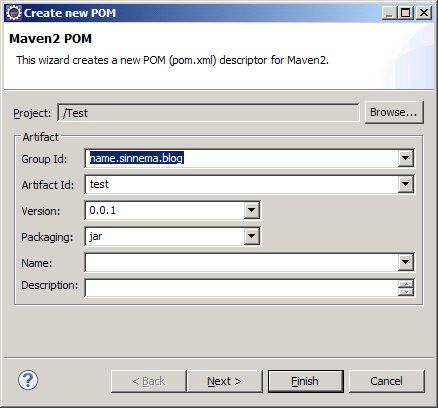
However, as a developer it’s a pain to keep switching between your favorite IDE and the command line. Not to worry, Eclipse has plug-ins that handle just about any situation. Using M2Eclipse, you can maintain your POM from within the IDE.

But an Eclipse Maven project is not an Eclipse OSGi project. For handling OSGi bundles, one would want to use the Eclipse Plug-in Development Environment (PDE) with all the goodies that brings to OSGi development. There is, however, a way to get the best of both worlds, although it still isn’t perfect, as we will see shortly.

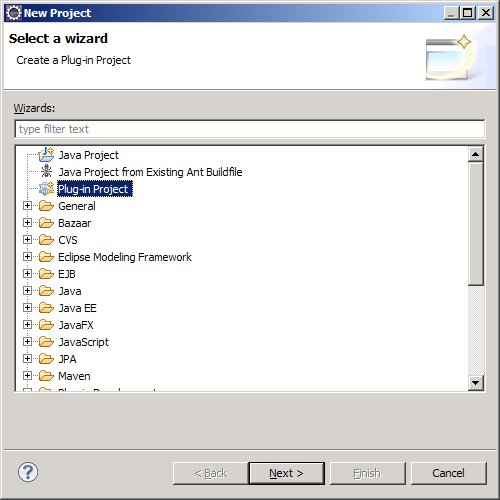
The trick is to start with a PDE project:

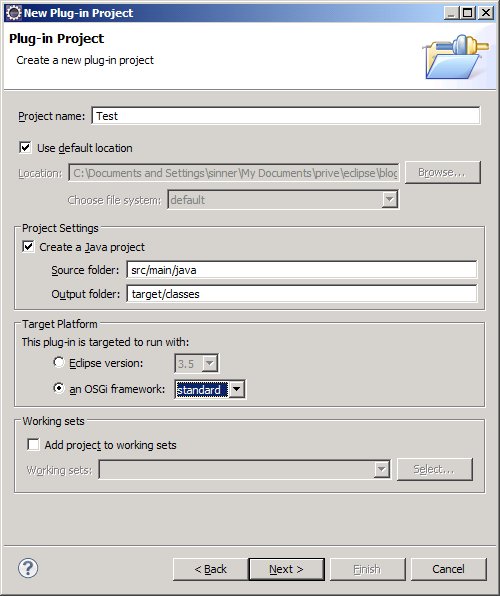
Make sure to follow the Maven convention for sources and classes and to use plain OSGi (so you’re not tied to Eclipse/Equinox):

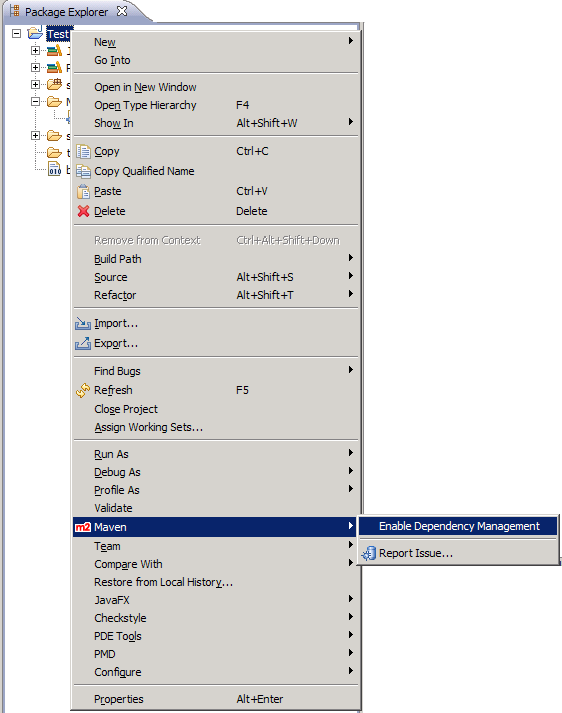
Once you’ve created the project, you can add Maven support:

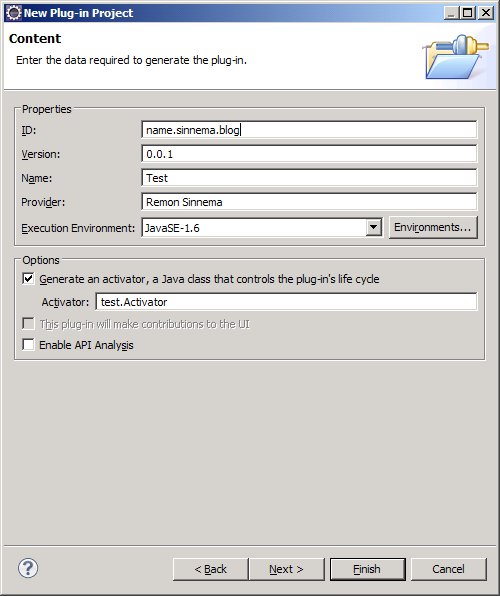
Make sure to use the same identification for Maven as for PDE:

Now you have an Eclipse project that plays nice with both PDE (and thus OSGi) and Maven. The only downside to this solution is that some information, like the bundle ID, is duplicated.

Ubuntu 9.10 & Eclipse 3.5

I recently upgraded Ubuntu to its latest version (9.10, Karmic Koala) and it works great so far. Except for Eclipse.

I ran Eclipse 3.5 (Galileo), and apparently SWT in that version does something wrong in communicating with GTK. The end result is that buttons don’t react to mouse clicks anymore. Rather annoying. Luckily, there is a solution available. Alternatively, you can use the latest Eclipse 3.6 (Helios) milestone.

But that wasn’t the end of it. Eclipse would now perform extremely slowly on a variety of tasks. It turns out that this is caused by Eclipse now running on the GCJ Virtual Machine. I simply uninstalled everything with “gcj” in its name using Synaptic and all was well again.

JavaFX for GNU/Linux has arrived

Finally, the time has come: JavaFX is now supported on both GNU/Linux and Solaris.

It’s not really advertised, though, so h Here’s how to get it:

  • Go to the JavaFX website.
  • Click the Download now button. Yes, the one that reads JavaFX 1.1 SDK.
  • Click the JavaFX 1.1.1 1.2 SDK option, and click Download.
  • You’ll be prompted to download javafx_sdk-1_2-linux-i586.sh. Save it somewhere convenient.
  • Make the downloaded file executable with chmod + x
  • Run the shell script with ./javafx_sdk-1_2-linux-i586.sh
  • Page through the annoying legal stuff by pressing Space repeatedly. At the end, type yes.
  • You now have a javafx-sdk1.2 directory that you can play with.

Enjoy!

Oh, and in case you have some JavaFX code from pre-1.2 versions, here’s how to migrate it.

Update: There is also a new Eclipse plugin. Binaries only, the source will have to wait until it gets transferred to eclipse.org.

Supporting multiple versions of a data model

As an application evolves, its data model often does too. If you control both, this usually isn’t a problem. However, sometimes your power to change the data model is restricted. This happens, for instance, when the data model is published, and others may depend on it. An extreme case of this is when the data model is defined by another organization as, for example, with S1000D.

Having no absolute control over the data model isn’t much of a problem if you can leave one version behind completely, and move on to the next. But often you won’t be so lucky. I know I’m not: we need to support both S1000D 3.0 and 4.0.

There’s different ways in which you can support multiple data model versions. The one I’m concerned with here, is when your application needs to support multiple data models at the same time with the same code. That leaves out alternatives like having multiple branches of your code for the different data model versions.

One trick that can come to the rescue here is the Once And Only Once rule (also called the DRY principle). When applied to creating instances, this leads to the Factory pattern. If you have all your instances created by a factory, then there’s only one place where you need to decide which class (e.g. the 3.0 or 4.0 version) to instantiate. If those decisions are similar for all the classes in your model, then you could even extract them into a common base class for your factories.

Most of the time, the different versions of the data model will share a lot of similarities. It is tempting to extract those into a common base class. For example, in S1000D there is a type called descriptive data module, and you could derive DescriptiveDataModule30 and DescriptiveDataModule40 from DecriptiveDataModule.

But when the objects in your data model have inheritance relationships themselves, that can get ugly very fast. For instance, a descriptive data module is one of many kinds of data modules, and these data modules share a lot of characteristics. So in code, DescriptiveDataModule would descend from DataModule, and both would have aspects that differ in the 3.0 and 4.0 versions. This spells trouble.

Therefore, it is usually better to use composition instead. So DataModule would have a reference to a DataModuleIssue (where “issue” is used in the sense of the various issues of the S1000D specification, i.e. what I’ve been calling “versions” so far), which the DescriptiveDataModule would inherit. The factory would inject either a DescriptiveDataModuleIssue30 or a DescriptiveDataModuleIssue40 into the DescriptiveDataModule, where DescriptiveDataModuleIssue30 would descend from DataModuleIssue30, and DescriptiveDataModuleIssue40 from DataModuleIssue40.

The idea is to make the Issue classes very bare, dealing only with the stuff that differs between issues, so there is no need for a common base class (although both do implement the same interface). The things that are the same in all issues, go into the core model objects (DescriptiveDataModule and DataModule in our example).

Kanban

Lately, I’ve seen a lot of discussions on Kanban. For those of you who, like me, want to know what all that fuss is about, I collected a couple of links that I will try to merge into a coherent whole below.

So what exactly is Kanban? Literally, it means “visual card”, but that’s not very helpful. This introduction explains that Kanban revolves around a board that visualizes the software development flow.

In fact, flow is a very important concept here. Kanban is a pull system, in which Minimal Marketable Features (MMFs) flow through the development stages when there is capacity available. This contrasts with most Agile methods that push work items into iterations. Also, note that for most Agile methods, those work items (e.g. User Stories) would be smaller than MMFs.

The other big point is that Kanban limits Work In Progress (i.e. the number of MMFs per development stage). This naturally exposes the bottleneck(s) in the flow.
Kanban limits WIP

This leads us nicely to the main reason to use Kanban: to improve your software development process. Other Agile methods deal with process improvement as well, but Kanban is different from e.g. Scrum.

So, if all this sounds cool and you want to give Kanban a shot, then apparently this is how you should get started. If you do, then you may see these effects. Also, make sure to get into a Kanban state of mind.

Update: here is a great compilation of Kanban resources.

Replacing the word “test”

Elisabeth Hendrickson wants to get rid of the word “test”, as it can mean two different things, which she labels “Check” and “Explore”.

I very much agree with the fact that there are two entirely different aspects to testing. “Checking” is when you get a warm fuzzy feeling when the bar gets green. You perform an experiment and if you get a positive result then you know that all is well.

“Exploring” is different in that you don’t get a warm fuzzy feeling on “green”. In other words, if the experiment produces a positive result, you’re not done yet. You need to look further, until you find a negative result. Only then will you have learned something. And if you spend some time exploring, and find no problems, then there’s always that nagging feeling: is there really nothing to find, or did I just not look hard enough?

So it seems I agree with Elisabeth. Then why this blog post?

Like Elisabeth, I think that words matter. She’s right to want to replace the word “test”. I just disagree with the replacements. “Check” has way too many meanings, and the definitions of “explore” don’t seem to catch what is meant well enough for my taste.

So I’d like to propose an alternative from the world of science: “verify” and “falsify”. Automated tests verify that the software behaves as expected, while exploratory testing falsifies both the expectations and the completeness of the test suite.

What do you think?

Pre-OSGi modularity with Macker

OSGi is gaining a lot of traction lately. But what if you have a very large application? Migration can be a lot of work.

I would like to point to a simple tool we use that might help out a bit here. It’s called Macker and

it’s meant to model the architectural ideals programmers always dream up for their projects, and then break — it helps keep code clean and consistent.

Macker is open source (GPL). It’s current version is 0.4 and has been for a long time. That doesn’t mean it’s immature or abandoned, however. It’s author had a lot more features planned, hence the 0.4. But what’s already available is enough to give it a serious look.

So, what does Macker do, exactly? It enforces rules about your architecture. For example, suppose you have a product with a public API. You could create a rule file with an <access-rule> that the API must be self-contained:

  <message>The API should be self-contained</message>
  <deny>
    <from pattern="api" />
  </deny>
  <allow>
    <from pattern="api" />
    <to pattern="api" />
  </allow>
  <allow>
   <from pattern="api" />
    <to pattern="jre" />
  </allow>

These rules can be very explicit about what is and what isn’t allowed. There are several ways to specify them, but I’ve found it easiest to use patterns, like in the example above, since they can have symbolic names. Here’s an example:

<pattern name="api">
  <include class="com.acme.api.**"/>
</pattern>

Where the ** denotes every class in the com.acme.api package, or any of its sub-packages. See the Macker user guide for more information about supported regular expressions.

Macker comes with an Ant task, so you can enforce your architecture from your build. Maybe not as good as OSGi, but it sure helps with keeping your code the way you intended it.

Writing Maintainable and Secure Java Applications using an XQuery Builder

So you’re developing this cool Java application where you access XML data using XQuery. Easy enough with a powerful XML database like xDB, right? Well, yes and no 😉 This document addresses some of the issues you may encounter.

The naive approach

The easiest way to execute XQuery statements, is to embed them into your Java code:

executeXQuery("for $a in document('/content/repository)"
    + " where $a//html/head/title = 'Using XQuery'"
    + " return $a");

where executeXQuery() executes the XQuery against your XML database.

Most of your XQuery statements won’t be static like this example. Rather, you’d get some input from your end user:

    final String title = getInputFromEndUser();
    final String xquery
        = "for $a in document('/content/repository)"
        + " where $a//html/head/title = '"
        + title
        + "' return $a";
    executeQuery(xquery);

Problems with the naive approach

This approach has some problems, though. First of all, the last XQuery is vulnerable to an XQuery Injection attack. This is the same as a SQL Injection attack, but based on XQuery instead of SQL. Like with SQL programming, you can use variables to work around this issue:

final String title = getInputFromEndUser();
final String xquery
    = "declare variable $title external;"
    + "for $a in document('/content/repository)"
    + " where $a//html/head/title = $title"
    + " return $a";
executeQuery(xquery, title);

where executeXQuery() now accepts a variable number of arguments after the XQuery statement that are values for the externally declared variables.

But there are still some maintainability issues with this code. For starters, see the argument to the document() function. This depends on the particular database layout for your application. If you’ll ever need to change it, you’ll likely need to update hundreds of XQuery statements. You could, of course, extract this into a constant.

But there is more. Your XQueries are likely to go beyond the basic XQuery specification, for instance to search on meta-data. In xDB, that would read something like this:

final String title = getInputFromEndUser();
final String xquery
    = "declare variable $title external;"
    + "for $a in document('/content/repository)"
    + " where xhive:metadata($a, 'Title') = $title"
    + " return $a";
executeQuery(xquery, title);

You’ve now added a dependency on a specific implementation, which is never a good idea, since it basically generates a self-inflicted vendor lock-in.

Of course, you could extract the vendor-specific parts as well, but by now I hope you begin to see the mess you’ll end up with.

Worse, since you embed the XQuery statement as a String in your Java code, any typos you make in this unreadable statement can only be found at runtime, since the Java compiler doesn’t understand XQuery.

XQuery Builder to the rescue

Let’s take a step back here and look at what we’re trying to achieve. We want to construct an object (an XQuery statement), that we want to use later on (execute it against our XML database). This is a recurring pattern, called the Builder Pattern. So we need an XQuery Builder.

Now, the XQuery standard is complex enough that I don’t recommend spending a lot of time coming up with the perfect XQuery Builder. Instead, you should take it slow, and only implement what you really need.

The best way to do that is using Test-Driven Development (TDD). I like to think that’s always the case, but even if you disagree, there are good reasons why it is the best approach in this scenario.

You’ll evolve the XQuery Builder over time, adding capabilities as needed, so you need a good suite of unit tests to ensure you didn’t break anything. Also, TDD focuses first and foremost on the API that you want to realize, making it easier to come up with a clean design.

Speaking of a clean design, the Builder Pattern lends itself very much to the use of a fluent interface, since you want to be able to express the XQuery in code as much as possible as you would in a string. Here’s an example of the sort of thing we’re trying to achieve:

    final String xquery = builder
        .where().metaData("Title").isEqualTo(title)
        .and().uri().startsWith(prefix)
        .orderBy().uri()
        .returns().id()
        .build();

Let’s take a look at how the XQuery Builder approach solves the problems we identified earlier.

First the security issue. The example above doesn’t explicitly mention external variables, but that doesn’t mean that they aren’t used. If your code needs security, the XQuery Builder can provide it. If you’re absolutely sure that your application only runs in a trusted environment, you can leave it out. If you later discover that your environment isn’t as secure as you thought, you can add support for external variables in the XQuery Builder and be done with it. No need to change hundreds of XQuery statements!

Next, notice that the example didn’t mention where to look for documents. The XQuery Builder is the only place where the repository layout is specified, so that it is easy to update.

There is also nothing vendor specific in the example above. The metaData() clause handles that, again in one place.

Arguably the biggest benefit of the XQuery Builder, however, is that it gives you (some) compile time checking of your XQuery statements. For example, if you were to write builder.hwere(), the Java compiler would tell you about it right away.

You can take this as far as you think is useful. For instance, notice the uri() method in the example. Apparently, this application uses URIs on objects a lot, so it made sense to make it easy to use them. The same apparently didn’t hold for the Title meta-data field. By developing your own XQuery Builder, you get to decide the API that makes sense for your application.

Creating an XQuery Builder

So, how hard is it to create such an XQuery Builder? That depends on how far you want to go. But the beginnings are simple.

Start out with this JUnit 4 test:

import static org.junit.Assert.assertEquals;

import org.junit.Before;
import org.junit.Test;


public class XQueryBuilderTest {

  private XQueryBuilder builder;

  @Before
  public void init() {
    builder = new XQueryBuilder();
  }

  @Test
  public void all() {
    assertEquals("XQuery",
        "for $a in document('/content/repository')\n"
            + "return $a",
        builder.build());
  }

}

which forces us to write this code to make it compile:

public class XQueryBuilder {

  public String build() {
    return null;
  }

}

The test obviously fails. For now just fake it by returning "for $a in document('/content/repository')\nreturn $a".

This first step may seem a bit silly to those not used to TDD, but it is essentially just a way to get set up. In TDD, you don’t want to write code without a failing test, so always try to get a failing test as fast as possible.

Now, for something a bit more interesting. Let’s test that the XQuery can return IDs of documents, since we’ll need that very often:

@Test
public void returnId() {
  assertEquals("XQuery", 
      "for $a in document('/content/repository')\n"
          + "return xhive:metadata($a,'id')", 
      builder.returns().id().build());
}

In fact, that’s a special case of returning some meta-data, so we’ll tackle the simpler case first:

@Test
public void returnMetaData() {
  assertEquals("XQuery", 
      "for $a in document('/content/repository')\n"
          + "return xhive:metadata($a,'foo')", 
      builder.returns().metaData("foo").build());
}

For this to compile, we need a returns() method in XQueryBuilder:

public class XQueryBuilder {

  private final Return returns = new Return(this);

  public String build() {
    final StringBuilder result = new StringBuilder();
    result.append(
        "for $a in document('/content/repository')\n");
    result.append(returns);
    return result.toString();
  }

  public Return returns() {
    return returns;
  }

}

Note that we can’t use the more natural term return, since that is a reserved word in Java. Here’s the Return class:

public class Return {

  private final XQueryBuilder builder;
  private MetaDataReturnClause clause;

  public Return(final XQueryBuilder builder) {
    this.builder = builder;
  }

  public Return metaData(final String name) {
    return setClause(new MetaDataReturnClause(name));
  }

  private Return setClause(
      final MetaDataReturnClause clause) {
    this.clause = clause;
    return this;
  }

  @Override
  public String toString() {
    final StringBuilder result = new StringBuilder(
        "return ");
    if (clause == null) {
      result.append("$a");
    } else {
      result.append(clause);
    }
    return result.toString();
  }

  public String build() {
    return builder.build();
  }

}

And here’s the MetaDataReturnClause:

public class MetaDataReturnClause {

  private final String name;

  public MetaDataReturnClause(final String name) {
    this.name = name;
  }

  @Override
  public String toString() {
    return "xhive:metadata($a,'" + name + "')";
  }

}

So implementing the ID is easy:

public class Return {

  public Return id() {
    return setClause(new IdReturnClause());
  }

  // ...
}
public class IdReturnClause 
    extends MetaDataReturnClause {

  public IdReturnClause() {
    super("id");
  }

}

By now you probably spotted some duplication. First the tests:

  @Test
  public void all() {
    assertXQuery("return $a", builder.build());
  }

  @Test
  public void returnMetaData() {
    assertXQuery("return xhive:metadata($a,'foo')",
        builder.returns().metaData("foo").build());
  }

  @Test
  public void returnId() {
    assertXQuery("return xhive:metadata($a,'id')",
        builder.returns().id().build());
  }

  private void assertXQuery(final String expected, 
      final String actual) {
    assertEquals("XQuery", 
        "for $a in document('/content/repository')\n" 
        + expected, actual);
  }

Yes, it’s just as important to keep your tests clean as it is for your code! Speaking of which, there are a lot of places where this $a thingie comes up. Let’s extract it:

public class XQueryBuilder {

  public String build() {
    final StringBuilder result = new StringBuilder();
    result.append("for ").append(getContext())
       .append(" in document('/content/repository')\n");
    result.append(returns);
    return result.toString();
  }

  public String getContext() {
    return "$a";
  }

  // ...
}

So that the Return class can use it:

public class Return {

  private final XQueryBuilder builder;
  private MetaDataReturnClause clause;

  public Return(final XQueryBuilder builder) {
    this.builder = builder;
  }

  public Return metaData(final String name) {
    return setClause(new MetaDataReturnClause(this, 
        name));
  }

  public Return id() {
    return setClause(new IdReturnClause(this));
  }

  private Return setClause(
      final MetaDataReturnClause clause) {
    this.clause = clause;
    return this;
  }

  @Override
  public String toString() {
    final StringBuilder result = new StringBuilder();
    result.append("return ");
    if (clause == null) {
      result.append(builder.getContext());
    } else {
      result.append(clause);
    }
    return result.toString();
  }

  public String build() {
    return builder.build();
  }

  public XQueryBuilder getBuilder() {
    return builder;
  }

}

And the MetaDataReturnClause as well:

public class MetaDataReturnClause {

  private final String name;
  private final Return returns;
  private XQueryBuilder builder;

  public MetaDataReturnClause(final Return returns, 
      final String name) {
    this.returns = returns;
    this.name = name;
  }

  @Override
  public String toString() {
    return "xhive:metadata(" 
        + returns.getBuilder().getContext() 
        + ",'" + name + "')";
  }

}

You can probably see the getContext() method gaining traction when considering recursive XQueries. As always, keeping your design clean makes it easier to enhance later.

So there you have your basic XQuery Builder. From these humble beginnings, it’s easy to add more functionality. For example, suppose we want to return not just the ID, but also the URI of an object. First we add support for URIs in the return clause, since we anticipate we’ll it need often:

  @Test
  public void returnUri() {
    assertXQuery("return xhive:metadata($a,'uri')",
        builder.returns().uri().build());
  }

Which is implemented along the same lines as before:

public class Return {

  public Return uri() {
    return setClause(new UriReturnClause(this));
  }

  // ...

}

With a new class UriReturnClause:

public class UriReturnClause
    extends MetaDataReturnClause {

  public UriReturnClause(final Return returns) {
    super(returns, "uri");
  }

}

Next, we need to be able to return multiple items:

  @Test
  public void returnIdAndUri() {
    assertXQuery("return (xhive:metadata($a,'id'), "
        + "xhive:metadata($a,'uri'))",
        builder.returns().id().and().uri().build());
  }

The and() method is just syntactic sugar to make the code easy to read:

  public Return and() {
    return this;
  }

To pass the test, we need to change the clause instance variable to a list:

public class Return {

  private final List clauses = new ArrayList();

  public Return metaData(final String name) {
    return addClause(new MetaDataReturnClause(this,
        name));
  }

  private Return addClause(
      final MetaDataReturnClause clause) {
    clauses.add(clause);
    return this;
  }

  @Override
  public String toString() {
    final StringBuilder result = new StringBuilder();
    result.append("return ");
    if (clauses.isEmpty()) {
      result.append(builder.getContext());
    } else {
      if (clauses.size() > 1) {
        result.append('(');
      }
      String prefix = "";
      for (final MetaDataReturnClause clause : clauses) {
        result.append(prefix).append(clause);
        prefix = ", ";
      }
      if (clauses.size() > 1) {
        result.append(')');
      }
    }
    return result.toString();
  }

  // ...

}

Adding support for the where and orderBy clauses follows the same approach as for return and is left as an exercise for the reader 😉

In doing so, you will probably encounter some duplication for e.g. meta-data handling between the where, orderBy and return clauses, which you can extract into e.g. XQueryBuilder.getMetaDataClause().

Have fun writing your XQueryBuilder based Java applications!