Book Review: The Security Development Lifecycle (SDL)

In The Security Development Lifecycle (SDL), A Process for Developing Demonstrably More Secure Software, authors Michael Howard and Steven Lipner explain how to build secure software through a repeatable process.

The methodology they describe was developed at Microsoft and has led to a measurable decrease in vulnerabilities. That’s why it’s now also used elsewhere, like at EMC (my employer).

Chapter 1, Enough is Enough: The Threats have Changed, explains how the SDL was born out of the Trustworthy Computing initiative that started with Bill Gates’ famous email in early 2002. Most operating systems have since become relatively secure, so hackers have shifted their focus to applications and the burden is now on us developers to crank up our security game. Many security issues are also privacy problems, so if we don’t, we are bound to pay the price.

Chapter 2, Current Software Development Methods Fail to Produce Secure Software, reviews current software development methods with regard to how (in)secure the resulting applications are. It shows that the adage given enough eyeballs, all bugs are shallow is wrong when it comes to security. The conclusion is that we need to explicitly include security into our development efforts.

Chapter 3, A Short History of the SDL at Microsoft, describes how security improvement efforts at Microsoft evolved into a consistent process that is now called the SDL.

Chapter 4, SDL for Management, explains that the SDL requires time, money, and commitment from senior management to prioritize over time to market. We’re talking real commitment, like delaying the release of an insecure application.

Chapter 5, Stage 0: Education and Awareness, starts the second part of the book, that describes the stages of the SDL. It all starts with educating developers about security. Without this, there’s no real chance of delivering secure software.

Chapter 6, Stage 1: Project Inception, sets the security context for the development effort. This includes assigning someone to guide the team through the SDL, building security leaders within the team, and setting up security expectations and tools.

Chapter 7, Stage 2: Define and Follow Best Practices, lists common secure design principles and describes attack surface analysis and attack surface reduction. The latter is about reducing the amount of code accessible to untrusted users, for example by disabling certain features by default.

Chapter 8, Stage 3: Product Risk Assessment, shows how to determine the application’s level of vulnerability to attack and its privacy impact. This helps to determine what level of security investment is appropriate for what parts of the application.

Chapter 9, Stage 4: Risk Analysis, explains threat modeling. The authors think that this is the practice with the most significant contribution to an application’s security. The idea is to understand the potential threats to the application, the risks those threats pose, and the mitigations that can reduce those risks. Threat models also help with code reviews and penetration tests. The chapter uses a pet shop website as an example.

[Note that there is now a tool that helps you with threat modeling. In this tool, you draw data flow diagrams, after which the tool uses the STRIDE approach to automatically find threats. The tool requires Visio 2007+.]

Chapter 10, Stage 5: Creating Security Documents, Tools, and Best Practices for Customers, describes the collateral that helps customers install, maintain, and use your application securely.

Chapter 11, Stage 6: Secure Coding Policies, explains the need for prescribing security-specific coding practices, educating developers about them, and verifying that they are adhered to. This is a high-level chapter, with details following in later chapters.

Chapter 12, Stage 7: Secure Testing Policies, describes the various forms of security testing, like fuzz testing, penetration testing, and run-time verification.

Chapter 13, Stage 8: The Security Push, explains that the goal of a security push is to hunt for security bugs and triage them. Fixes should follow the push. A security push doesn’t really fit into the SDL, since the goal is to prevent vulnerabilities. It can, however, be useful for legacy (i.e. pre-SDL) code.

Chapter 14, Stage 9: The Final Security Review, describes how to assess (from a security perspective) whether the application is ready to ship. A questionnaire is filled out to show compliance with the SDL, the threat models are reviewed, and unfixed security bugs are reviewed to make sure none are critical.

Chapter 15, Stage 10: Security Response Planning, explains that you need to be prepared to respond to the discovery of vulnerabilities in your deployed application, so that you can prevent panic and follow a solid process. You should have a Security Response Center outside your development team that interfaces with security researchers and others who discover vulnerabilities and guides the development team through the process of releasing a fix. It’s also important to feed back lessons learned into the development process.

Chapter 16, Stage 11: Product Release, explains that the actual release is a non-event, since all the hard work was done in the Final Security Review.

Chapter 17, Stage 12: Security Response Execution, describes the real-world challenges associated with responding to reported vulnerabilities, including when and how to deviate from the plan outlined in Security Response Planning. Above all, you must take the time to fix the root problem properly and to make sure you’re not introducing new bugs.
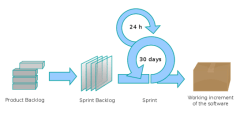
Chapter 18, Integrating SDL with Agile Methods, starts the final part of the book. It shows how to incorporate agile practices into the SDL, or the other way around.

Chapter 19, SDL Banned Function Calls, explains that some functions are so bad from a security perspective, that they never should be used. This chapter is heavily focused on C.

Chapter 20, SDL Minimum Cryptographic Standards, gives guidance on the use of cryptography, like never roll your own, make the use of crypto algorithms configurable, and what key sizes to use for what algorithms.

Chapter 21, SDL-Required Tools and Compiler Options, describes security tools you should use during development. This chapter is heavily focused on Microsoft technologies.

Chapter 22, Threat Tree Patterns, shows a number of threat trees that reflect common attack patterns. It follows the STRIDE approach again.

The appendix has information about the authors.

I think this book is a must-read for every developer who is serious about building secure software.

Abuse Cases

Gary McGraw describes several best practices for building secure software. One is the use of so-called abuse cases. Since his chapter on abuse cases left me hungry for more information, this post examines additional literature on the subject and how to fit abuse cases into a Security Development Lifecycle (SDL).
Modeling Functional Requirements With Use Cases

Abuse cases are an adaptation of use cases, abstract episodes of interaction between a system and its environment.

A use case consists of a number of related scenarios. A scenario is a description of a specific interaction between the system and particular actors. Each use case has a main success scenario and some additional scenarios to cover variations and exceptional cases.

Actors are external agents, and can be either human or non-human.

For better understanding, each use case should state the goal that the primary actor is working towards.

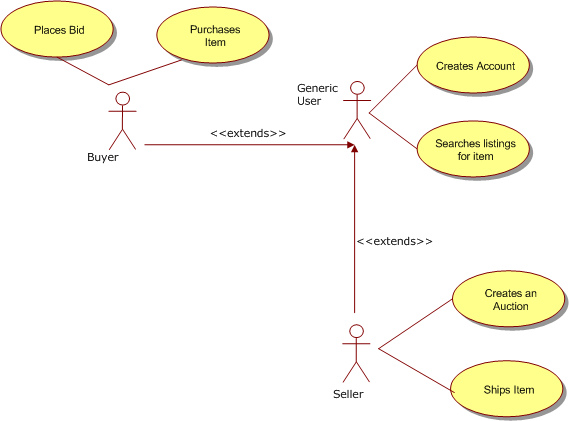
Use cases are represented in UML diagrams (see example on left) as ovals that are connected to stick figures, which represent the actors. Use case diagrams are accompanied by textual use case descriptions that explain how the actors and the system interact.

Modeling Security Requirements With Abuse Cases

An abuse case is a use case where the results of the interaction are harmful to the system, one of the actors, or one of the stakeholders in the system. An interaction is harmful if it decreases the security (confidentiality, integrity, or availability) of the system.

Abuse cases are also referred to as misuse cases, although some people maintain they’re different. I think the two concepts are too similar to treat differently, so whenever I write “abuse case”, it refers to “misuse case” as well.

Some actors in regular use cases may also act as attacker in an abuse case (e.g. in the case of an insider threat). We should then introduce a new actor to avoid confusion (potentially using inheritance). This is consistent with the best practice of having actors represent roles rather than actual users.

Attackers are described in more detail than regular actors, to make it easier to look at the system from their point of view. Their description should include the resources at their disposal, their skills, and their objectives.

Note that objectives are longer term than the (ab)use case’s goal. For instance, the attacker’s goal for an abuse case may be to gain root privileges on a certain server, while her objective may be industrial espionage.

Abuse cases are very different from use cases in one respect: while we know how the actor in a use case achieves her goal, we don’t know precisely how an attacker will break the system’s security. If we would, we would fix the vulnerability! Therefore, abuse case scenarios describe interactions less precisely than regular use case scenarios.

Modeling Other Non-Functional Requirements

Note that since actors in use cases needn’t be human, we can employ a similar approach to abuse cases with actors like “network failure” etc. to model non-functional requirements beyond security, like reliability, portability, maintainability, etc.

For this to work, one must be able to express the non-functional requirement as an interactive scenario. I won’t go into this topic any further in this post.

Creating Abuse Cases

Abuse case models are best created when use cases are: during requirements gathering. It’s easiest to define the abuse cases after the regular use cases are identified (or even defined).

Abuse case modeling requires one to wear a black hat. Therefore, it makes sense to invite people with black hat capabilities, like testers and network operators or administrators to the table.

The first step in developing abuse cases is to find the actors. As stated before, every actor in a regular use case can potentially be turned into an malicious actor in an abuse case.

We should next add actors for different kinds of intruders. These are distinguished based on their resources and skills.

When we have the actors, we can identify the abuse cases by determining how they might interact with the system. We might identify such malicious interactions by combining the regular use cases with attack patterns.

We can find more abuse cases by combining them systematically and recursively with regular use cases.

Combining Use Cases and Abuse Cases

Some people keep use cases and abuse cases separate to avoid confusion. Others combine them, but display abuse cases as inverted use cases (i.e. black ovals with white text, and actors with black heads).

The latter approach makes it possible to relate abuse cases to use cases using UML associations. For instance, an abuse case may threaten a use case, while a use case might mitigate an abuse case. The latter use case is also referred to as a security use case. Security use cases usually deal with security features.

Security use cases can be threatened by new abuse cases, for which we can find new security use cases to mitigate, etc. etc. In this way, a “game” of play and counterplay enfolds that fits well in a defense in depth strategy.

We should not expect to win this “game”. Instead, we should make a good trade-off between security requirements and other aspects of the system, like usability and development cost. Ideally, these trade-offs are made clearly visible to stakeholders by using a good risk management framework.

Reusing Abuse Cases

Use cases can be abstracted into essential use cases to make them more reusable. There is no reason we couldn’t do the same with abuse cases and security use cases.

It seems to me that this not just possible, but already done. Microsoft’s STRIDE model contains generalized threats, and its SDL Threat Modeling tool automatically identifies which of those are applicable to your situation.

Conclusion

Although abuse cases are a bit different from regular use cases, their main value is that they present information about security risks in a format that may already be familiar to the stakeholders of the software development process. Developers in particular are likely to know them.

This should make it easier for people with little or no security background to start thinking about securing their systems and how to trade-off security and functionality.

However, it seems that threat modeling gives the same advantages as abuse cases. Since threat modeling is supported by tools, it’s little wonder that people prefer that over abuse cases for inclusion in their Security Development Lifecycle.

Outbound Passwords

Much has been written on how to securely store passwords. This sort of advice deals with the common situation where your users present their passwords to your application in order to gain access.

But what if the roles are reversed, and your application is the one that needs to present a password to another application? For instance, your web application must authenticate with the database server before it can retrieve data.

Such credentials are called outbound passwords.

Outbound Passwords Must Be Stored Somewhere

Outbound passwords must be treated like any other password. For instance, they must be as strong as any password.

But there is one exception to the usual advice about passwords: outbound passwords must be written down somehow. You can’t expect a human to type in a password every time your web application connects to the database server.

This begs the question of how we’re supposed to write the outbound password down.

Storing Outbound Passwords In Code Is A Bad Idea

The first thing that may come to mind is to simply store the outbound password in the source code. This is a bad idea.

With access to source code, the password can easily be found using a tool like grep. But even access to binary code gives an attacker a good chance of finding the password. Tools like javap produce output that makes it easy to go through all strings. And since the password must be sufficiently strong, an attacker can just concentrate on the strings with the highest entropy and try those as passwords.

To add insult to injury, once a hard-coded password is compromised, there is no way to recover from the breach without patching the code!

Solution #1: Store Encrypted Outbound Passwords In Configuration Files

So the outbound password must be stored outside of the code, and the code must be able to read it. The most logical place then, is to store it in a configuration file.

To prevent an attacker from reading the outbound password, it must be encrypted using a strong encryption algorithm, like AES. But now we’re faced with a different version of the same problem: how does the application store the encryption key?

One option is to store the encryption key in a separate configuration file, with stricter permissions set on it. That way, most administrators will not be able to access it. This scheme is certainly not 100% safe, but at least it will keep casual attackers out.

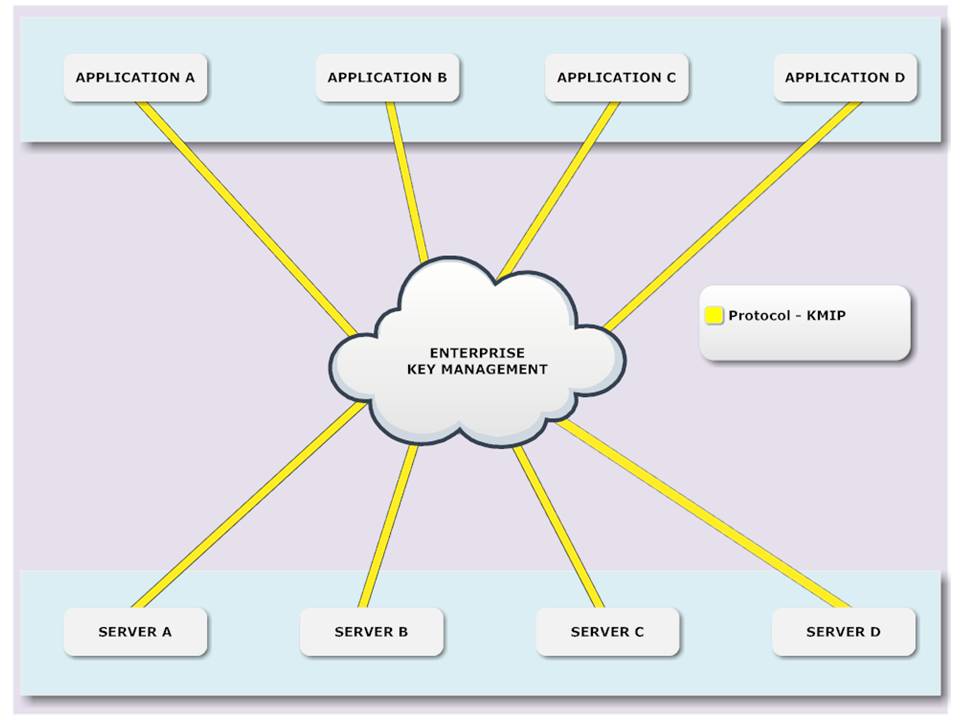
A more secure option is to use key management services, perhaps based on the Key Management Interoperability Protocol (KMIP).

In this case, the encryption key is not stored with the application, but in a separate key store. KMIP also supports revoking keys in case of a breach.

Solution #2: Provide Outbound Passwords During Start Up

An even more secure solution is to only store the outbound password in memory. This requires that administrators provide the password when the application starts up.

You can even go a step further and use a split-key approach, where multiple administrators each provide part of a key, while nobody knows the whole key. This approach is promoted in the PCI DSS standard.

Providing keys at start up may be more secure than storing the encryption key in a configuration file, but it has a big drawback: it prevents automatic restarts. The fact that humans are involved at all makes this approach impractical in a cloud environment.

Creating Outbound Passwords

If your application has some control over the external system that it needs to connect to, it may be able to determine the outbound password, just like your users define their passwords for your application.

For instance, in a multi-tenant environment, data for the tenants might be stored in separate databases, and your application may be able to pick an outbound password for each one of those as it creates them.

Created outbound passwords must be sufficiently strong. One way to accomplish that is to use random strings, with characters from different character classes. Another approach is Diceware.

Make sure to use a good random number generator. In Java, for example, prefer SecureRandom over plain old Random.

Visualizing Code Coverage in Eclipse with EclEmma

Last time, we saw how Behavior-Driven Development (BDD) allows us to work towards a concrete goal in a very focused way.

In this post, we’ll look at how the big BDD and the smaller TDD feedback loops eliminate waste and how you can visualize that waste using code coverage tools like EclEmma to see whether you execute your process well.

The Relation Between BDD and TDD

Depending on your situation, running BDD scenarios may take a lot of time. For instance, you may need to first create a Web Application Archive (WAR), then start a web server, deploy your WAR, and finally run your automated acceptance tests using Selenium.

This is not a convenient feedback cycle to run for every single line of code you write.

So chances are that you’ll write bigger chunks of code. That increases the risk of introducing mistakes, however. Baby steps can mitigate that risk. In this case, that means moving to Test-First programming, preferably Test-Driven Development (TDD).

The link between a BDD scenario and a bunch of unit tests is the top-down test. The top-down test is a translation of the BDD scenario into test code. From there, you descend further down into unit tests using regular TDD.

This translation of BDD scenarios into top-down tests may seem wasteful, but it’s not.

Top-down tests only serve to give the developer a shorter feedback cycle. You should never have to leave your IDE to determine whether you’re done. The waste of the translation is more than made up for by the gains of not having to constantly switch to the larger BDD feedback cycle. By doing a little bit more work, you end up going faster!

If you’re worried about your build time increasing because of these top-down tests, you may even consider removing them after you’ve made them pass, since their risk-reducing job is then done.

Both BDD and TDD Eliminate Waste Using JIT Programming

Both BDD and TDD operate on the idea of Just-In-Time (JIT) coding. JIT is a Lean principle for eliminating waste; in this case of writing unnecessary code.

There are many reasons why you’d want to eliminate unnecessary code:

  • Since it takes time to write code, writing less code means you’ll be more productive (finish more stories per iteration)
  • More code means more bugs
  • In particular, more code means more opportunities for security vulnerabilities
  • More code means more things a future maintainer must understand, and thus a higher risk of bugs introduced during maintenance due to misunderstandings

Code Coverage Can Visualize Waste

With BDD and TDD in your software development process, you expect less waste. That’s the theory, at least. How do we prove this in practice?

Well, let’s look at the process:

  1. BDD scenarios define the acceptance criteria for the user stories
  2. Those BDD scenarios are translated into top-down tests
  3. Those top-down tests lead to unit tests
  4. Finally, those unit tests lead to production code

The last step is easiest to verify: no code should have been written that wasn’t necessary for making some unit test pass. We can prove that by measuring code coverage while we execute the unit tests. Any code that is not covered is by definition waste.

EclEmma Shows Code Coverage in Eclipse

We use Cobertura in our Continuous Integration build to measure code coverage. But that’s a long feedback cycle again.

Therefore, I like to use EclEmma to measure code coverage while I’m in the zone in Eclipse.

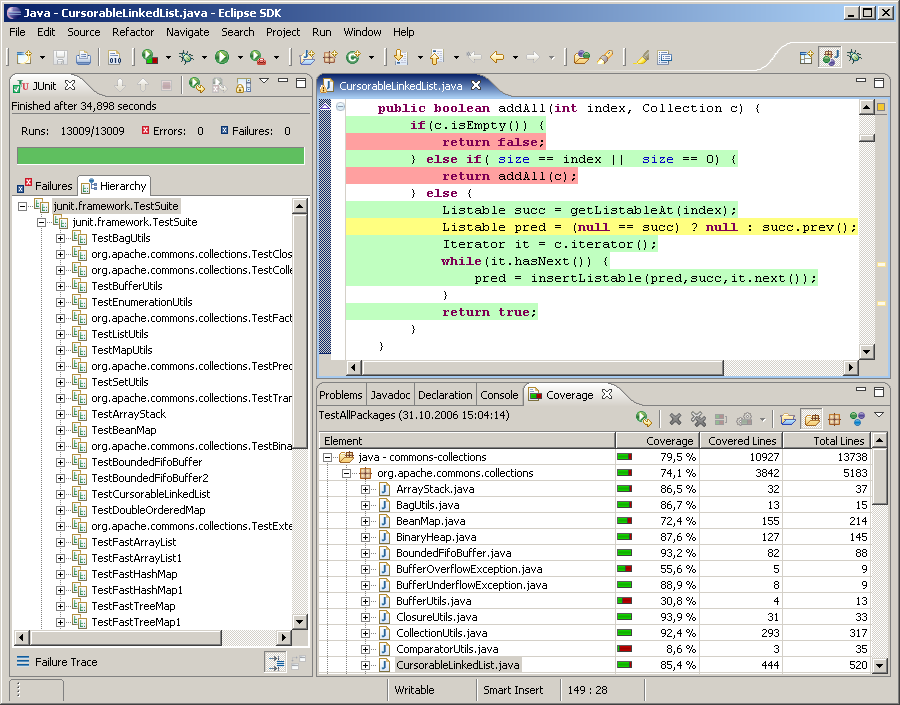
EclEmma turns covered lines green, uncovered lines red, and partially covered lines yellow.

You can change these colors using Window|Preferences|Java|Code coverage. For instance, you could change Full Coverage to white, so that the normal case doesn’t introduce visual clutter and only the exceptions stand out.

The great thing about EclEmma is that it let’s you measure code coverage without making you change the way you work.

The only difference is that instead of choosing Run As|JUnit Test (or Alt+Shift+X, T), you now choose Coverage As|JUnit test (or Alt+Shift+E, T). To re-run the last coverage, use Ctrl+Shift+F11 (instead of Ctrl+F11 to re-run the last launch).

If your fingers are conditioned to use Alt+Shift+X, T and/or Ctrl+F11, you can always change the key bindings using Window|Preferences|General|Keys.

In my experience, the performance overhead of EclEmma is low enough that you can use it all the time.

EclEmma Helps You Monitor Your Agile Process

The feedback from EclEmma allows you to immediately see any waste in the form of unnecessary code. Since there shouldn’t be any such waste if you do BDD and TDD well, the feedback from EclEmma is really feedback on how well you execute your BDD/TDD process. You can use this feedback to hone your skills and become the best developer you can be.

Behavior-Driven Development (BDD) with JBehave, Gradle, and Jenkins

Behavior-Driven Development (BDD) is a collaborative process where the Product Owner, developers, and testers cooperate to deliver software that brings value to the business.

BDD is the logical next step up from Test-Driven Development (TDD).

Behavior-Driven Development

In essence, BDD is a way to deliver requirements. But not just any requirements, executable ones! With BDD, you write scenarios in a format that can be run against the software to ascertain whether the software behaves as desired.

Scenarios

Scenarios are written in Given, When, Then format, also known as Gherkin:

Given the ATM has $250
And my balance is $200
When I withdraw $150
Then the ATM has $100
And my balance is $50

Given indicates the initial context, When indicates the occurrence of an interesting event, and Then asserts an expected outcome. And may be used to in place of a repeating keyword, to make the scenario more readable.

Given/When/Then is a very powerful idiom, that allows for virtually any requirement to be described. Scenarios in this format are also easily parsed, so that we can automatically run them.

BDD scenarios are great for developers, since they provide quick and unequivocal feedback about whether the story is done. Not only the main success scenario, but also alternate and exception scenarios can be provided, as can abuse cases. The latter requires that the Product Owner not only collaborates with testers and developers, but also with security specialists. The payoff is that it becomes easier to manage security requirements.

Even though BDD is really about the collaborative process and not about tools, I’m going to focus on tools for the remainder of this post. Please keep in mind that tools can never save you, while communication and collaboration can. With that caveat out of the way, let’s get started on implementing BDD with some open source tools.

JBehave

JBehave is a BDD tool for Java. It parses the scenarios from story files, maps them to Java code, runs them via JUnit tests, and generates reports.

Eclipse

JBehave has a plug-in for Eclipse that makes writing stories easier with features such as syntax highlighting/checking, step completion, and navigation to the step implementation.

JUnit

Here’s how we run our stories using JUnit:

@RunWith(AnnotatedEmbedderRunner.class)
@UsingEmbedder(embedder = Embedder.class, generateViewAfterStories = true,
    ignoreFailureInStories = true, ignoreFailureInView = false, 
    verboseFailures = true)
@UsingSteps(instances = { NgisRestSteps.class })
public class StoriesTest extends JUnitStories {

  @Override
  protected List<String> storyPaths() {
    return new StoryFinder().findPaths(
        CodeLocations.codeLocationFromClass(getClass()).getFile(),
        Arrays.asList(getStoryFilter(storyPaths)), null);
  }

  private String getStoryFilter(String storyPaths) {
    if (storyPaths == null) {
      return "*.story";
    }
    if (storyPaths.endsWith(".story")) {
      return storyPaths;
    }
    return storyPaths + ".story";
  }

  private List<String> specifiedStoryPaths(String storyPaths) {
    List<String> result = new ArrayList<String>();
    URI cwd = new File("src/test/resources").toURI();
    for (String storyPath : storyPaths.split(File.pathSeparator)) {
      File storyFile = new File(storyPath);
      if (!storyFile.exists()) {
        throw new IllegalArgumentException("Story file not found: " 
          + storyPath);
      }
      result.add(cwd.relativize(storyFile.toURI()).toString());
    }
    return result;
  }

  @Override
  public Configuration configuration() {
    return super.configuration()
        .useStoryReporterBuilder(new StoryReporterBuilder()
            .withFormats(Format.XML, Format.STATS, Format.CONSOLE)
            .withRelativeDirectory("../build/jbehave")
        )
        .usePendingStepStrategy(new FailingUponPendingStep())
        .useFailureStrategy(new SilentlyAbsorbingFailure());
  }

}

This uses JUnit 4’s @RunWith annotation to indicate the class that will run the test. The AnnotatedEmbedderRunner is a JUnit Runner that JBehave provides. It looks for the @UsingEmbedder annotation to determine how to run the stories:

  • generateViewAfterStories instructs JBehave to create a test report after running the stories
  • ignoreFailureInStories prevents JBehave from throwing an exception when a story fails. This is essential for the integration with Jenkins, as we’ll see below

The @UsingSteps annotation links the steps in the scenarios to Java code. More on that below. You can list more than one class.

Our test class re-uses the JUnitStories class from JBehave that makes it easy to run multiple stories. We only have to implement two methods: storyPaths() and configuration().

The storyPaths() method tells JBehave where to find the stories to run. Our version is a little bit complicated because we want to be able to run tests from both our IDE and from the command line and because we want to be able to run either all stories or a specific sub-set.

We use the system property bdd.stories to indicate which stories to run. This includes support for wildcards. Our naming convention requires that the story file names start with the persona, so we can easily run all stories for a single persona using something like -Dbdd.stories=wanda_*.

The configuration() method tells JBehave how to run stories and report on them. We need output in XML for further processing in Jenkins, as we’ll see below.

One thing of interest is the location of the reports. JBehave supports Maven, which is fine, but they assume that everybody follows Maven conventions, which is really not. The output goes into a directory called target by default, but we can override that by specifying a path relative to the target directory. We use Gradle instead of Maven, and Gradle’s temporary files go into the build directory, not target. More on Gradle below.

Steps

Now we can run our stories, but they will fail. We need to tell JBehave how to map the Given/When/Then steps in the scenarios to Java code. The Steps classes determine what the vocabulary is that can be used in the scenarios. As such, they define a Domain Specific Language (DSL) for acceptance testing our application.

Our application has a RESTful interface, so we wrote a generic REST DSL. However, due to the HATEOAS constraint in REST, a client needs a lot of calls to discover the URIs that it should use. Writing scenarios gets pretty boring and repetitive that way, so we added an application-specific DSL on top of the REST DSL. This allows us to write scenarios in terms the Product Owner understands.

Layering the application-specific steps on top of generic REST steps has some advantages:

  • It’s easy to implement new application-specific DSL, since they only need to call the REST-specific DSL
  • The REST-specific DSL can be shared with other projects

Gradle

With the Steps in place, we can run our stories from our favorite IDE. That works great for developers, but can’t be used for Continuous Integration (CI).

Our CI server runs a headless build, so we need to be able to run the BDD scenarios from the command line. We automate our build with Gradle and Gradle can already run JUnit tests. However, our build is a multi-project build. We don’t want to run our BDD scenarios until all projects are built, a distribution is created, and the application is started.

So first off, we disable running tests on the project that contains the BDD stories:

test {
  onlyIf { false } // We need a running server
}

Next, we create another task that can be run after we start our application:

task acceptStories(type: Test) {
  ignoreFailures = true
  doFirst {
    // Need 'target' directory on *nix systems to get any output
    file('target').mkdirs()

    def filter = System.getProperty('bdd.stories') 
    if (filter == null) {
      filter = '*'
    }
    def stories = sourceSets.test.resources.matching { 
      it.include filter
    }.asPath
    systemProperty('bdd.stories', stories)
  }
}

Here we see the power of Gradle. We define a new task of type Test, so that it already can run JUnit tests. Next, we configure that task using a little Groovy script.

First, we must make sure the target directory exists. We don’t need or even want it, but without it, JBehave doesn’t work properly on *nix systems. I guess that’s a little Maven-ism 😦

Next, we add support for running a sub-set of the stories, again using the bdd.stories system property. Our story files are located in src/test/resources, so that we can easily get access to them using the standard Gradle test source set. We then set the system property bdd.stories for the JVM that runs the tests.

Jenkins

So now we can run our BDD scenarios from both our IDE and the command line. The next step is to integrate them into our CI build.

We could just archive the JBehave reports as artifacts, but, to be honest, the reports that JBehave generates aren’t all that great. Fortunately, the JBehave team also maintains a plug-in for the Jenkins CI server. This plug-in requires prior installation of the xUnit plug-in.

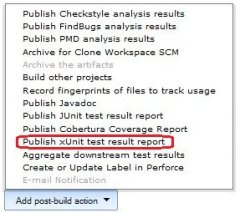
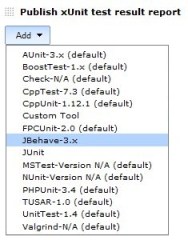
After installation of the xUnit and JBehave plug-ins into jenkins, we can configure our Jenkins job to use the JBehave plug-in. First, add an xUnit post-build action. Then, select the JBehave test report.

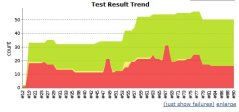
With this configuration, the output from running JBehave on our BDD stories looks just like that for regular unit tests:

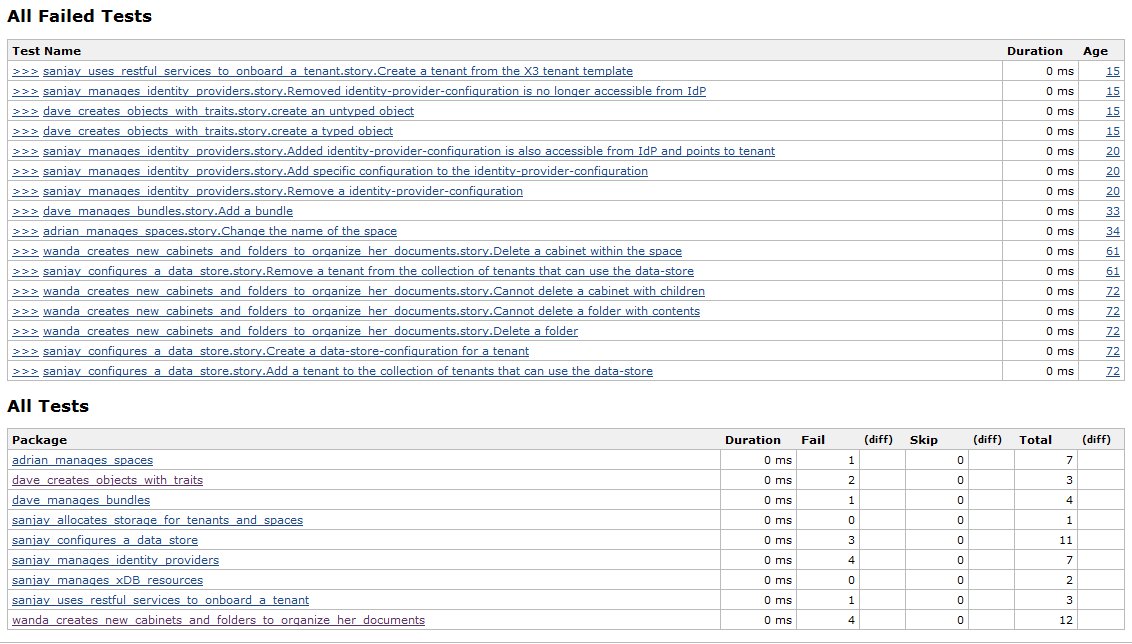
Note that the yellow part in the graph indicates pending steps. Those are used in the BDD scenarios, but have no counterpart in the Java Steps classes. Pending steps are shown in the Skip column in the test results:

Notice how the JBehave Jenkins plug-in translates stories to tests and scenarios to test methods. This makes it easy to spot which scenarios require more work.

Although the JBehave plug-in works quite well, there are two things that could be improved:

  • The output from the tests is not shown. This makes it hard to figure out why a scenario failed. We therefore also archive the JUnit test report
  • If you configure ignoreFailureInStories to be false, JBehave throws an exception on a failure, which truncates the XML output. The JBehave Jenkins plug-in can then no longer parse the XML (since it’s not well formed), and fails entirely, leaving you without test results

All in all these are minor inconveniences, and we ‘re very happy with our automated BDD scenarios.

Software Development and Security

It seems that not many software developers are interested in security. One reason may be that security is a negative feature. Another could be that developers don’t see how security relates to their daily activities. Let’s look at a detailed example that sheds some light on this relation.

Example: Crashing Tetris

My employer, EMC, takes security seriously. Besides the annual security awareness training that every employee has to take, software developers are required to take additional security courses, so that they understand the Security Development Lifecycle. In one of those courses, security guru Hugh Thompson tells the following story.

While on an airplane, he found a Tetris game in the on-board entertainment system. The game showed the next blocks to drop in a preview pane. The game’s settings had up and down buttons to increase or decrease the number of preview blocks.

Using the up button, the number could only be increased to four. However, using the telephone key pad, Thompson could enter 5 and get it accepted.

No higher digits were accepted from the telephone, but now that the number was five, the up button on the screen happily increased the number further.

He increased the number all the way up to 127. The next time he pressed the up button, the screen went black. And so did the screen next to him. And everywhere else in the plane. Zero availability.

Exploits Use Vulnerabilities, Which Come From Bugs

How did this happen? The answer is simple: there were some bugs in the application that were abused in a systematic manner. In the security world, such a bug is referred to as a vulnerability, and the abuse of them to decrease security is known as an exploit.

There is nothing inherently “security related” about vulnerabilities. In the example, the first mistake was that the two interfaces each had their own logic for manipulating the model, a clear violation of DRY. The second was the off-by-one error in the telephone interface. Next, the logic for the up button only checked for the specific boundary value four, instead of for four and anything larger. The final mistake was a missing check for integer overflow. These four more or less innocent bugs combined to form a vulnerability that Thompson exploited.

Certain bugs are more likely to lead to vulnerabilities than others. Two notorious examples are Buffer Overflow and SQL Injection. Luckily, many of such bugs are easily prevented. Good tools and a little awareness on the side of the developer go a long way.

Conclusion: Less Bugs Means More Secure

If vulnerabilities come from bugs, then we need a relentless focus on preventing and eliminating bugs in order to make our applications more secure.

With that insight, we’re firmly back in the land of software development. Security isn’t the big scary monster we developers sometimes think it is.

LinkedIn Incident Shows Need for SecaaS

Security is a negative feature.

What I mean by that is that you will never get kudos for implementing a secure system, but you certainly will get a lot of flak for an insecure system, as the recent LinkedIn incident shows. Therefore, security is a distraction for most developers; they’d rather focus on their core business of implementing features.

Where have we heard that before?

Cloud Computing to the Rescue: SecaaS

Cloud computing promises to free businesses from having to buy, install, and maintain their own software and hardware, so they can focus on their core business.

We can apply this idea to security as well. The Cloud Security Alliance (CSA) calls this Security as a Service, or SecaaS.

For instance, instead of learning how to store passwords securely, we could just use an authentication service and not store passwords ourselves at all.

The alternative of using libraries, while infinitely better than rolling our own, is less attractive than the utility model. We’d still have to update the libraries ourselves. Also, with libraries, we depend on a language level API, which segments the market, making it less efficient.

There are some hurdles to tackle before SecaaS will go mainstream. Let’s take a look at one issue close to my heart.

Security as a Service Requires Standards

The utility model of cloud computing requires standards. This is also true for SecaaS.

Each type of security service should have one or at most a few standards, to level the playing field for vendors and to allow for easy switching between offerings of different vendors.

For authorization, I think we already have such a standard: XACML.

We also need a more general standard that applies to all security services, so that we have a simple programming model for integrating different security services into our applications. I believe that standard should be REST.
Update: The market seems to agree with this. Just see the figures in this presentation.

This is one of the reasons why we’re working on a REST profile for XACML. Stay tuned for more information on that.

So what do you think about SecaaS? Let me know in the comments.

Practicing TDD using the Roman Numerals kata

Test-Driven Development (TDD) is a scientific approach to software development that supports incremental design. I’ve found that, although very powerful, this approach takes some getting used to. Although the rules of TDD are simple, they’re not always easy:

  1. Write a failing test
  2. Write the simplest bit of code that makes it pass
  3. Refactor the code to follow the rules of simple design

This is also called the Red-Green-Refactor cycle of TDD.

Writing a failing test isn’t always easy. Lots of TDD beginners write tests that are to big; TDD is all about taking baby steps. Likewise, writing the simplest bit of code to make the test pass is sometimes difficult. Many developers are trained to write generic code that can handle more than just the case at hand; they must unlearn these habits and truly focus on doing The Simplest Thing That Could Possibly Work.

The hardest part of TDD, however, is the final step. Some TDD novices skip it altogether, others have trouble evolving their design. Code that follows the rules of simple design

  1. Passes all the tests
  2. Contains no duplication
  3. Clearly expresses the programmer’s intent
  4. Minimizes code

The first is easy, since your xUnit framework will either give you Red or Green. But then the fun begins. Let’s walk through an example to see TDD in action.

We’ll use the Roman Numerals kata for this example. A kata is a term inherited from the martial arts. To get really good at something, you have to practice. The martial arts understood this long before the Software Crafsmanship movement was born.
They use katas to practice their basic moves over and over again. Software katas are similar. They focus on fundamental skills like TDD and incremental design.

In the Roman Numerals kata, we convert Arabic numbers (the one we use daily: 1, 2, 3, 4, 5, …) into their Roman equivalent: I, II, III, IV, V, … It’s a good kata, because it allows one to practice skills in a very concentrated area, as we’ll see.

So let’s get started. The first step is to write a failing test:

public class RomanNumeralsTest {

  @Test
  public void one() {
    Assert.assertEquals("1", "I", RomanNumerals.arabicToRoman(1));
  }

}

Note that this step really is not (only) about tests. It really is about designing your API from the client’s perspective. Think of something that you as a user of the API would like to see to solve your bigger problem. In this kata, the API is just a single method, so there is not much to design.

OK, we’re at Red, so let’s get to Green:

public class RomanNumerals {

  public static String arabicToRoman(int arabic) {
    return "I";
  }

}

But that’s cheating! That’s not an algorithm to convert Arabic numerals into Roman! True, it’s not, but it isn’t cheating either. The rules of TDD state that we should write the simplest code that passes the test. It’s only cheating if you play by the old rules. You must unlearn what you have learned.

Now for the Refactor step. The test passes, there is no duplication, we express our intent (that currently is limited to convert 1 into I) clearly, and we have the absolute minimum number of classes and methods (both 1), so we’re done. Easy, right?

Now we move to the next TDD cycle. First Red:

public class RomanNumeralsTest {

  @Test
  public void oneTwo() {
    Assert.assertEquals("1", "I", RomanNumerals.arabicToRoman(1));
    Assert.assertEquals("2", "II", RomanNumerals.arabicToRoman(2));
  }

}

No need to change our API. In fact we won’t have to change it again for the whole kata. So let’s move to Green:

public static String arabicToRoman(int arabic) {
  if (arabic == 2) {
    return "II";
  }
  return "I";
}

OK, we’re Green. Now let’s look at this code. It’s pretty obvious that if we continue down this path, we’ll end up with very, very bad code. There is no design at all, just a bunch of hacks. That’s why the Refactor step is essential.

We pass the tests, but how about duplication? There is duplication in the Arabic number passed in and the number of I’s the method returns. This may not be obvious to everyone because of the return in the middle of the method. Let’s get rid of it to better expose the duplication…

public static String arabicToRoman(int arabic) {
  StringBuilder result = new StringBuilder();
  if (arabic == 2) {
    result.append("I");
  }
  result.append("I");
  return result.toString();
}

…so that we can remove it:

public static String arabicToRoman(int arabic) {
  StringBuilder result = new StringBuilder();
  for (int i = 0; i < arabic; i++) {
    result.append("I");
  }
  return result.toString();
}

What we did here was generalize an if statement into a for (or while). This is one of a bunch of transformations one often uses in TDD. The net effect of a generalization like this is that we have discovered a rule based on similarities. This means that our code can now handle more cases than the ones we supplied as tests. In this specific case, we can now also convert 3 to III:

@Test
public void oneTwoThreeRepeatIs() {
  Assert.assertEquals("1", "I", RomanNumerals.arabicToRoman(1));
  Assert.assertEquals("2", "II", RomanNumerals.arabicToRoman(2));
  Assert.assertEquals("3", "III", RomanNumerals.arabicToRoman(3));
}

Now that we have removed duplication, let’s look at expressiveness and compactness. Looks OK to me, so let’s move on to the new case. We got 3 covered, so 4 is next:

@Test
public void four() {
  Assert.assertEquals("4", "IV", RomanNumerals.arabicToRoman(4));
}

This fails as expected, because we generalized to far. We need an exception to our discovered rule:

  public static String arabicToRoman(int arabic) {
    StringBuilder result = new StringBuilder();
    if (arabic == 4) {
      return "IV";
    }
    for (int i = 0; i < arabic; i++) {
      result.append("I");
    }
    return result.toString();
  }

This uses return in the middle of a method again, which we discovered may hide duplication. So let’s not ever use that again. One alternative is to use an else statement. The other is to decrease the arabic parameter, so that the for loop never executes. We have no information right now on which to base our choice, so either will do:

public static String arabicToRoman(int arabic) {
  StringBuilder result = new StringBuilder();
  if (arabic == 4) {
    result.append("IV");
  } else {
    for (int i = 0; i < arabic; i++) {
      result.append("I");
    }
  }
  return result.toString();
}

It’s hard to see duplication in here, and I think the code expresses our current intent and is small, so let’s move on to the next test:

@Test
public void five() {
  Assert.assertEquals("5", "V", RomanNumerals.arabicToRoman(5));
}

Which we make pass with:

public static String arabicToRoman(int arabic) {
  StringBuilder result = new StringBuilder();
  if (arabic == 5) {
    result.append("V");
  } else if (arabic == 4) {
    result.append("IV");
  } else {
    for (int i = 0; i < arabic; i++) {
      result.append("I");
    }
  }
  return result.toString();
}

This is turning into a mess. But there is no duplication apparent yet, and the code does sort of say what we mean. So let’s push our uneasy feelings aside for a little while and move on to the next test:

@Test
public void six() {
  Assert.assertEquals("6", "VI", RomanNumerals.arabicToRoman(6));
}

Which passes with:

public static String arabicToRoman(int arabic) {
  StringBuilder result = new StringBuilder();
  if (arabic == 6) {
    result.append("VI");
  } else if (arabic == 5) {
      result.append("V");
  } else if (arabic == 4) {
    result.append("IV");
  } else {
    for (int i = 0; i < arabic; i++) {
      result.append("I");
    }
  }
  return result.toString();
}

Hmm, uglier still, but at least some duplication is now becoming visible: VI is V followed by I, and we already have code to append those. So we could first add the V and then rely on the for loop to add the I:

public static String arabicToRoman(int arabic) {
  StringBuilder result = new StringBuilder();
  int remaining = arabic;
  if (remaining >= 5) {
    result.append("V");
    remaining -= 5;
  }
  if (remaining == 4) {
    result.append("IV");
    remaining -= 4;
  }
  for (int i = 0; i < remaining; i++) {
    result.append("I");
  }
  return result.toString();
}

Still not very clean, but better than before. And we can now also handle 7 and 8. So let’s move on to 9:

@Test
public void nineIsXPrefixedByI() {
  Assert.assertEquals("9", "IX", RomanNumerals.arabicToRoman(9));
}
public static String arabicToRoman(int arabic) {
  StringBuilder result = new StringBuilder();
  int remaining = arabic;
  if (remaining == 9) {
    result.append("IX");
    remaining -= 9;
  }
  if (remaining >= 5) {
    result.append("V");
    remaining -= 5;
  }
  if (remaining == 4) {
    result.append("IV");
    remaining -= 4;
  }
  for (int i = 0; i < remaining; i++) {
    result.append("I");
  }
  return result.toString();
}

There’s definitely a pattern emerging. Two ifs use ==, and one uses >=, but the rest of the statements is the same. We can make them all completely identical by a slight generalization:

public static String arabicToRoman(int arabic) {
  StringBuilder result = new StringBuilder();
  int remaining = arabic;
  if (remaining >= 9) {
    result.append("IX");
    remaining -= 9;
  }
  if (remaining >= 5) {
    result.append("V");
    remaining -= 5;
  }
  if (remaining >= 4) {
    result.append("IV");
    remaining -= 4;
  }
  for (int i = 0; i < remaining; i++) {
    result.append("I");
  }
  return result.toString();
}

Now we can extract the duplication:

public static String arabicToRoman(int arabic) {
  StringBuilder result = new StringBuilder();
  int remaining = arabic;
  remaining = appendRomanNumerals(remaining, 9, "IX", result);
  remaining = appendRomanNumerals(remaining, 5, "V", result);
  remaining = appendRomanNumerals(remaining, 4, "IV", result);
  for (int i = 0; i < remaining; i++) {
    result.append("I");
  }
  return result.toString();
}

private static int appendRomanNumerals(int arabic, int value, String romanDigits, StringBuilder builder) {
  int result = arabic;
  if (result >= value) {
    builder.append(romanDigits);
    result -= value;
  }
  return result;
}

There is still duplication is the enumeration of calls to appendRomanNumerals. We can turn that into a loop:

private static final int[]    VALUES  = { 9,    5,   4 };
private static final String[] SYMBOLS = { "IX", "V", "IV" };

public static String arabicToRoman(int arabic) {
  StringBuilder result = new StringBuilder();
  int remaining = arabic;
  for (int i = 0; i < VALUES.length; i++) {
    remaining = appendRomanNumerals(remaining, VALUES[i], SYMBOLS[i], result);
  }
  for (int i = 0; i < remaining; i++) {
    result.append("I");
  }
  return result.toString();
}

Now that we look at the code this way, it seems that the for loop does something similar to what appendRomanNumerals does. The only difference is that the loop does it multiple times, while the method does it only once. We can generalize the method and rewrite the loop to make this duplication more visible:

public static String arabicToRoman(int arabic) {
  StringBuilder result = new StringBuilder();
  int remaining = arabic;
  for (int i = 0; i < VALUES.length; i++) {
    remaining = appendRomanNumerals(remaining, VALUES[i], SYMBOLS[i], result);
  }
  while (remaining >= 1) {
    result.append("I");
    remaining -= 1;
  }
  return result.toString();
}

private static int appendRomanNumerals(int arabic, int value, String romanDigits, StringBuilder builder) {
  int result = arabic;
  while (result >= value) {
    builder.append(romanDigits);
    result -= value;
  }
  return result;
}

This makes it trivial to eliminate it:

private static final int[]    VALUES  = { 9,    5,   4,    1   };
private static final String[] SYMBOLS = { "IX", "V", "IV", "I" };

public static String arabicToRoman(int arabic) {
  StringBuilder result = new StringBuilder();
  int remaining = arabic;
  for (int i = 0; i < VALUES.length; i++) {
    remaining = appendRomanNumerals(remaining, VALUES[i], SYMBOLS[i], result);
  }
  return result.toString();
}

Now we have discovered our algorithm and new cases can be handled by just adding to the arrays:

  private static final int[]    VALUES  = { 1000, 900,  500, 400,  100, 90,   50,  40,   10,  9,    5,   4,    1   };
  private static final String[] SYMBOLS = { "M",  "CM", "D", "CD", "C", "XC", "L", "XL", "X", "IX", "V", "IV", "I" };

There is still some duplication in the arrays, but one can wonder whether eliminating it would actually improve the code, so we’re just going to leave it as it is. And then there is some duplication in the fact that we have two arrays with corresponding elements. Moving to one array would necessitate the introduction of a new class to hold the value/symbol combination and I don’t think that that’s worth it.

So that concludes our tour of TDD using the Roman Numerals kata. What I really like about this kata is that it is very focused. There is hardly any API design, so coming up with tests is really easy. And the solution isn’t all that complicated either; you only need if and while. This kata really helps you hone your skills of detecting and eliminating duplication, which is a fundamental skill to have when evolving your designs.

Have fun practicing!

Update: Here is a screencast of a better version of the kata:

A REST API for XACML

The wonderful book RESTful Web Services describes a procedure for developing RESTful web services. In this post, we will apply this procedure to XACML.

The eXtensible Access Control Markup Language (XACML) describes an architecture for authorization. The components of the architecture that are of interest to us here are the Policy Decision Point (PDP) and Policy Administration Point (PAP). The PDP is the component that decides on an authorization request. The PAP is the component that maintains the authorization policies that the PDP uses to reach its decision. There are more components in the architecture, but from a web services standpoint, the PAP and PDP give a client everything it needs to write and evaluate authorization policies.

Resources
Key to the REST architectural style is to identify resources and name them with URIs. The book states that “A resource is anything interesting enough to be the target of a hypertext link.” There are three different types of resources:

  • Predefined one-off resources for especially important aspects of the application
  • Resources for every object in the data set the service exposes
  • Resources representing the results of algorithms applied to the data set

An example of a predefined one-off resource is the list of XACML policies. We name that resource with the URI /policies. Note that this is a relative URI, the actual URI will be something like http://www.example.com/application/policies. In this post we will show relative URIs only.

An application can have many policies, which means the response could become very large. We solve that problem using pagination: we will return a small number of results only. If a client wants more results, it can use query parameters to do so: /policies?offset=100&count=20.

Resources from the data set that our service exposes are the individual XACML policies. We name policies with the URI /policies/{policyId}, where the part between {} is variable. We could even go a step further and include finer-grained resources like rules, attributes, and conditions. Their URIs would be /policies/{policyId}/{ruleId}, etc.

An example of a resource that is the result of an algorithm is the PDP’s access decision, which we arrive at by matching the policies with the request attributes. This resource is a bit trickier to name, since we need to supply input to it, which is usually accomplished using query parameters. So we could name this resource with the URI /decision?attribute1=value1&attribute2=value2&... A XACML attribute is identified by multiple pieces of information: category, id, and data type. We could encode these in a query parameter name using the scheme {category}/{id};{dataType}. Here we follow the convention that / implies hierarchy, while ; implies unordered combination.

However, with categories like urn:oasis:names:tc:xacml:1.0:subject-category:access-subject, ids like urn:oasis:names:tc:xacml:1.0:subject:subject-id, and data types like urn:oasis:names:tc:xacml:1.0:data-type:rfc822Name, the URI will grow very big very quickly. There is no theoretical limit to URI length, but many applications will enforce limits in practice. (There is even an HTTP status code for this situation.) So we will need a way to shorten the URI considerably.

One way to do that, is to define shortcuts for standard attributes. For instance, instead of writing urn:oasis:names:tc:xacml:1.0:subject-category:access-subject/urn:oasis:names:tc:xacml:1.0:subject:subject-id,urn:oasis:names:tc:xacml:1.0:data-type:rfc822Name, we could just use subject. To avoid conflicts, these shortcuts would have to be standardized along with the REST API.

The other potential problem with this approach is that / and ; are valid parts of URIs, and therefore could be used in categories, ids, and data types. The chances of this happening are not very high, though. The XACML specification uses : to separate components, and extensions would be wise to follow that example. Otherwise, they could use percent encoding.

Uniform Interface
The next step is to determine what operations are allowed on what resources. In a RESTful architecture, operations use the HTTP verbs only. This is called the uniform interface. We must identify the HTTP verbs supported for each URI, and also determine what HTTP status codes they return.

The list of policies, /policies, only supports GET, to retrieve the policies. There is no need to support POST to create policies: policies are named by ID, and the ID is part of the content, so it must be known to the client. This method will always return 200 OK if the server is operating fine. Otherwise, a 500 Internal Server Error will be returned. This last status is returned for all methods on all resources when there is a problem with the server, so we will not mention it any further.

PUT on /policies/{policyId} creates a new policy, or overwrites an existing policy. GET retrieves a policy and DELETE removes it. GET will return either 200 OK or 404 Not Found. PUT and DELETE will normally return 204 No Content. PUT can additionally return 415 Unsupported Media Type when the representation in the request (see below) is not understood.

The /decision resource, being algorithmic, only supports GET. Possible return codes are 200 OK, or 400 Bad Request when a parameter is invalid. This could happen when an unknown category, id, or data type is specified, or when the value supplied doesn’t match the data type. It can also happen when an unknown shortcut is used to identify a variable.

Like all web services, a XACML PAP needs to be secured. Whatever means used for that is out of scope for this discussion, but there are some additional status codes that the web service may return, irrespective of the security means. 401 Unauthorized means that the user making the request didn’t provide sufficient credentials, while 403 Forbidden means that the user doesn’t have the privileges required to honor the request.

Representations
The next step is to design the representations of the resources. There are two such representations: those presented to the server by the client, and those returned to the client by the server.

Clients don’t always have to provide content to the web services. Only PUT on /policies/{policyId}/ requires input, namely the policy. The representation of a policy should simply follow the XML format that the XACML standard prescribes. There is no media type registered for XACML at IANA, so we’ll have to make do with text/xml.

The representations returned by the server are a bit trickier. First there is the list of policies returned by /policies. This service could either return all the policies in XACML format, or only the IDs. Chances are this service is invoked to determine which policies exist. It’s not clear that their details are always required, so it may make more sense to just return the IDs, since that keeps the response leaner. Atom is always a good representation for lists of entries with links, but XACML 3.0 has a construct named PolicyIdentifierList that specifically represents a list of policy IDs. We should use that instead of Atom, since it’s extremely likely that the client can already parse XACML, but not that they can also parse Atom.

In order for representations to drive the state, which is the point in REST, they should contain links to other resources. So /policies should return not just IDs, but also links to the policies identified by those IDs. PolicyIdentifierList doesn’t provide for that, however. But we can augment it using the standard way of linking in XML: XLink. An example would be:

<PolicyIdentifierList xmlns:xlink='http://www.w3.org/1999/xlink
    xmlns="urn:oasis:names:tc:xacml:3.0:core:schema:wd-17">
  <PolicyIdReference xlink:href="/policies/urn:sample:policy:id">urn:sample:policy:id</PolicyIdReference>
</PolicyIdentifierList>

The result of GET on /policies/{policyId} should simply be the XACML policy in the canonical XML format. The issue of linking comes up here as well, so we’ll use XLink again. For instance, a policy set can contain a PolicyIdReference.

The result of /decision is a XACML decision, i.e. one of Permit, Deny, NotApplicable or Indeterminate. We should represent that with the XACML Decision XML element, since the client can likely already parse that.

So this is my proposal for a REST API for XACML. What do you think?

Update: There is now an official REST Profile for XACML.

CQRS by Example – XACML

Often, when people talk about dividing a software system up into layers, they mention that you should start with the domain model. Note the word the, suggesting there is only ever a single domain model.

Not so with Command-Query Responsibility Separation (CQRS, see also CQRS Clarified). This is a pattern where the domain is described by more than one model. Updating of information happens by executing commands on one (or more) models. Viewing of information happens by querying one (or more) other models. The command and query models obviously need to be synchronized.

To see the value in such a separation, let’s consider an example. The eXtensible Access Control Markup Language (XACML) defines an XML language for expressing access control policies, and an architecture for evaluating access requests. The architecture defines different components that play different roles. The most important for the current example are the Policy Administration Point (PAP) that maintains access control policies, and the Policy Decision Point (PDP) that evaluates access requests.

Both the PAP and the PDP work with the same access control policies, but their relationship with these policies is quite different. The PAP should be able to edit and import policies, and must, therefore, understand the canonical XML format of XACML. The PDP, however, should respond as quickly as possible and XML may not be the best format to achieve that. By letting the PDP (query) work with a different model than the PAP (command), an XACML imlementation can perform best on both fronts.