Using Cryptography in Java Applications

This post describes how to use the Java Cryptography Architecture (JCA) that allows you to use cryptographic services in your applications.

Java Cryptography Architecture Services

The JCA provides a number of cryptographic services, like message digests and signatures. These services are accessible through service specific APIs, like MessageDigest and Signature. Cryptographic services abstract different algorithms. For digests, for instance, you could use MD5 or SHA1. You specify the algorithm as a parameter to the getInstance() method of the cryptographic service class:

MessageDigest digest = MessageDigest.getInstance("MD5");

You find the value of the parameter for your algorithm in the JCA Standard Algorithm Name Documentation. Some algorithms have parameters. For instance, an algorithm to generate a private/public key pair will take the key size as a parameter. You specify the parameter(s) using the initialize() method:

KeyPairGenerator generator = KeyPairGenerator.getInstance("DSA");
generator.initialize(1024);

If you don’t call the initialize() method, some default value will be used, which may or may not be what you want. Unfortunately, the API for initialization is not 100% consistent across services. For instance, the Cipher class uses init() with an argument indicating encryption or decryption, while the Signature class uses initSign() for signing and initVerify() for verification.

Java Cryptography Architecture Providers

The JCA keeps your code independent from a particular cryptographic algorithm’s implementation through the provider system. Providers are ranked according to a preference order, which is configurable (see below). The best preference is 1, the next best is 2, etc. The preference order allows the JCA to select the best available provider that implements a given algorithm. Alternatively, you can specify a specific provider in the second argument to getInstance():

Signature signature = Signature.getInstance("SHA1withDSA", "SUN");

The JRE comes with a bunch of providers from Oracle by default. However, due to historical export restrictions, these are not the most secure implementations. To get access to better algorithms and larger key sizes, install the Java Cryptography Extension Unlimited Strength Jurisdiction Policy Files. Update: Note that the above statement is true for the Oracle JRE. OpenJDK doesn’t have the same limitation.

Make Your Use of Cryptography Configurable

You should always make sure that the cryptographic services that your application uses are configurable. If you do that, you can change the cryptographic algorithm and/or implementation without issuing a patch. This is particularly valuable when a new attack on an (implementation of an) algorithm becomes available. The JCA makes it easy to configure the use of cryptography. The getInstance() method accepts both the name of the algorithm and the name of the provider implementing that algorithm. You should read both and any values for the algorithm’s parameters from some sort of configuration file. Also make sure you keep your code DRY and instantiate cryptographic services in a single place. Check that the requested algorithm and/or provider are actually available. The getInstance() method throws NoSuchAlgorithmException when a given algorithm or provider is not available, so you should catch that. The safest option then is to fail and have someone make sure the system is configured properly. If you continue despite a configuration error, you may end up with a system that is less secure than required. Note that Oracle recommends not specifying the provider. The reasons they provide is that not all providers may be available on all platforms, and that specifying a provider may mean that you miss out on optimizations. You should weigh those disadvantages against the risk of being vulnerable. Deploying specific providers with known characteristics with your application may neutralize the disadvantages that Oracle mentions.

Adding Cryptographic Service Providers

The provider system is extensible, so you can add providers. For example, you could use the open source Bouncy Castle or the commercial RSA BSAFE providers. In order to add a provider, you must make sure that its jar is available to the application. You can put it on the classpath for this purpose. Alternatively, you can make it an installed extension by placing it in the $JAVA_HOME/lib/ext directory, where $JAVA_HOME is the location of your JDK/JRE distribution. The major difference between the two approaches is that installed extensions are granted all permissions by default whereas code on the classpath is not. This is significant when (part of) your code runs in a sandbox. Some services, like Cipher, require the provider jar to be signed. The next step is to register the provider with the JCA provider system. The simplest way is to use Security.addProvider():

Security.addProvider(new BouncyCastleProvider());

You can also set the provider’s preference order by using the Security.insertProviderAt() method:

Security.insertProviderAt (new JsafeJCE(), 1);

One downside of this approach is that it couples your code to the provider, since you have to import the provider class. This may not be an important issue in an modular system like OSGi. Another thing to look out for is that code requires SecurityPermission to add a provider programmatically. The provider can also be configured as part of your environment via static registration by adding an entry to the java.security properties file (found in $JAVA_HOME/jre/lib/security/java.security):

security.provider.1=com.rsa.jsafe.provider.JsafeJCE
security.provider.2=sun.security.provider.Sun

The property names in this file start with security.provider. and end with the provider’s preference. The property value is the fully qualified name of the class implementing Provider.

Implementing Your Own Cryptographic Service Provider

Don’t do it. You will get it wrong and be vulnerable to attacks.

Using Cryptographic Service Providers

The documentation for the provider should tell you what provider name to use as the second argument to getInstance(). For instance, Bouncy Castle uses BC, while RSA BSAFE uses JsafeJCE. Most providers have custom APIs as well as JCA conformant APIs. Do not use the custom APIs, since that will make it impossible to configure the algorithms and providers used.

Not All Algorithms and Implementations Are Created Equal

It’s important to note that different algorithms and implementations have different characteristics and that those may make them more or less suitable for your situation. For instance, some organizations will only allow algorithms and implementations that are FIPS 140-2 certified or are on the list of NSA Suite B cryptographic algorithms. Always make sure you understand your customer’s cryptographic needs and requirements.

Using JCA in an OSGi environment

The getInstance() method is a factory method that uses the Service Provider Interface (SPI). That is problematic in an OSGi world, since OSGi violates the SPI framework’s assumption that there is a single classpath. Another potential issue is that JCA requires some jars to be signed. If those jars are not valid OSGi bundles, you can’t run them through bnd to make them so, since that would make the signature invalid. Fortunately, you can kill both birds with one stone. Put your provider jars on the classpath of your main program, that is the program that starts the OSGi framework. Then export the provider package from the OSGi system bundle using the org.osgi.framework.system.packages.extra system property. This will make the system bundle export that package. Now you can simply use Import-Package on the provider package in your bundles. There are other options for resolving these problems if you can’t use the above solution.

Permissions in OSGi

In a previous post, we looked at implementing a sandbox for Java applications in which we can securely run mobile code.

This post looks at how to do the same in an OSGi environment.

OSGi

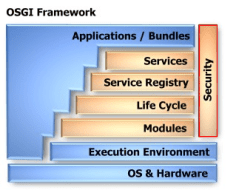
The OSGi specification defines a dynamic module system for Java. As such, it’s a perfect candidate for implementing the kind of plugin system that would enable your application to dynamically add mobile code.

Security in OSGi builds on the Java 2 security architecture that we discussed earlier, so you can re-use your knowledge about code signing, etc.

OSGi goes a couple of steps further, however.

Revoking Permissions

One of the weaknesses in the Java permissions model is that you can only explicitly grant permissions, not revoke them. There are many cases where you want to allow everything except a particular special case.

There is no way to do that with standard Java permissions, but, luckily, OSGi introduces a solution.


The downside is that OSGi introduces its own syntax for specifying policies.

The following example shows how to deny PackagePermission for subpackages of com.acme.secret:

DENY {
  ( ..PackagePermission "com.acme.secret.*" "import,exportonly" )
} "denyExample"

(In this and following examples, I give the simple name of permission classes instead of the fully qualified name. I hint at that by prefixing the simple name with ..)

PackagePermission is a permission defined by OSGi for authorization of package imports and exports. Your application could use a policy like this to make sure that mobile code can’t call the classes in a given package, for instance to limit direct access to the database.

Extensible Conditions on Permissions

The second improvement that OSGi brings is that the conditions under which a permission are granted can be dynamically evaluated at runtime.

The following example shows how to conditionally grant ServicePermission:

ALLOW {
  [ ..BundleSignerCondition "* ; o=ACME" ]
  ( ..ServicePermission "..ManagedService" "register" )
} "conditionalExample"

ServicePermission is an OSGi defined permission that restricts access to OSGi services.

The condition is the part between square brackets. OSGi defines two conditions, which correspond to the signedBy and codeBase constructs in regular Java policies.

You can also define your own conditions. The specification gives detailed instructions on implementing conditions, especially with regard to performance.

Different Types of Permissions

The final innovation that OSGi brings to the Java permissions model, is that there are different types of permissions.

Bundles can specify their own permissions. This doesn’t mean that bundles can grant themselves permissions, but rather that they can specify the maximum privileges that they need to function. These permissions are called local permissions.

The OSGi framework ensures that the bundle will never have more permissions than the local permissions, thus implementing the principle of least privilege.

Actually, that statement is not entirely accurate. Every bundle will have certain permissions that they need to function in an OSGi environment, like being able to read the org.osgi.framework.* system properties.

These permissions are called implicit permissions, since every bundle will have them, whether the permissions are explicitly granted to the bundle or not.

The final type of permissions are the system permissions. These are the permissions that are granted to the bundle.

The effective permissions are the set of permissions that are checked at runtime:

effective = (local ∩ system) ∪ implicit

Local permissions enable auditing. Before installing a bundle into your OSGi environment, you can inspect the Bundle Permission Resource in OSGI-INF/permissions.perm to see what permissions the bundle requires.

If you are not comfortable with granting the bundle these permissions, you can decide to not install the bundle. The point is that you can know all of this without running the bundle and without having access to its source code.

Integration into the Java Permissions Model

The OSGi framework integrates their extended permissions model into the standard Java permissions model by subclassing ProtectionDomain.

Each bundle gets a BundleProtectionDomainImpl for this purpose.

This approach allows OSGi to tap into the standard Java permissions model that you have come to know, so you can re-use most of your skills in this area. The only thing you’ll have to re-learn, is how to write policies.

Comparison of Permission Models

To put the OSGi permission model into perspective, consider the following comparison table, which uses terminology from the XACML specification:

Permission Models Standard Java OSGi
Effects permit permit, deny
Target, Condition codeBase, signedBy codeBase, signedBy, custom conditions
Combining Algorithms first-applicable first-applicable, local/system/implicit

From this table you can see that the OSGi model is quite a bit more expressive than the standard Java permission model, although not as expressive as XACML.

Sandboxing Java Code

In a previous post, we looked at securing mobile Java code. One of the options for doing so is to run the code in a cage or sandbox.

This post explores how to set up such a sandbox for Java applications.

Security Manager

The security facility in Java that supports sandboxing is the java.lang.SecurityManager.

By default, Java runs without a SecurityManager, so you should add code to your application to enable one:

System.setSecurityManager(new SecurityManager());

You can use the standard SecurityManager, or a descendant.

The SecurityManager has a bunch of checkXXX() methods that all forward to checkPermission(permission, context). This method calls upon the AccessController to do the actual work (see below).

[The checkXXX() methods are a relic from Java 1.1.]

If a requested access is allowed, checkPermission() returns quietly. If denied, a java.lang.SecurityException is thrown.

Code that implements the sandbox should call a checkXXX method before performing a sensitive operation:

SecurityManager securityManager = System.getSecurityManager();
if (securityManager != null) {
  Permission permission = ...;
  securityManager.checkPermission(permission);
}

The JRE contains code just like that in many places.

Permissions

A permission represents access to a system resource.

In order for such access to be allowed, the corresponding permission must be explicitly granted (see below) to the code attempting the access.

Permissions derive from java.security.Permission. They have a name and an optional list of actions (in the form of comma separated string values).

Java ships with a bunch of predefined permissions, like FilePermission. You can also add your own permissions.

The following is a permission to read the file /home/remon/thesis.pdf:

Permission readPermission = new java.io.FilePermission(
    "/home/remon/thesis.pdf", "read");

You can grant a piece of code permissions to do anything and everything by granting it AllPermission. This has the same effect as running it without SecurityManager.

Policies

Permissions are granted using policies. A Policy is responsible for determining whether code has permission to perform a security-sensitive operation.

The AccessController consults the Policy to see whether a Permission is granted.

There can only be one Policy object in use at any given time. Application code can subclass Policy to provide a custom implementation.

The default implementation of Policy uses configuration files to load grants. There is a single system-wide policy file, and a single (optional) user policy file.

You can create additional policy configuration files using the PolicyTool program. Each configuration file must be encoded in UTF-8.

By default, code is granted no permissions at all. Every grant statement adds some permissions. Permissions that are granted cannot be revoked.

The following policy fragment grants code that originates from the /home/remon/code/ directory read permission to the file /home/remon/thesis.pdf:

grant codeBase "file:/home/remon/code/-" {
    permission java.io.FilePermission "/home/remon/thesis.pdf",
        "read";
};

Note that the part following codeBase is a URL, so you should always use forward slashes, even on a Windows system.

A codeBase with a trailing / matches all class files (not JAR files) in the specified directory. A codeBase with a trailing /* matches all files (both class and JAR files) contained in that directory. A codeBase with a trailing /- matches all files (both class and JAR files) in the directory and recursively all files in subdirectories contained in that directory.

For paths in file permissions on Windows systems, you need to use double backslashes (\\), since the \ is an escape character:

grant codeBase "file:/C:/Users/remon/code/-" {
    permission java.io.FilePermission
        "C:\\Users\\remon\\thesis.pdf", "read";
};

For more flexibility, you can write grants with variable parts. We already saw the codeBase wildcards. You can also substitute system properties:

grant codeBase "file:/${user.home}/code/-" {
    permission java.io.FilePermission
        "${user.home}${/}thesis.pdf", "read";
};

Note that ${/} is replaced with the path separator for your system. There is no need to use that in codeBase, since that’s a URL.

Signed Code

Of course, we should make sure that the code we use is signed, so that we know that it actually came from who we think it came from.

We can test for signatures in our policies using the signedBy clause:

keystore "my.keystore";
grant signedBy "signer.alias", codeBase ... {
  ...
};

This policy fragment uses the keystore with alias my.keystore to look up the public key certificate with alias signer.alias.

It then verifies that the executing code was signed by the private key corresponding to the public key in the found certificate.

There can be only one keystore entry.

The combination of codeBase and signedBy clauses specifies a ProtectionDomain. All classes in the same ProtectionDomain have the same permissions.

Privileged Code

Whenever a resource access is attempted, all code on the stack must have permission for that resource access, unless some code on the stack has been marked as privileged.

Marking code as privileged enables a piece of trusted code to temporarily enable access to more resources than are available directly to the code that called it. In other words, the security system will treat all callers as if they originated from the ProtectionDomain of the class that issues the privileged call, but only for the duration of the privileged call.

You make code privileged by running it inside an AccessController.doPrivileged() call:

AccessController.doPrivileged(new PrivilegedAction() {
  public Object run() {
    // ...privileged code goes here...
    return null;
  }
});

Assembling the Sandbox

Now we have all the pieces we need to assemble our sandbox:

  1. Install a SecurityManager
  2. Sign the application jars
  3. Grant all code signed by us AllPermission
  4. Add permission checks in places that mobile code may call
  5. Run the code after the permission checks in a doPrivileged() block

I’ve created a simple example on GitHub.

Building Both Security and Quality In

One of the important things in a Security Development Lifecycle (SDL) is to feed back information about vulnerabilities to developers.

This post relates that practice to the Agile practice of No Bugs.

The Security Incident Response

Even though we work hard to ship our software without security vulnerabilities, we never succeed 100%.

When an incident is reported (hopefully responsibly), we execute our security response plan. We must be careful to fix the issue without introducing new problems.

Next, we should also look for similar issues to the one reported. It’s not unlikely that there are issues in other parts of the application that are similar to the reported one. We should find and fix those as part of the same security update.

Finally, we should do a root cause analysis to determine why this weakness slipped through the cracks in the first place. Armed with that knowledge, we can adapt our process to make sure that similar issues will not occur in the future.

From Security To Quality

The process outlined above works well for making our software ever more secure.

But security weaknesses are essentially just bugs. Security issues may have more severe consequences than regular bugs, but most regular bugs are expensive to fix once the software is deployed as well.

So it actually makes sense to treat all bugs, security or otherwise, the same way.

As the saying goes, an ounce of prevention is worth a pound of cure. Just as we need to build security in, we also need to build quality in general in.

Building Quality In Using Agile Methods

This has been known in the Agile and Lean communities for a long time. For instance, James Shore wrote about it in his excellent book The Art Of Agile Development and Elisabeth Hendrickson thinks that there should be so little bugs that they don’t need triaging.

Some people object to the Zero Defects mentality, claiming that it’s unrealistic.
There is, however, clear evidence of much lower defect rates for Agile development teams. Many Lean implementations also report successes in their quest for Zero Defects.

So there is at least anecdotal evidence that a very significant reduction of defects is possible.

This will require change, of course. Testers need to change and so do developers. And then everybody on the team needs to speak the same language and work together as a single team instead of in silos.

If we do this well, we’ll become bug exterminators that delight our customers with software that actually works.

On Measuring Code Coverage

In a previous post, I explained how to visualize what part of your code is covered by your tests.

This post explores two questions that are perhaps more important: why and what code coverage to measure.

Why We Measure Code Coverage

What does it mean for a statement to be covered by tests? Well, it means that the statement was executed while the tests ran, nothing more, nothing less.

We can’t automatically assume that the statement is tested, since the bare fact that a statement was executed doesn’t imply that the effects of that execution were verified by the tests.

If you practice Test-First Programming, then the tests are written before the code. A new statement is added to the code only to make a failing test pass. So with Test-First Programming, you know that each executed statement is also a tested statement.

If you don’t write your tests first, then all bets are off. Since Test-First Programming isn’t as popular as I think it should be, let’s assume for the remainder of this post that you’re not practicing it.

Then what good does it do us to know that a statement is executed?

Well, if the next statement is also executed, then we know that the first statement didn’t throw an exception.

That doesn’t help us much either, however. Most statements should not throw an exception, but some statements clearly should. So in general, we still don’t get a lot of value out of knowing that a statement is executed.

The true value of measuring code coverage is therefore not in the statements that are covered, but in the statements that are not covered! Any statement that is not executed while running the tests is surely not tested.

Uncovered code indicates that we’re missing tests.

What Code Coverage We Should Measure

Our next job is to figure out what tests are missing, so we can add them. How can we do that?

Since we’re measuring code coverage, we know the target of the missing tests, namely the statements that were not executed.

If some of those statements are in a single class, and you have unit tests for that class, it’s easy to see that those unit tests are incomplete.

Unit tests can definitely benefit from measuring code coverage.

What about acceptance tests? Some code can easily be related to a single feature, so in those cases we could add an acceptance test.

In general, however, the relationship between a single line of code and a feature is weak. Just think of all the code we re-use between features. So we shouldn’t expect to always be able to tell by looking at the code what acceptance test we’re missing.

It makes sense to measure code coverage for unit tests, but not so much for acceptance tests.

Code Coverage on Acceptance Tests Can Reveal Dead Code

One thing we can do by measuring code coverage on acceptance tests, is find dead code.
Dead code is code that is not executed, except perhaps by unit tests. It lives on in the code base like a zombie.

Dead code takes up space, but that’s not usually a big problem.

Some dead code can be detected by other means, like by your IDE. So all in all, it seems that we’re not gaining much by measuring code coverage for acceptance tests.

Code Coverage on Acceptance Tests May Be Dangerous

OK, so we don’t gain much by measuring coverage on acceptance tests. But no harm, no foul, right?

Well, that remains to be seen.

Some organizations impose targets for code coverage. Mindlessly following a rule is not a good idea, but, alas, such is often the way of big organizations. Anyway, an imposed number of, say, 75% line coverage may be achievable by executing only the acceptance tests.

So developers may have an incentive to focus their tests exclusively on acceptance tests.

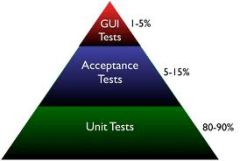
This is not as it should be according to the Test Pyramid.

Acceptance tests are slower, and, especially when working through a GUI, may also be more brittle than unit tests.

Therefore, they usually don’t go much further than testing the happy path. While it’s great to know that all the units integrate well, the happy path is not where most bugs hide.

Some edge and error cases are very hard to write as automated acceptance tests. For instance, how do you test what happens when the network connection drops out?

These types of failures are much easier explored by unit tests, since you can use mock objects there.

The path of least resistance in your development process should lead developers to do the right thing. The right thing is to have most of the tests in the form of unit tests.

If you enforce a certain amount of code coverage, be sure to measure that coverage on unit tests only.

Securing Mobile Java Code

Mobile Code is code sourced from remote, possibly untrusted systems, that are executed on your local system. Mobile code is an optional constraint in the REST architectural style.

This post investigates our options for securely running mobile code in general, and for Java in particular.

Mobile Code

Examples of mobile code range from JavaScript fragments found in web pages to plug-ins for applications like FireFox and Eclipse.

Plug-ins turn a simple application into an extensible platform, which is one reason they are so popular. If you are going to support plug-ins in your application, then you should understand the security implications of doing so.

Types of Mobile Code

Mobile code comes in different forms. Some mobile code is source code, like JavaScript.

Mobile code in source form requires an interpreter to execute, like JägerMonkey in FireFox.

Mobile code can also be found in the form of executable code.

This can either be intermediate code, like Java applets, or native binary code, like Adobe’s Flash Player.

Active Content Delivers Mobile Code

A concept that is related to mobile code is active content, which is defined by NIST as

Electronic documents that can carry out or trigger actions automatically on a computer platform without the intervention of a user.

Examples of active content are HTML pages or PDF documents containing scripts and Office documents containing macros.

Active content is a vehicle for delivering mobile code, which makes it a popular technology for use in phishing attacks.

Security Issues With Mobile Code

There are two classes of security problems associated with mobile code.

The first deals with getting the code safely from the remote to the local system. We need to control who may initiate the code transfer, for example, and we must ensure the confidentiality and integrity of the transferred code.

From the point of view of this class of issues, mobile code is just data, and we can rely on the usual solutions for securing the transfer. For instance, XACML may be used to control who may initiate the transfer, and SSL/TLS may be used to protect the actual transfer.

It gets more interesting with the second class of issues, where we deal with executing the mobile code. Since the remote source is potentially untrusted, we’d like to limit what the code can do. For instance, we probably don’t want to allow mobile code to send credit card data to its developer.

However, it’s not just malicious code we want to protect ourselves from.

A simple bug that causes the mobile code to go into an infinite loop will threaten your application’s availability.

The bottom line is that if you want your application to maintain a certain level of security, then you must make sure that any third-party code meets that same standard. This includes mobile code and embedded libraries and components.

That’s why third-party code should get a prominent place in a Security Development Lifecycle (SDL).

Safely Executing Mobile Code

In general, we have four types of safeguards at our disposal to ensure the safe execution of mobile code:

  • Proofs
  • Signatures
  • Filters
  • Cages (sandboxes)

We will look at each of those in the context of mobile Java code.

Proofs

It’s theoretically possible to present a formal proof that some piece of code possesses certain safety properties. This proof could be tied to the code and the combination is then proof carrying code.

After download, the code could be checked against the code by a verifier. Only code that passes the verification check would be allowed to execute.

Updated for Bas’ comment:
Since Java 6, the StackMapTable attribute implements a limited form of proof carrying code where the type safety of the Java code is verified. However, this is certainly not enough to guarantee that the code is secure, and other approaches remain necessary.

Signatures

One of those approaches is to verify that the mobile code is made by a trusted source and that it has not been tampered with.

For Java code, this means wrapping the code in a jar file and signing and verifying the jar.

Filters

We can limit what mobile content can be downloaded. Since we want to use signatures, we should only accept jar files. Other media types, including individual .class files, can simply be filtered out.

Next, we can filter out downloaded jar files that are not signed, or signed with a certificate that we don’t trust.

We can also use anti-virus software to scan the verified jars for known malware.

Finally, we can use a firewall to filter out any outbound requests using protocols/ports/hosts that we know our code will never need. That limits what any code can do, including the mobile code.

Cages/Sandboxes

After restricting what mobile code may run at all, we should take the next step: prevent the running code from doing harm by restricting what it can do.
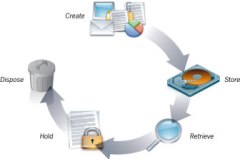
We can intercept calls at run-time and block any that would violate our security policy. In other words, we put the mobile code in a cage or sandbox.

In Java, cages can be implemented using the Security Manager. In a future post, we’ll take a closer look at how to do this.

Using a Layered XACML Architecture to Implement Retention

A previous post showed how the security principle of segmentation led to a small adaption of the XACML architecture for use in the cloud.

This post shows how a similar adaptation may be required on-premise.

Segmentation of Retention and Regular Access Control Policies

Even when we don’t live in a cloud world, there may be reasons for segmentation. Take records management, for instance.

Any piece of data that is marked as a record, may not be deleted until after the end of the retention period (at which point it must be deleted).
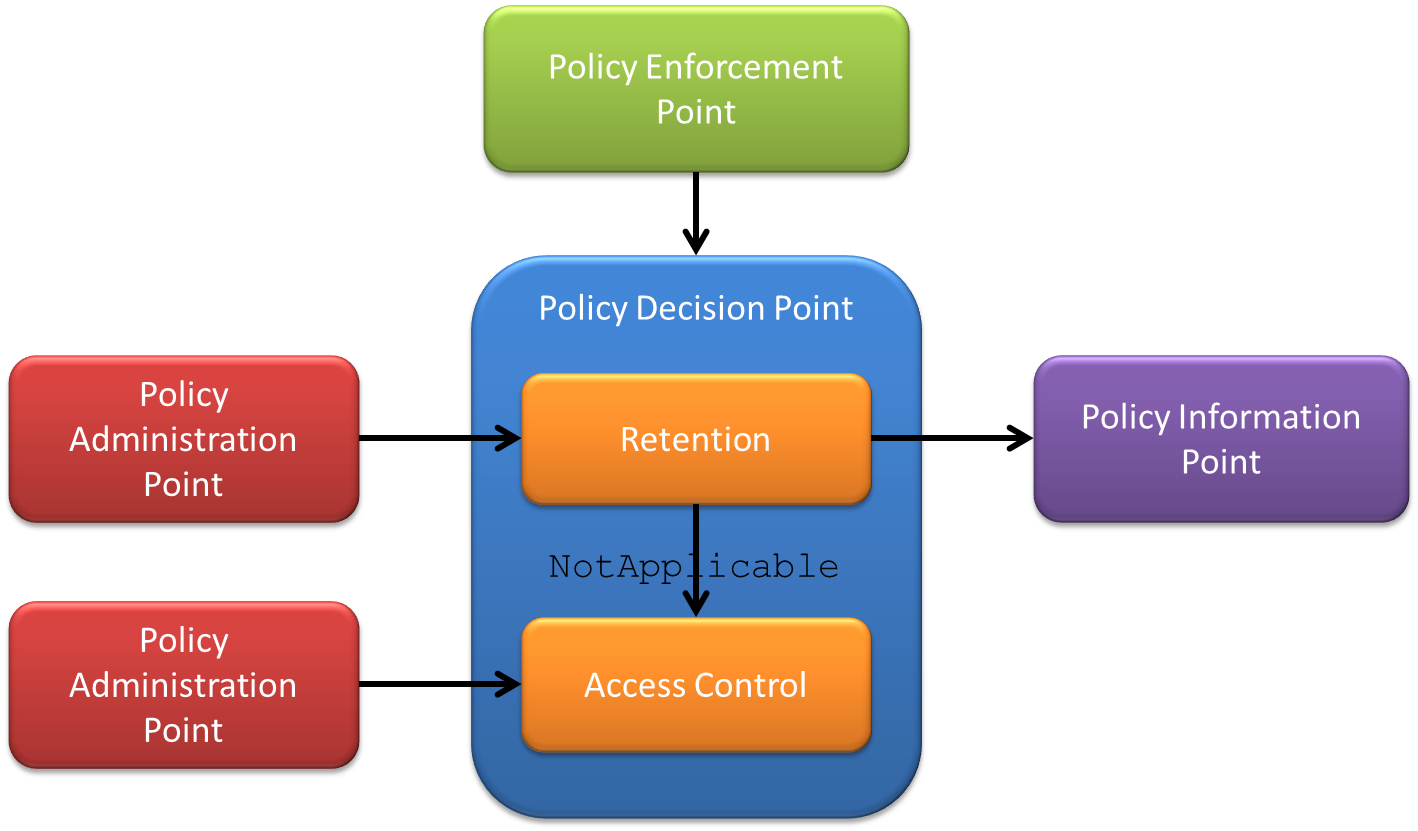

This is an access control policy that clearly takes precedence over the regular policies.

A similar situation exists with legal holds.

While it’s certainly possible to achieve that with various policy sets and clever policy combining, the principle of segmentation encourages us to take a different approach. We would like to physically separate the policies into different layers, so that they can never interfere with each other.

Segmenting XACML Policies Using Layered Policy Decision Points

We can create a layered Policy Decision Point (PDP) that wraps smaller PDPs that each deal with a single type of access control policies.

The PDP with retention policies is asked for a decision first. When the decision is NotApplicable it means the resource being accessed is not under retention, and the decision is forwarded to the next PDP, which uses regular access control policies.

The retention policies will probably require a PIP to look up resource attributes, like is-under-retention.

Segmentation Implementation Patterns

While the multi-tenant XACML architecture was an example of a dispatching mechanism, the layered architecture is an example of the Chain of Responsibility pattern.

Supporting Multiple XACML Representations

We’re in the process of registering an XML media type for the eXtensible Access Control Markup Language (XACML). Simultaneously, the XACML Technical Committee is working on a JSON format.

Both media types are useful in the context of another committee effort, the REST profile. This post explains what benefit these profiles will bring once approved, and how to support them in clients and servers.

Media Types Support Content Negotiation

With the REST profile, any application can communicate with a Policy Decision Point (PDP) in a RESTful manner. The media types make it possible to communicate with such a PDP in a manner that is most convenient for the client, using a process called content negotiation.

For instance, a web application that is mainly implemented in JavaScript may prefer to use JSON for communication with the PDP, to avoid having to bring in infrastructure to deal with XML.

Content negotiation is not just a convenience feature, however. It also facilitates evolution.

A server with many clients that understand 2.0 may start also serving 3.0, for instance. The older clients stay functional using 2.0, whereas newer clients can communicate in 3.0 syntax with the same server.

This avoids having to upgrade all the clients at the same time as the server.

So how does a server that supports multiple versions and/or formats know which one to serve to a particular client? The answer is the Accept HTTP header. For instance, a client can send Accept: application/xacml+xml; version=2.0 to get an XACML 2.0 XML format, or Accept: application/xacml+json; version=3.0 to get an XACML 3.0 JSON answer.

The value for the Accept header is a list of media types that are acceptable to the client, in decreasing order of precedence. For instance, a new client could prefer 3.0, but still work with older servers that only support 2.0 by sending Accept: application/xacml+xml; version=3.0, application/xacml+xml; version=2.0.

Supporting Multiple Versions and Formats

So there is value for both servers and clients to support multiple versions and/or formats. Now how does one go about implementing this? The short answer is: using indirection.

The longer answer is to make an abstraction for the version/format combination. We’ll dub this abstraction a representation.

For instance, an XACML request is really not much more than a collection of categorized attributes, while a response is basically a collection of results.

Instead of working with, say, the XACML 3.0 XML form of a request, the client or server code should work with the abstract representation. For each version/format combination, you then add a parser and a builder.

The parser reads the concrete syntax and creates the abstract representation from it. Conversely, the builder takes the abstract representation and converts it to the desired concrete syntax.

In many cases, you can re-use parts of the parsers and builders between representations. For instance, all the XML formats of XACML have in common that they require XML parsing/serialization.

In a design like this, no code ever needs to be modified when a new version of the specification or a new serialization format comes out. All you have to do is add a parser and a builder, and all the other code can stay the way it is.

The only exception is when a new version introduces new capabilities and your code wants to use those. In that case, you probably must also change the abstract representation to accommodate the new functionality.

Software Development and Lifelong Learning

The main constraint in software development is learning. This means that learning is a core skill for developers and we should not think we’re done learning after graduation. This post explores some different ways in which to learn.

Go To Conferences

Conferences are a great place to learn new things, but also to meet new people. New people can provide new ways of looking at things, which helps with learning as well.

You can either go to big and broad conferences, like Java One or the RSA conference, or you can attend a smaller, more focused event. Some of these smaller events may not be as well-known, but there are some real gems nonetheless.

Take XML Amsterdam, for example, a small conference here in the Netherlands with excellent international speakers and attendees (even some famous ones).

Attend Workshops

Learning is as much about doing as it is about hearing and watching. Some conferences may have hands-on sessions or labs, but they’re in the minority. So just going to conferences isn’t good enough.

A more practical variant are workshops. They are mostly organized by specific communities, like Java User Groups.

One particularly useful form for developers is the code retreat. Workshops are much more focused than conferences and still provide some of the same networking opportunities.

Get Formal Training

Lots of courses are being offered, many of them conveniently online. One great (and free) example is Cryptography from Coursera.

Some of these course lead to certifications. The world is sharply divided into those who think certifications are a must and those that feel they are evil. I’ll keep my opinion on this subject to myself for once 😉 but whatever you do, focus on the learning, not on the piece of paper.

Learn On The Job

There is a lot to be learned during regular work activities as well.

You can organize that a bit better by doing something like job rotation. Good forms of job rotation for developers are collective code ownership and swarming.

Pair programming is an excellent way to learn all kinds of things, from IDE shortcuts to design patterns.

Practice in Private

Work has many distractions, though, like Getting a Story Done.

Open source is an alternative, in the sense that it takes things like deadlines away, which can help with learning.

However, that still doesn’t provide the systematic exploration that is required for the best learning. So practicing on “toy problems” is much more effective.

There are many katas that do just that, like the Roman Numerals Kata. They usually target a specific skill, like Test-Driven Development (TDD).

A Classification of Tests

There are many ways of testing software. This post uses the five Ws to classify the different types of tests and shows how to use this classification.
Programmer vs Customer (Who)

Tests exist to give confidence that the software works as expected.

But whose expectations are we talking about? Developers have different types of expectations about their code than users have about the application. Each audience deserves its own set of tests to remain confident enough to keep going.

Functionality vs Performance vs Load vs Security (What)

When not specified, it’s assumed that what is being tested is whether the application functions the way it’s supposed to. However, we can also test non-functional aspects of an application, like security.

Before Writing Code vs After (When)

Tests can be written after the code is complete to verify that it works (test-last), or they can be written first to specify how the code should work (test-first). Writing the test first may seem counter-intuitive or unnatural, but there are some advantages:

  • When you write the tests first, you’ll guarantee that the code you later write will be testable (duh). Anybody who’s written tests for legacy code will surely acknowledge that that’s not a given if you write the code first
  • Writing the tests first can prevent defects from entering the code and that is more efficient than introducing, finding, and then fixing bugs
  • Writing the tests first makes it possible for the tests to drive the design. By formulating your test, in code, in a way that looks natural, you design an API that is convenient to use. You can even design the implementation

Unit vs Integration vs System (Where)


Tests can be written at different levels of abstraction. Unit tests test a single unit (e.g. class) in isolation.

Integration tests focus on how the units work together. System tests look at the application as a whole.

As you move up the abstraction level from unit to system, you require fewer tests.

Verification vs Specification vs Design (Why)

There can be different reasons for writing tests. All tests verify that the code works as expected, but some tests can start their lives as specifications of how yet-to-be-written code should work. In the latter situation, the tests can be an important tool for communicating how the application should behave.

We can even go a step further and let the tests also drive how the code should be organized. This is called Test-Driven Design (TDD).

Manual vs Automated Tests (How)


Tests can be performed by a human or by a computer program. Manual testing is most useful in the form of exploratory testing.

When you ship the same application multiple times, like with releases of a product or sprints of an Agile project, you should automate your tests to catch regressions. The amount of software you ship will continue to grow as you add features and your testing effort will do so as well. If you don’t automate your tests, you will eventually run out of time to perform all of them.

Specifying Tests Using the Classification

With the above classifications we can be very specific about our tests. For instance:

  • Tests in TDD are automated (how) programmer (who) tests that design (why) functionality (what) at the unit or integration level (where) before the code is written (when)
  • BDD scenarios are automated (how) customer (who) tests that specify (why) functionality (what) at the system level (where) before the code is written (when)
  • Exploratory tests are manual (how) customer (who) tests that verify (why) functionality (what) at the system level (where) after the code is written (when)
  • Security tests are automated (how) customer (who) tests that verify (why) security (what) at the system level (where) after the code is written (when)

By being specific, we can avoid semantic diffusion, like when people claim that “tests in TDD do not necessarily need to be written before the code”.

Reducing Risk Using the Classification

Sometimes you can select a single alternative along a dimension. For instance, you could perform all your testing manually, or you could use tests exclusively to verify.

For other dimensions, you really need to cover all the options. For instance, you need tests at the unit and integration and system level and you need to test for functionality and performance and security. If you don’t, you are at risk of not knowing that your application is flawed.

Proper risk management, therefore, mandates that you shouldn’t exclusively rely on one type of tests. For instance, TDD is great, but it doesn’t give the customer any confidence. You should carefully select a range of test types to cover all aspects that are relevant for your situation.