Performance tuning a GWT application

With Google Web Toolkit (GWT), you write your AJAX front-end in the Java programming language which GWT then cross-compiles into optimized JavaScript that automatically works across all major browsers.

…claims Google. And I must say, I’m pretty impressed by the ease of development GWT offers. I’ve used it at work on a project that I probably couldn’t have done without it, given my poor JavaScript skills. Especially the fact that you don’t have to worry about whether your code works in all browsers is great.

There are a couple of caveats, however:

  • The set of supported Java classes is limited, which sometimes causes confusion. For instance, there is a Character class, but the isWhitespace() method is not supported. And neither is List.subList().
  • Serialization works differently from the Java standard.
  • You can’t work with regular W3C DOM objects on the client. Instead, GWT provides it’s own DOM hierarchy.
  • Even though Google claims that GWT “allows developers to quickly build and maintain complex yet highly performant JavaScript front-end applications in the Java programming language”, performance can be a problem.

The purpose of this post is to elaborate on that last point.

Java isn’t JavaScript

Most developers evolve a sense of intuition about what type of code can be a performance problem, and what not. The problem with GWT development, however, is that even though you write Java code, the browser executes JavaScript code. So any intuitions about Java performance are misleading.

Therefore, your usual rules of thumb won’t work in GWT development. Here’s a couple that may.

Serialization is slow

Our application created a domain model on the server, serialized that to the client, and had the client render it. The problem was that the model could become quite large, consisting of thousands of objects. This is not something that GWT currently handles well. Serialization performance appears to be proportional to the number of objects, not just to their total size. Therefore, we translated the model to XML, and serialized that as a single string. This was way faster.

However, this meant that we needed to parse the XML on the client side to reconstruct our model. GWT provides an XMLParser class to handle just that. This class is very efficient in parsing XML, but it turned out that traversing the resulting DOM document was still too slow.

So I wrote a dedicated XML parser, one that can only parse the subset of XML documents that represent our domain model. This parser builds the domain model directly, without intermediate representation. This proved to be faster than the generic approach, but only after being very careful with handling strings.

Some string handling is slow, particularly in Internet Explorer

Java developers know that string handling can be a performance bottleneck. This is also true for GWT development, but not in quite the same way. For instance, using StringBuffer or StringBuilder is usually sufficient for improving String handling performance in Java code. But not so in JavaScript. StringBuffer.append() can be very slow on Internet Explorer, for instance.

GWT 1.6 will contain its own version of StringBuffer that will alleviate some of these problems. Since 1.6 isn’t released yet, we just copied this class into our project.

But even with the new StringBuffer class, you still need to be careful when dealing with strings. Some of the StringBuffer methods are implemented by calling toString() and doing something on the result. That can be a real performance killer. So anything you can do to stay away from substring(), charAt(), etc. will help you. This can mean that it’s sometimes better to work with plain Strings instead of StringBuffers!

Tables

For displaying data in a table-like format, you can use the Grid widget. This is not terribly fast, however, so you may want to consider the bulk table renderers.

The downside of these is that they translate any widgets you insert into the table to HTML, and you loose all the functionality to attached to them, like click handling. Instead, you can add a TableListener, that has a onCellClicked() method.

Varargs are slow

Variable argument lists are sometimes quite handy. However, we’ve found that they come at a severe performance penalty, because a JavaScript array needs to be created to wrap the arguments. So if at all possible, use fixed argument lists, even though this may be less convenient from a code writing/maintaining perspective.

Don’t trust rules of thumb, use a profiler

The problem with rules of thumb is that they are just that: principles with broad application that are not intended to be strictly accurate or reliable for every situation. You shouldn’t put all your trust in them, but measure where the pain really is. This means using a profiler.

You could, of course, run your favorite Java profiler against hosted mode to get a sense of performance of your code. But that would be besides the point. Your Java code is compiled to JavaScript and it is the JavaScript code that gets executed by the browser. So you should use a JavaScript profiler.

We used Firebug to profile the compiled JavaScript code and this helped us enormously. As usual with profiling, we found performance bottlenecks that we didn’t anticipate. As a result, we were able to make our application load over 60 times faster! (on Internet Explorer 7)

Performance in different browsers

The only problem with Firebug is that it’s a FireFox plugin, and therefore not available for Internet Explorer. [Firebug Lite doesn’t contain a profiler.] Not that I personally would want to use IE, but our customers do, unfortunately.

The irony is that you need a JavaScript profiler in Internet Explorer the most: FireFox is unbelievably much faster than Internet Explorer when it comes to processing JavaScript, especially with string handling. For instance, for one data set, FireFox 3 loaded the page in 51 seconds, while Internet Explorer 7 took 12 minutes and 4 seconds!

Internet Explorer 8 will supposedly be better:

We have made huge improvements to widely-used JScript functionality including faster string, array, and lookup operations.

We’ll have to see how that works out when IE8 is released…

BTW, if you’re interested in browser performance, check out this comparison.
The Art of the Visitor Pattern (2)

In my previous post, we took a look at the basic Visitor design pattern, and a couple of simple variations. I now continue with a more ambitious variation.

This is where the fun begins.

Variation 3: Eliminate recursion

Suppose we have a huge file system tree and that processing it takes a lot of time. We’d then want to update some progress indicator, or give other threads some time to run. To do that, we’d need to interrupt the processing. The current implementation doesn’t support that, because of the recursion.

Most developers probably know that every recursive implementation can be replaced by an iterative one. In a recursive function, there is an iteration of the same method call on the program’s stack. We can replace that using an explicit stack.

But in order to be able to use iteration, we need to be able to move from one node in the file system tree to the next:

public interface FileSystemNode {

  FileSystemNode getFirstChild();
  FileSystemNode getLastChild();
  
  FileSystemNode getNextSibling();
  FileSystemNode getPrevSibling();
  
  FileSystemNode getNext();
  FileSystemNode getPrev();
  
  FileSystemNode getNextNoChild();

  boolean isAncestorOf(FileSystemNode next);

  // other methods as before ...
}

We can implement that as follows:

public abstract class AbstractFileSystemNode
    implements FileSystemNode {

  public FileSystemNode getFirstChild() {
    return children.isEmpty() ? null : children.get(0);
  }

  public FileSystemNode getLastChild() {
    return children.isEmpty() ? null
        : children.get(children.size() - 1);
  }

  public FileSystemNode getNextSibling() {
    FileSystemNode result = null;
    if (parent != null) {
      final int index = 
          parent.children.indexOf(this) + 1;
      if (index < parent.children.size()) {
        result = parent.children.get(index);
      }
    }
    return result;
  }
  
  public FileSystemNode getPrevSibling() {
    FileSystemNode result = null;
    if (parent != null) {
      final int index = 
          parent.children.indexOf(this) - 1;
      if (index >= 0) {
        result = parent.children.get(index);
      }
    }
    return result;
  }
  
  public FileSystemNode getNext() {
    FileSystemNode result = getFirstChild();
    if (result == null) {
      result = getNextNoChild();
    }
    return result;
  }

  public FileSystemNode getNextNoChild() {
    FileSystemNode result = getNextSibling();
    if (result == null) {
      FileSystemNode next = this;
      while (next.getParent() != null) {
        next = next.getParent();
        if (next.getNextSibling() != null) {
          result = next.getNextSibling();
          break;
        }
      }
    }
    return result;
  }

  public FileSystemNode getPrev() {
    FileSystemNode result = null;
    FileSystemNode prev = getPrevSibling();
    if (prev == null) {
      result = getParent();
    } else {
      while (prev.getLastChild() != null) {
        prev = prev.getLastChild();
      }
      result = prev;
    }
    return result;
  }

  public boolean isAncestorOf(
      final FileSystemNode descendant) {
    boolean result = false;
    FileSystemNode current = descendant;
    while (!result && current != null) {
      result = equals(current);
      current = current.getParent();
    }
    return result;
  }

  // other methods as before...
}

With these navigational methods in place, we can eliminate the recursion:

public class BaseFileSystemVisitor
    implements FileSystemVisitor {

  public void visit(final FileSystemNode node) {
    Stack stack = new Stack();
    FileSystemNode current = node;

    while (current != null) {
      stack.push(current);
      if (current.start(this)) {
        current = current.getNext();
      } else {
        current = current.getNextNoChild();
      }
      while (!stack.isEmpty() 


          && !stack.peek().isAncestorOf(current)) {
        stack.pop().stop(this);
      }
    }
  }

  // other methods as before...

}

Note: I use generics here (e.g. Stack<FileSystemNode>), but am not showing it, since that messes up the formatting in the code viewer thingie.

The current solution has some advantages over the recursive one, like not suffering from stack overflows with deeply nested trees, but my goal was to be able to traverse the tree in multiple calls. To make that possible, we need to be able to specify how many nodes can be visited in a single call:

public interface FileSystemVisitor {
  FileSystemNode visit(FileSystemNode node);
  void setMaxNodes(int maxNodes);
  
  // ...
}

The visit() method returns where it stopped, so you can supply that information with your next call. In our implementation, we need to make the stack a field instead of a local variable, so that its contents is preserved between calls:

public class BaseFileSystemVisitor
    implements FileSystemVisitor {

  private int maxNodes = Integer.MAX_VALUE;
  private final Stack stack = new Stack();
  
  public void setMaxNodes(int maxNodes) {
    this.maxNodes = maxNodes;
  }

  public FileSystemNode visit(final FileSystemNode node) {
    int numNodesVisited = 0;
    FileSystemNode current = node;

    while (current != null
        && numNodesVisited < maxNodes) {
      numNodesVisited++;
      stack.push(current);
      if (current.start(this)) {
        current = current.getNext();
      } else {
        current = current.getNextNoChild();
      }
      while (!stack.isEmpty()
          && !stack.peek().isAncestorOf(current)) {
        stack.pop().stop(this);
      }
    }
    return current;
  }

  // other methods as before...
}

And voila, we’re done. Next time we will look at making this code re-entrant, so that we can start visiting a node while we’re visiting another node.

The Art of the Visitor Pattern (1)

The visitor design pattern is one of those relatively simple patterns that you can use in many situations. Some situations are more complex than others, though, and may require some modifications. I will first present the basic pattern, and then some variations:

  1. process before and after a node
  2. skip parts of the data structure
  3. eliminate recursion
  4. support re-entrancy
  5. manipulate the data structure during visiting

This first post in a series will set the stage by discussing the basic pattern and the first two variations.

The basic pattern

Consider the following example. We have a data structure that represents a file system, with folders, files, links, devices, etc. This structure is basically a tree:

public interface FileSystemNode {

  FileSystemNode getParent();
  void setParent(FileSystemNode node);
	
  Iterator getChildren();
  void add(FileSystemNode child);
	
  void accept(FileSystemVisitor visitor);

  String getName();

}

Note: I’m using generics here but am not showing it, since it messes up the formatting.

Each of the implementors of this interface is listed in the FileSystemVisitor, so that it can handle them differently:

public interface FileSystemVisitor {

  void visit(Folder folder);
  void visit(File file);
  void visit(Link link);
  void visit(Device device);
  // ...

}

The gist of the visitor pattern is a double dispatch where the visitor calls the accept() method of the FileSystemNode:

public class BaseFileSystemVisitor 
    implements FileSystemVisitor {

  public void visit(final FileSystemNode node) {
    node.accept(this);
	  
    Iterator children = node.getChildren();
    while (children.hasNext()) {
      visit(children.next());
    }
  }

  public void visit(Folder folder) {
    // For descendants to implement
  }

  public void visit(File file) {
    // For descendants to implement
  }

  public void visit(Link link) {
    // For descendants to implement
  }

  public void visit(Device device) {
    // For descendants to implement
  }

  // ...
	
}

…and the FileSystemNode calls the visit() method of the visitor:

public class FolderImpl extends AbstractFileSystemNode 
    implements Folder {

  public void accept(final FileSystemVisitor visitor) {
    visitor.visit(this);
  }

  // Folder implementation...

}

An implementation for listing files (like the Unix ls command) could be implemented as follows:

public class ListVisitor extends BaseFileSystemVisitor {

  private final PrintStream out;

  public ListVisitor() {
    this(System.out);  
  }
  
  public ListVisitor(final PrintStream out) {
    super();
    this.out = out;
  }

  @Override
  public void visit(final Device device) {
    out.println(device.getType() + ": " 
        + device.getName());
  }

  @Override
  public void visit(final File file) {
    out.println(file.getName());
  }

  @Override
  public void visit(final Folder folder) {
    out.println(folder.getName() + "/");
  }

  @Override
  public void visit(final Link link) {
    out.println(link.getName() + " ->" 
        + link.getTarget());
  }
  
  // ...
  
}

Variation 1: Process before and after a node

Now suppose we don’t want a simple list like the one provided by ListVisitor, but we want to export to XML. For that to work, we need to open and close the containing folder tag, e.g.:

<folder name='remon'>
  <file name='quotes.txt'/>
  <device name='wlan' type='usb'/>
  <link name='java'
      target='/usr/lib/jvm/java-6-sun/bin/java'/>
</folder>

To implement this, we replace the visit() methods with start() and stop() methods:

public interface FileSystemVisitor {
  void start(Folder folder);
  void stop(Folder folder);

  void start(File file);
  void stop(File file);


  void start(Link link);
  void stop(Link link);

  void start(Device device);
  void stop(Device device);

  // ...
}

public class BaseFileSystemVisitor 
    implements FileSystemVisitor {

  public void visit(final FileSystemNode node) {
    node.start(this);
	  
    Iterator children = node.getChildren();
    while (children.hasNext()) {
      visit(children.next());
    }
	  
    node.stop(this);      
  }

  // ...
}

This allows us to implement the XmlVisitor:

public class XmlVisitor extends BaseFileSystemVisitor {

  private final PrintStream out;

  public XmlVisitor() {
    this(System.out);  
  }
  
  public XmlVisitor(final PrintStream out) {
    this.out = out;
  }

  @Override
  public void start(Device device) {
    out.println("<device type='" + device.getType() 
        + "' name='" + device.getName() + "'/>");
  }

  @Override
  public void start(File file) {
    out.println("<file name='" + file.getName() 
        + "'/>");
  }

  @Override
  public void start(Folder folder) {
    out.println("<folder name='" + folder.getName() 
        + "'>");
  }

  @Override
  public void stop(Folder folder) {
    out.println("</folder>");
  }
  
  @Override
  public void start(Link link) {
    out.println("<link name='" + link.getName() 
        + "' target='" + link.getTarget() + "'/>");
  }

}

Variation 2: Skip parts of the data structure

Now suppose we want to skip processing a sub-tree. For instance, we may want to skip folders and files whose names start with a dot. We can achieve this by having the start() method return a boolean that indicates whether the sub-tree starting at the node is to be processed:

public interface FileSystemVisitor {
  boolean start(Folder folder);
  void stop(Folder folder);

  boolean start(File file);
  void stop(File file);

  boolean start(Link link);
  void stop(Link link);

  boolean start(Device device);
  void stop(Device device);
  
  // ...
}

public class BaseFileSystemVisitor
    implements FileSystemVisitor {

  public void visit(final FileSystemNode node) {
    if (node.start(this)) {
      Iterator children = node.getChildren();
      while (children.hasNext()) {
        visit(children.next());
      }
  	  
      node.stop(this);
    }
  }

  public boolean start(Folder folder) {
    // For descendants to implement
    return true;
  }

  // ...
}

public class FolderImpl extends AbstractFileSystemNode 
    implements Folder {

  public FolderImpl(final String name) {
    super(name);
  }

  public boolean start(final FileSystemVisitor visitor) {
    return visitor.start(this);
  }

  public void stop(final FileSystemVisitor visitor) {
    visitor.stop(this);
  }

}

public class XmlVisitor extends BaseFileSystemVisitor {
  // ...

  @Override
  public boolean start(Folder folder) {
    boolean result = !folder.getName().startsWith(".");
    if (result) {
      out.println("<folder name='" + folder.getName() 
          + "'>");
    }
    return result;
  }

  // ...
}

Next time we’ll get serious with the visitor pattern by eliminating the recursion, so stay tuned!

Unit testing a user interface

So I’m on this new cool Google Web Toolkit (GWT) project of ours now. Part of the UI consists of a series of HTML labels that is the view to our model. Since our model has a tree structure, we use the visitor pattern to create this UI.

This all works beautifully, except when it doesn’t, i.e. when there is a bug. With all the recursion and the sometimes convoluted HTML that is required to achieve the desired effect, hunting down bugs isn’t always easy.

So it was about time to write some unit tests. Normally, I write the tests first. But I was added to this project, and there weren’t any tests yet. So I decided to introduce them. Now, it is often easier to start with tests than add them later. If you don’t start out by writing tests, you usually end up with code that is not easily testable. That was also the case here.

Making the code testable

So my first job was to make sure the code became testable. I started out by separating the creation of the HTML labels from the visitor code, since I didn’t want my tests to depend on GWT. So I introduced a simple TextStream:

public interface TextStream {
  void add(String text);
}

The visitor code is injected with this text stream and calls the add() method with some HTML markup. Normally, this TextStream is a HtmlLabelStream:

public class HtmlLabelStream implements TextStream {

  private final FlowPanel parent;

  public HtmlLabelStream(final FlowPanel parent) {
    this.parent = parent;
  }

  public void add(final String text) {
    parent.add(new HTML(text));
  }

}

But my test case also implements the TextStream interface, and it injects itself into the visitor. That way, it can collect the output from the visitor and compare it with the expected output.

Simplifying testing

Now I got a whole lot of HTML code that I needed to compare to the desired output. It was hard to find the deviations in this, since the required HTML is rather verbose.

So I decided to invest some time in transforming the incoming HTML into something more readable. For instance, to indent some piece of text, the HTML code contains something like this:

<div style="padding-left: 20px">...</div>

For each indentation level, 10px were used. So I decided to strip the div, and replace it with the number of spaces that corresponds to the indentation level. I repeated the same trick for a couple of other styles. In the end, the output became much easier to read, and thus much easier to spot errors in. In fact, it now looks remarkably similar to what is rendered by the browser.

This certainly cost me time to build. But it also won me time when comparing the actual and expected outputs. And adding a new test is now a breeze. Which is just the sort of incentive I need for my fellow team mates to also start writing tests…

Automated distribution creation (4)

In this series of posts, I talked about my continuing quest for the fully automated creation of a distribution for our product. I talked about downloading release notes from our issue tracker and how to add those to our NEWS file. Last time, I had the build automatically update some text files. Now, my journey comes to an end.

The final manual step in creating a distribution for our product, is about incorporating the latest version of the manual. Since our product is an extension of the Component Content Management System Docato, we naturally use Docato itfself for writing our manual. This means the source code to the manual is not in Subversion with the rest of the code, and is not easily available to the build system. So what to do?

Well, Docato is pretty versatile. One can have a publication’s output sent to a well-known location on a server, for example. From there, we can download it using Ant’ scp task:

<scp file="${remote.manual.html.files}"
    todir="${local.manual.html.dir}"/>

where ${remote.manual.html.files} can use wildcards, like ${download.dir}/html/AMDS-CMS/*. But the download directory is on a different machine, so you need to provide the username and password for logging into that machine:

<property name="download.dir"
    value="${username}:${password}@${host}:${remote.dir}"/>

Of course, having a username and password in an Ant build file is a security risk. But in this case, the build file is not available outside our firewall, so we’re good. Otherwise, you’d have to provide the user credentials on the command line when running the Ant target:

ant create-dist -Dusername=foo -Dpassword=bar

scp also allows you to rename a file when downloading:

<scp file="${remote.manual.pdf.file}"
    localtofile="${local.manual.pdf.file}"/>

So now we can download the manual and incorporate it in our distribution. But how do we know we have the latest version of the manual?

Again, Docato comes to the rescue. It has the concept of scheduled tasks, actions that automatically run in the background from time to time. These are ideal for making backups, for instance.

So I created a scheduled task that builds a publication, and installed the task code on our manual server. Now every time a tech writer edits something, the edit will be automatically published at most a day later.

And so my journey ends.

But every end is a new beginning. Now that our distribution can be built by running a single Ant target, a whole new world opens up to us. My plan is to create a distribution automatically as part of our CruiseControl build. And then install it automatically, and run some tests against the installed version. Also, the distribution could be made available on some well-known server, so that interested people could always use the latest version for giving demos, for instance. But only when all the tests pass, of course 😉

Automated distribution creation (3)

In previous posts, I talked about my continuing quest for the fully automated creation of a distribution for our product. First, I talked about downloading release notes from our issue tracker. Then I showed how to add those to our NEWS file. This time, it’s time for updating some text files.

Our product is parametrized by some properties in property files. For instance, the number of cache pages to use for our embedded database is stored in the xhive.server.cache property in the file build.properties. In a typical installation on a production server, you’d want to set this to some high number, since you would have lots of RAM. However, on our development machines, we are not so fortunate. So the build.properties file contains a value that works for us developers. But when we build a distribution, we need to increase the value.

Enter the replaceregexp Ant task. This task lets you replace the occurrence of a given regular expression with a substitution pattern in a file. So the following piece of Ant script sets the property to 150000:

<replaceregexp file="${property.file}"
    match="(xhive.server.cache\s*=)\s*.+"
    replace="\1 150000" byline="true"/>

I use a backreference in the regular expression to prevent duplication of xhive.server.cache. Also note the use of \s* to match any amount of whitespace.

But once the value is set this high, I can no longer start up our web application on my local machine, since I don’t have the required amount of RAM for that many cache pages (they’re 4K a piece). So I use a similar piece of code to set it back to the development value once the distribution is built.

I also need to update some shell scripts that start Java programs. These shell scripts specify the maximum amount of RAM available to the JVM using the -Xmx and -Xms command line options to java:

<replaceregexp file="${shell.script.file}"
    match="(-Xmx)[0-9]+(m -Xms)[0-9]+(m)"
    replace="\1512\2128\3" byline="true"/>

The replace pattern isn’t as readable as I would like with the backreferences \1, \2, and \3, but I still prefer that to the duplication of the command line options.

Note however, that this messes up the file permissions on *nix systems. So I use the chmod Ant task to fix that:

<chmod file="${shell.script.file}" perm="755"/>

The above code snippets show how to change property values. But I also need to add a value:

<replaceregexp file="${property.file}"
    match="docato-server\s*=.*"
    replace="" byline="true"/>
<echo file="${property.file}"
    message="docato-server = ${tomcat.host}/docato-composer${line.separator}"
    append="true"/>

I first use a replaceregexp to remove any occurrence of the property, and then add it using the echo task. The replaceregexp is necessary to be able to run the Ant script multiple times without the property being added multiple times. Note the use of ${line.separator} to add a newline in a cross-platform manner.

Running a JavaFX script from an OSGi bundle

Two technologies that have been on my radar for a while are JavaFX, Sun’s entry in the RIA race, and OSGi, the Dynamic Module System for Java. In this tutorial, I will combine the two by running a JavaFX script from an OSGi bundle. You will need Eclipse and Java 6. [That’s right: a JavaFX tutorial that doesn’t want you to use NetBeans!]

Although JavaFX is still in the beta stage (despite being announced at JavaOne last year), and is very much in flux, it makes for an interesting UI technology. I wouldn’t want to write production ready applications in it yet, but maybe that will change in the not-too-distant future.

OSGi, on the other hand, is very much a mature technology. It is widely used, for instance for the plug-ins that make up Eclipse. In fact, Eclipse Equinox is now the reference implementation for OSGi. BTW, the OSGi term for plug-in is bundle, and I will use the two interchangeably.

Wrapping the JavaFX libraries in an OSGI bundle

Everything in OSGi happens inside a bundle, so the first step to running a JavaFX script from an OSGi bundle, is to create a bundle that holds the JavaFX jars. You will need to download the latest JavaFX distribution and unzip it somewhere.

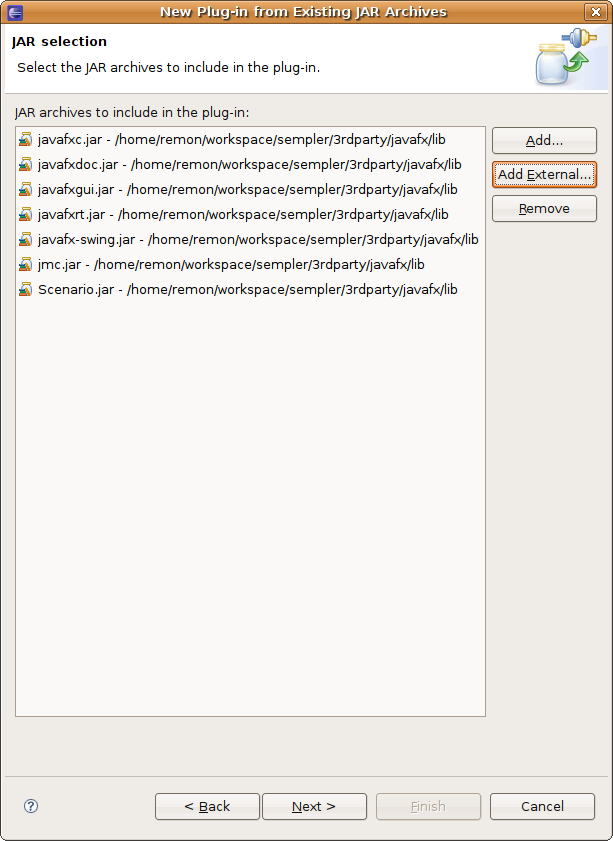
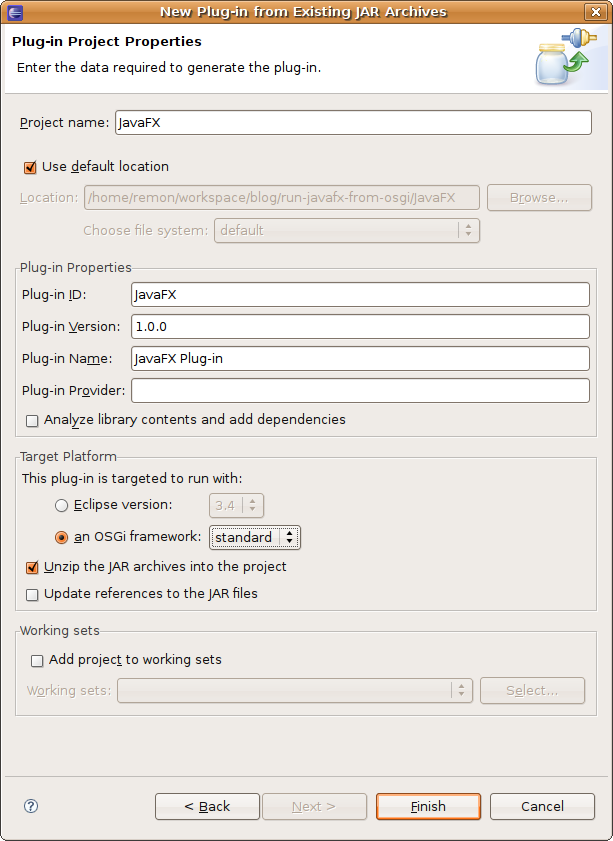
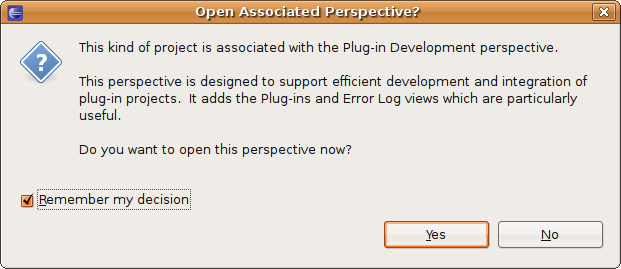
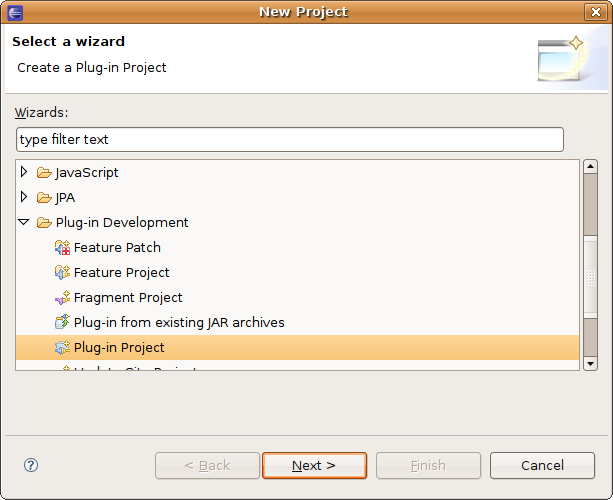
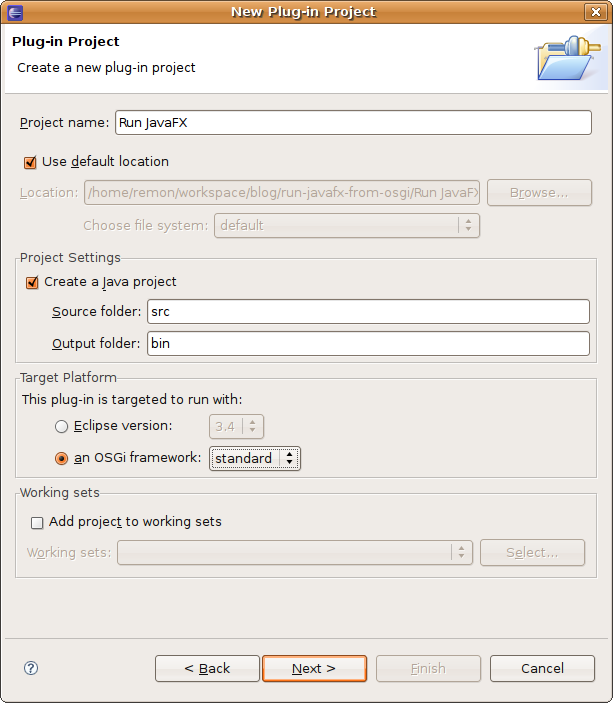
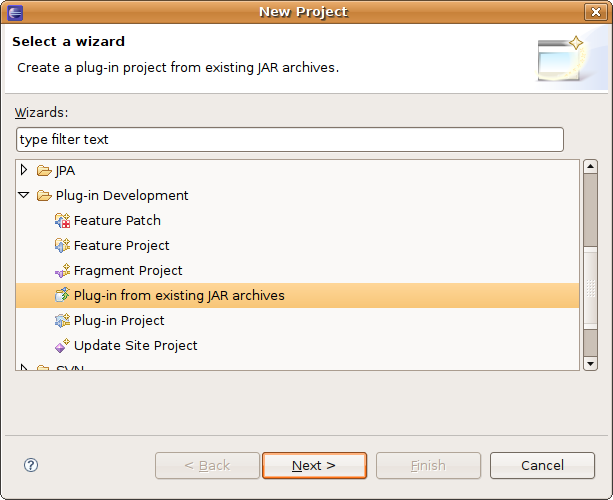
Then, in Eclipse, select File|New|Project..., so that the New Project wizard appears. In the first step, select from the Plug-in Development category the Plug-in from existing JAR archives, and click Next. In the second step, click the Add External button and add all the jars from the JavaFX distribution’s lib directory. In the third step, enter JavaFX for the Project name, and click an OSGi framework under Target platform. Select standard for the OSGi framework, and click Finish. After a while, the plug-in project appears.


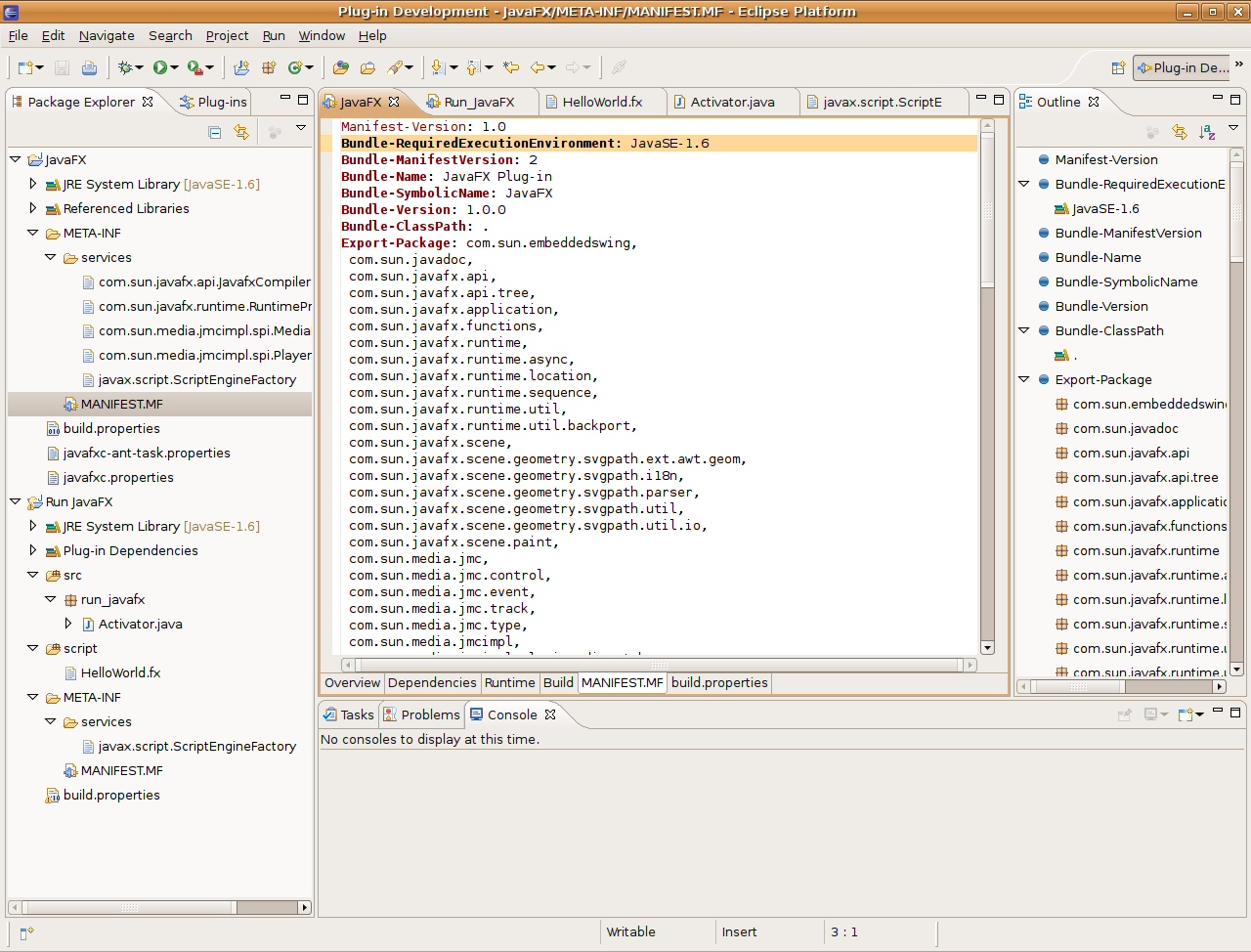
Next, open META-INF/MANIFEST.MF, select the MANIFEST.MF tab, and paste the following line into it:

Bundle-RequiredExecutionEnvironment: JavaSE-1.6

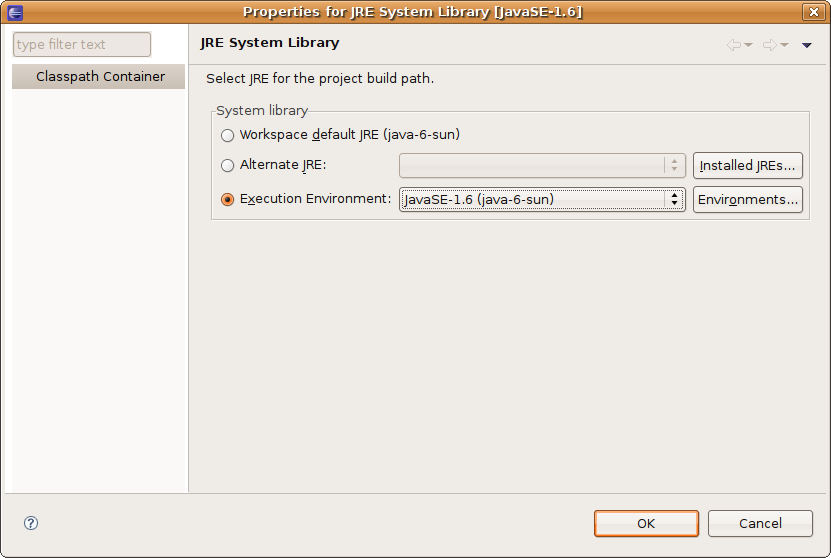
Now right-click on JRE System Library in the Package Explorer, and select Properties. For System library, select Execution environment, and from the combo box next to it, select JavaSE-1.6. Click OK.


Creating an OSGi bundle that will run a JavaFX script

You will now use the bundle you just created by a new bundle, the one running the JavaFX script. Again, select File|New|Project..., but this time, select Plug-in Project from the Plug-in Development category. In the next step, enter Run JavaFX for the Project Name, select the standard OSGi framework as the Target platform (same as above), and click Next. In the next step, just click Finish to create the project.


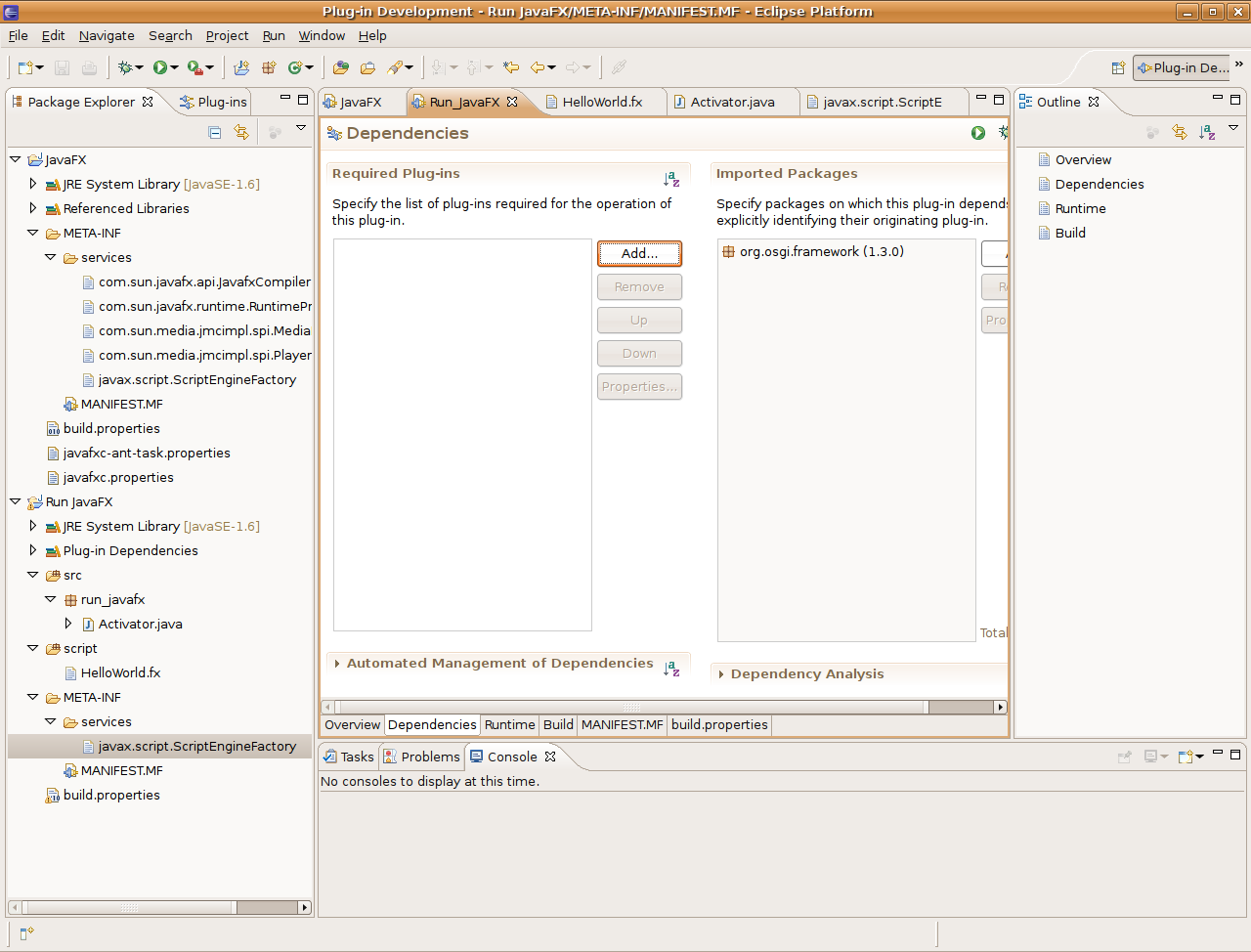
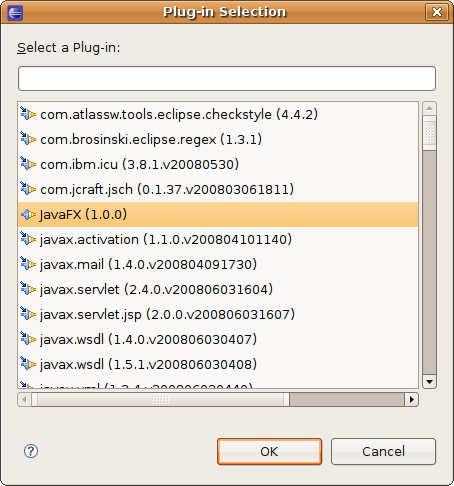
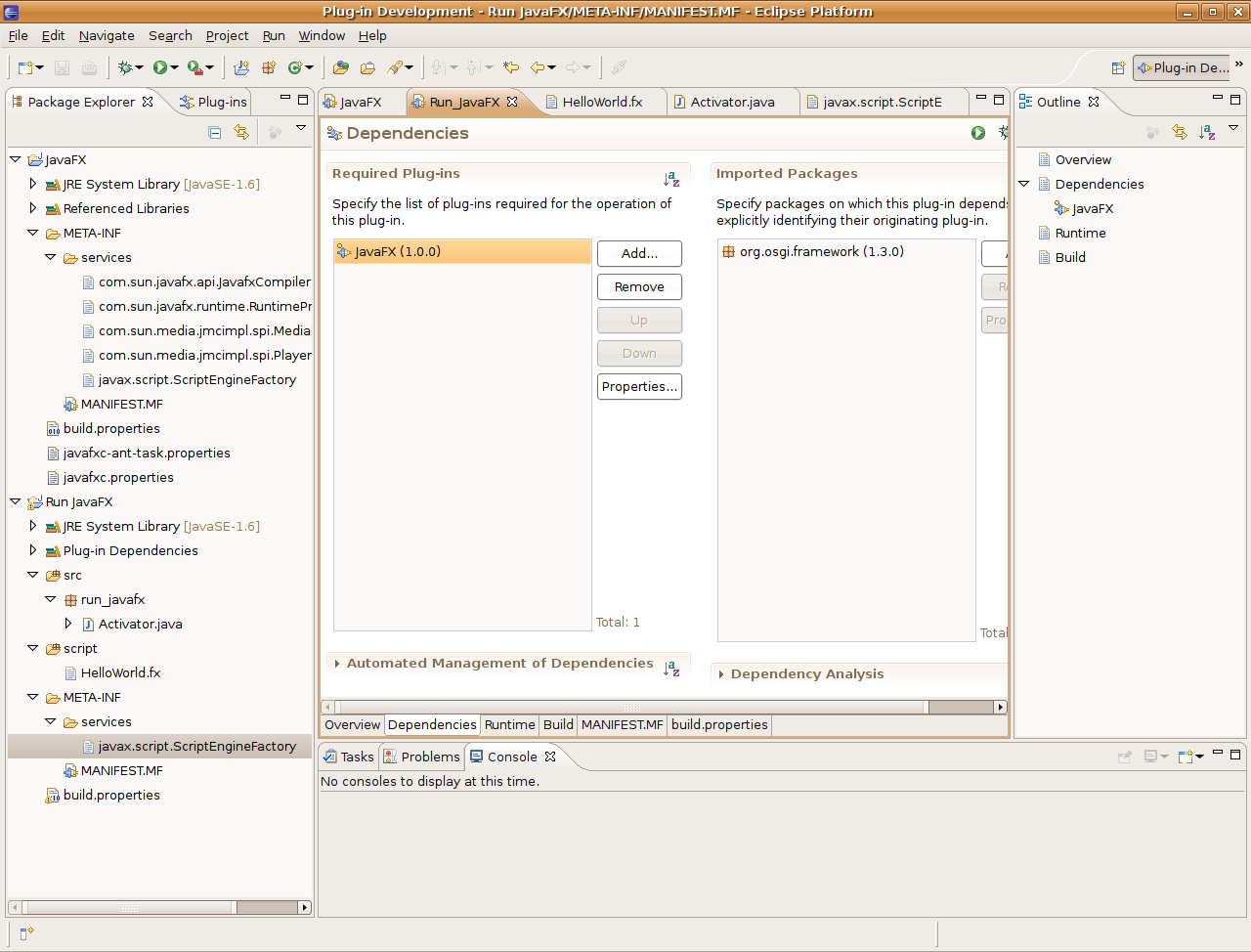
In the Manifest Editor, select the Dependencies tab. Click the Add button under Required Plug-ins, select JavaFX (1.0.0) from the list, and click the Save button in the toolbar.


Creating the JavaFX script

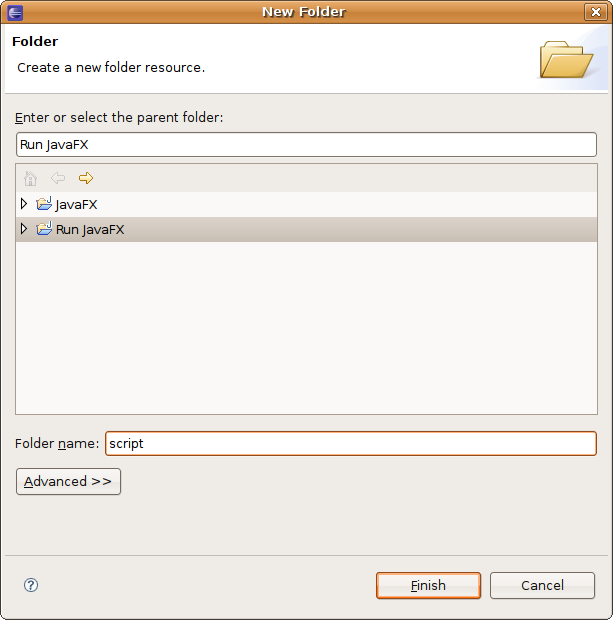
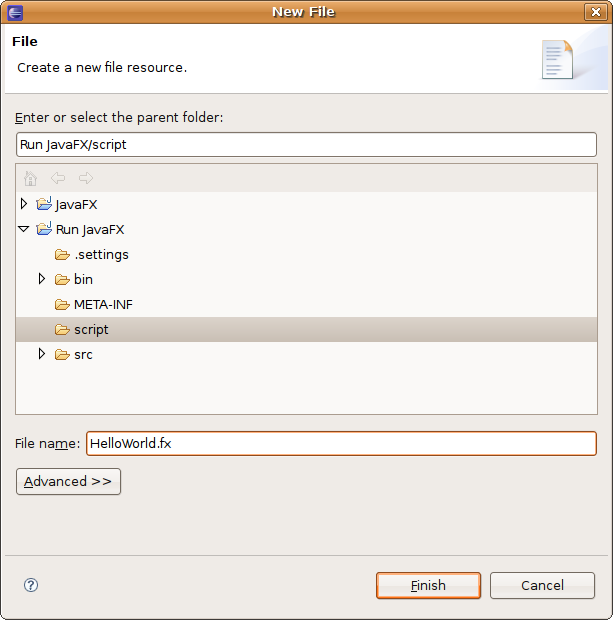
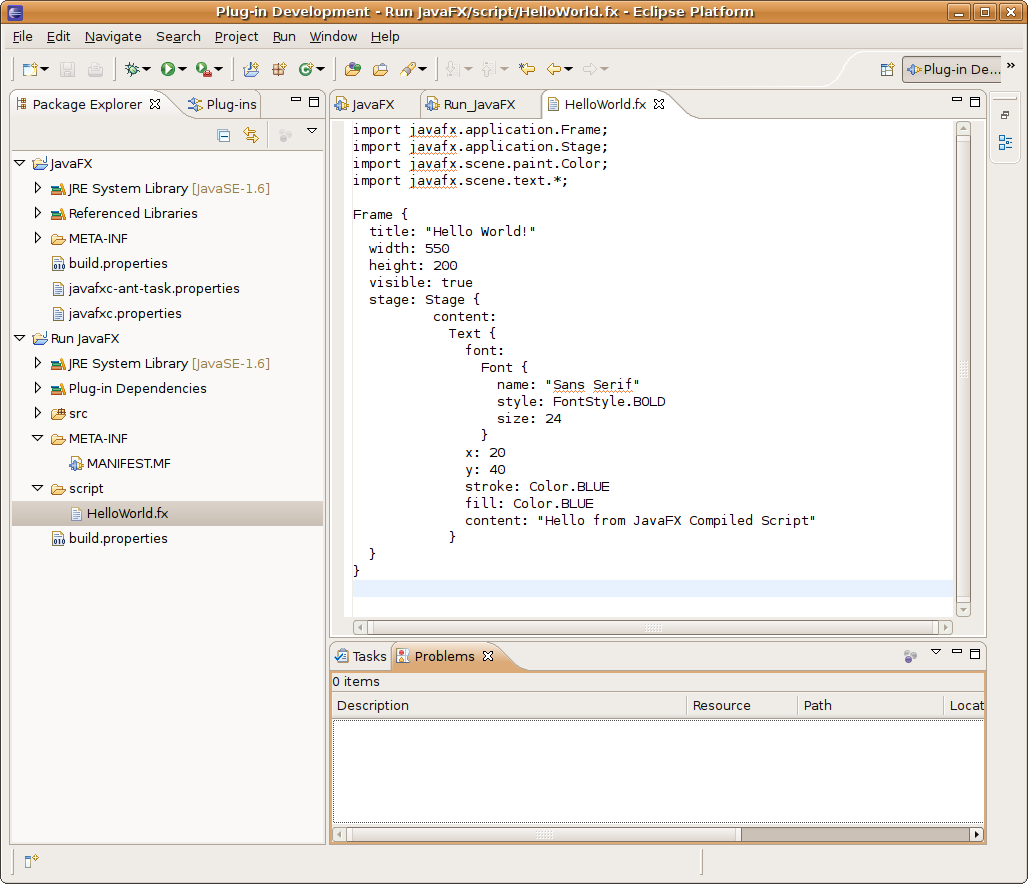
Create a new directory named script, and create a new file named HelloWorld.fx in it. Paste the following code into it:

import javafx.application.Frame;
import javafx.application.Stage;
import javafx.scene.paint.Color;
import javafx.scene.text.*;

Frame {
  title: "Hello World!"
  width: 550
  height: 200
  visible: true
  stage: Stage {
    content: Text {
      font: Font {
        name: "Sans Serif"
        style: FontStyle.BOLD
        size: 24
      }
      x: 20
      y: 40
      stroke: Color.BLUE
      fill: Color.BLUE
      content: "Hello from JavaFX Compiled Script"
    }
  }
}


Next, right-click the script directory, and select Build path|Use as Source Folder.

Running the script

To actually run the JavaFX script, we will use JSR-223: Scripting for the Java Platform. [That’s why I made you select JavaSE-1.6 as the bundle execution environment.]

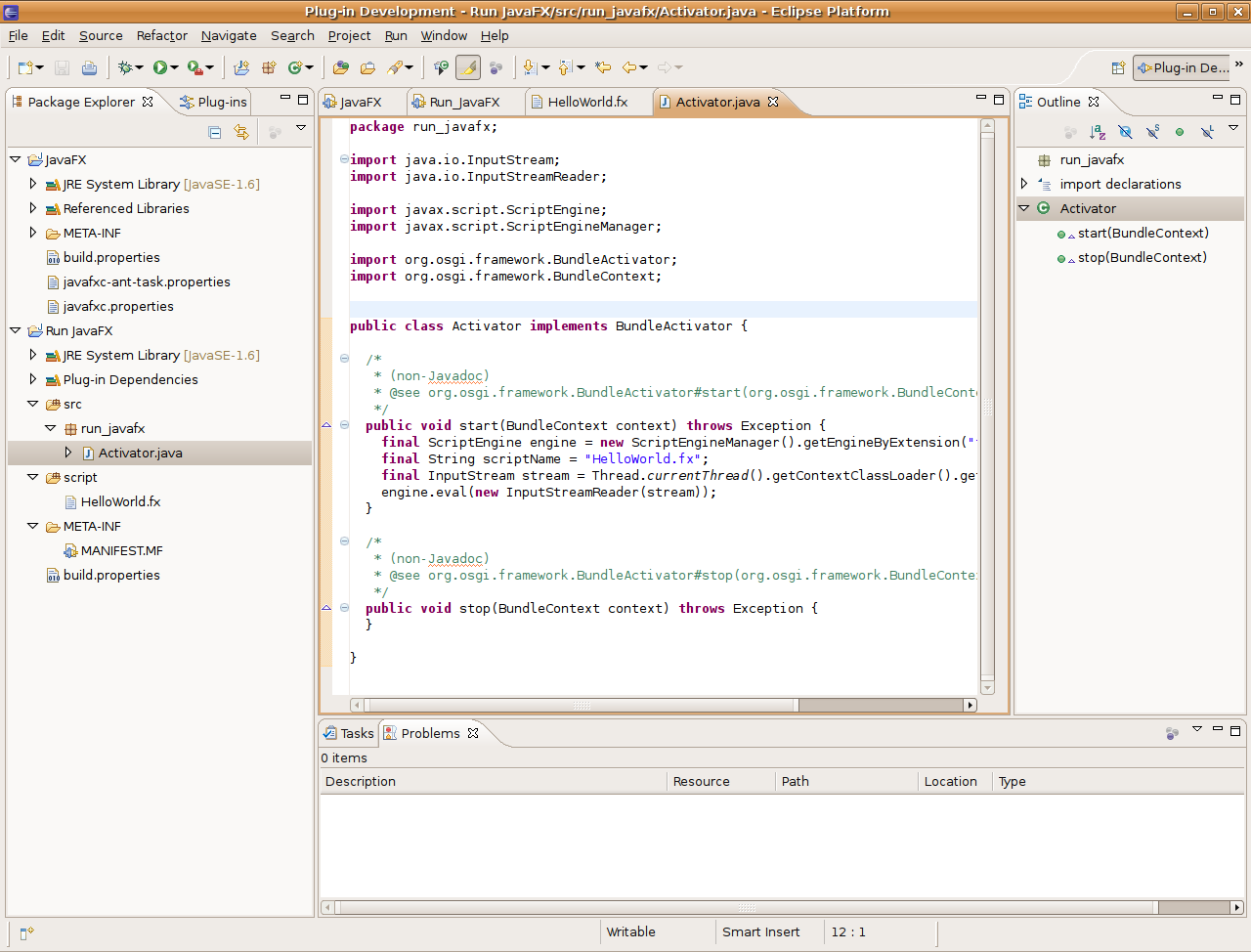
In the Run JavaFX project, open the src directory, the run_javafx package, and then the Activator class. [A bundle’s activator allows you to do stuff when your bundle starts or stops.] In the start() method, add the following code:

final ScriptEngine engine = new ScriptEngineManager()
    .getEngineByExtension("fx");
final String scriptName = "HelloWorld.fx";
final InputStream stream = Thread.currentThread()
    .getContextClassLoader()
    .getResourceAsStream(scriptName);
engine.eval(new InputStreamReader(stream));

Use Eclipse’s Quick Fix to add the required import statements for ScriptEngine, ScriptEngineManager, InputStream, and InputStreamReader.

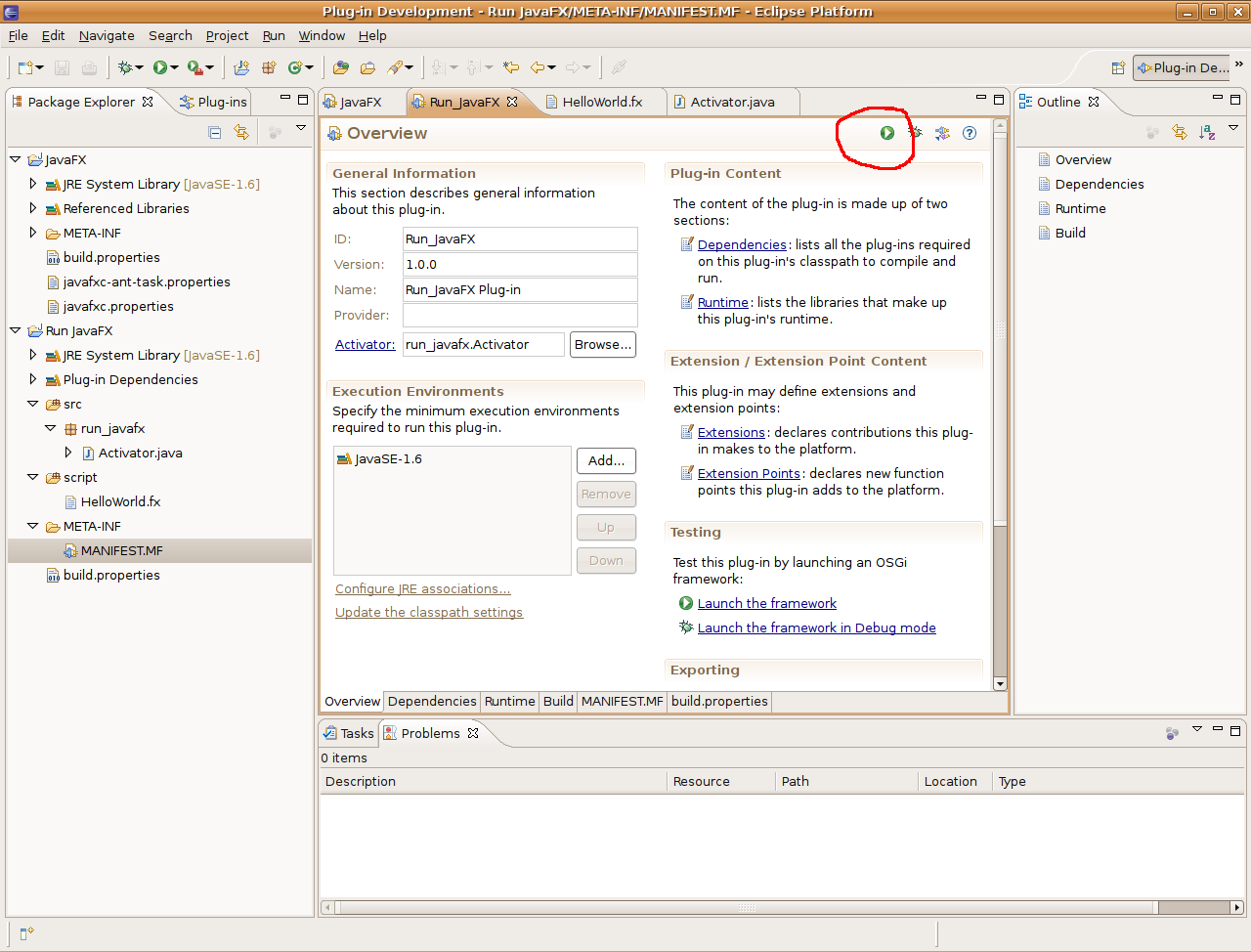
To run the bundle from Eclipse, select the MANIFEST.MF file, select the Overview tab, and click the Run button at the top.

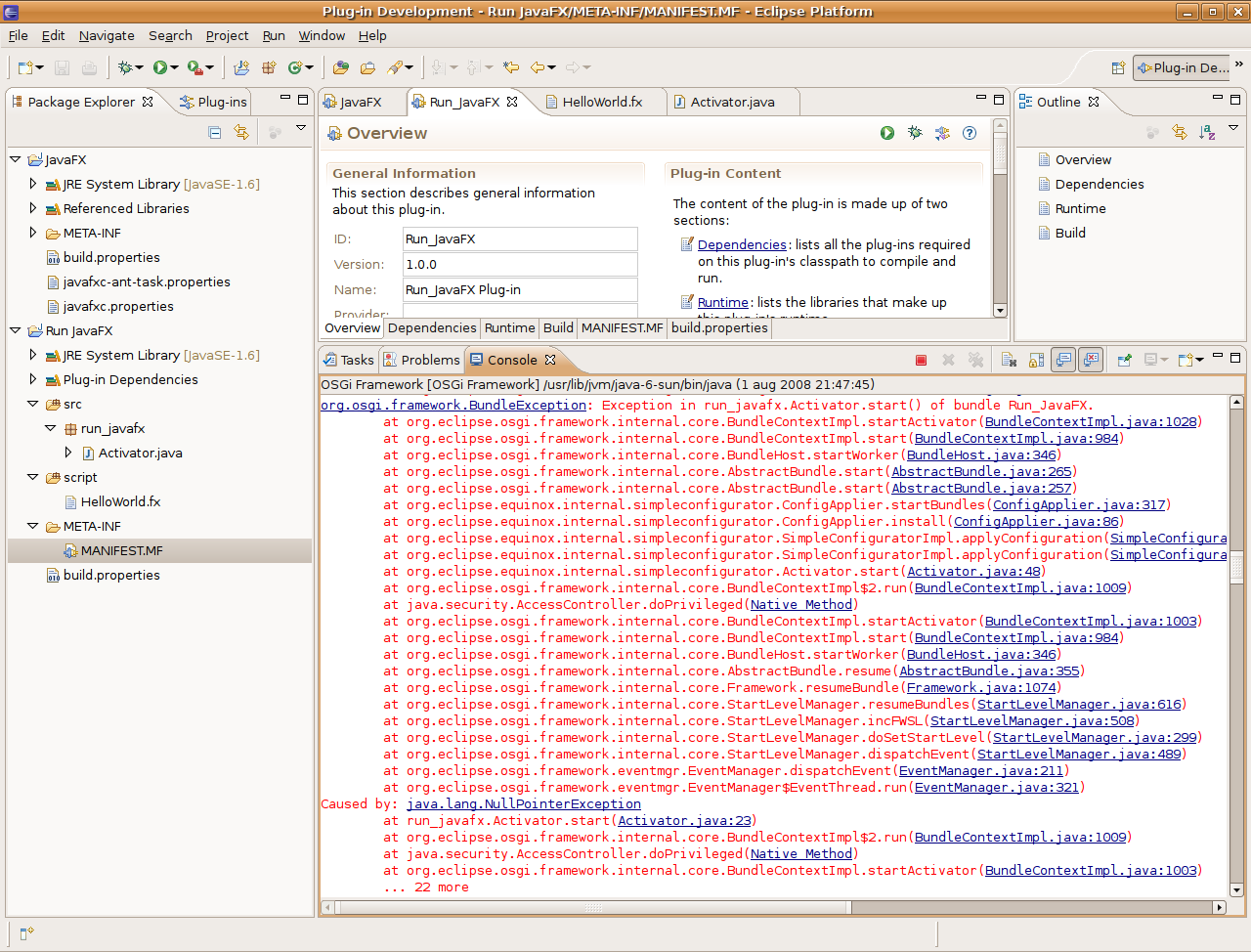
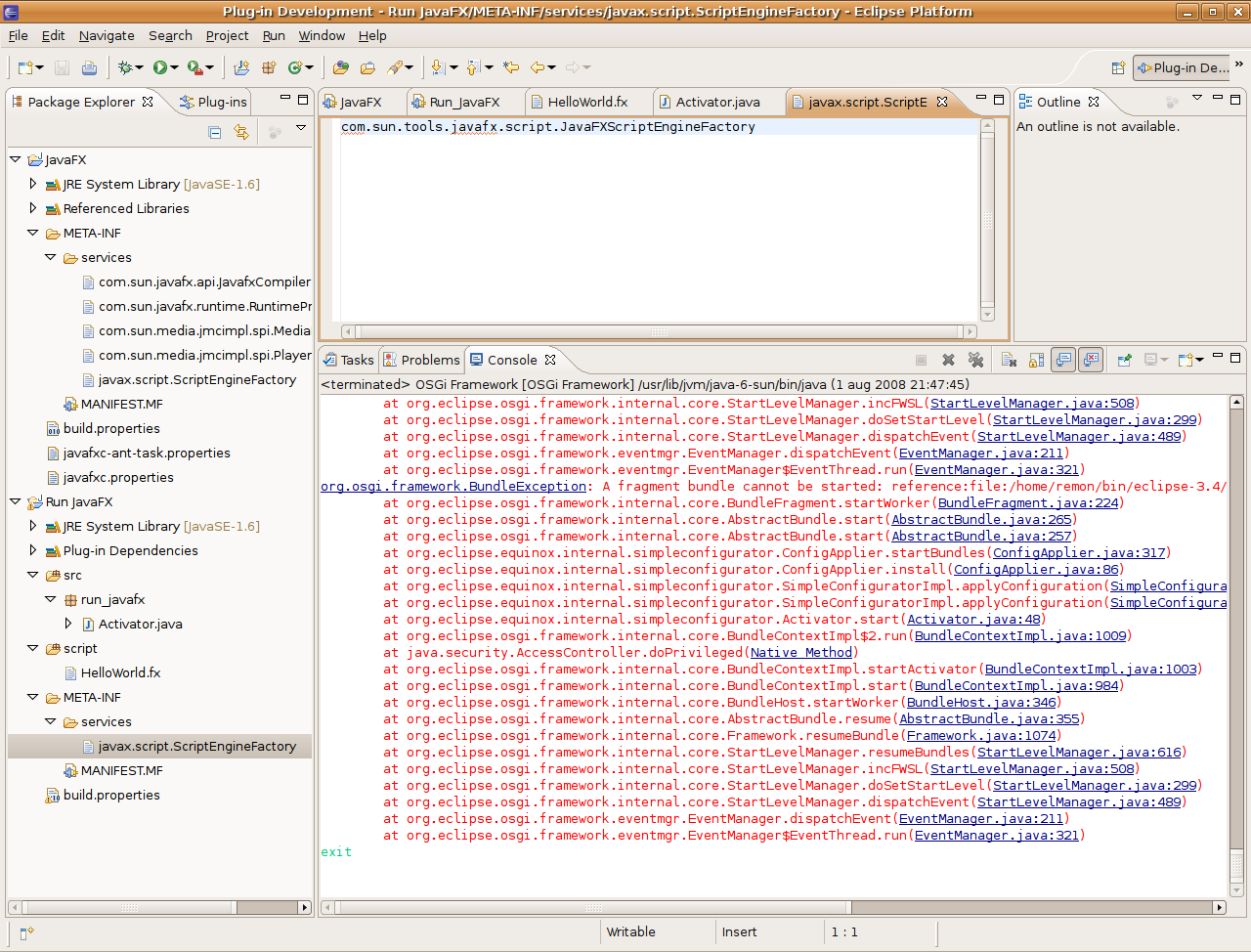
In the Console, you will see the osgi> prompt, followed by a lot of error output. If you scroll through the output, you will see

org.osgi.framework.BundleException: Exception in
    run_javafx.Activator.start() of bundle Run_JavaFX.
[...]
Caused by: java.lang.NullPointerException
	at run_javafx.Activator.start(Activator.java:24)
[...]

Type exit + Enter in the Console to shut down the plug-in.

Finding the script engine

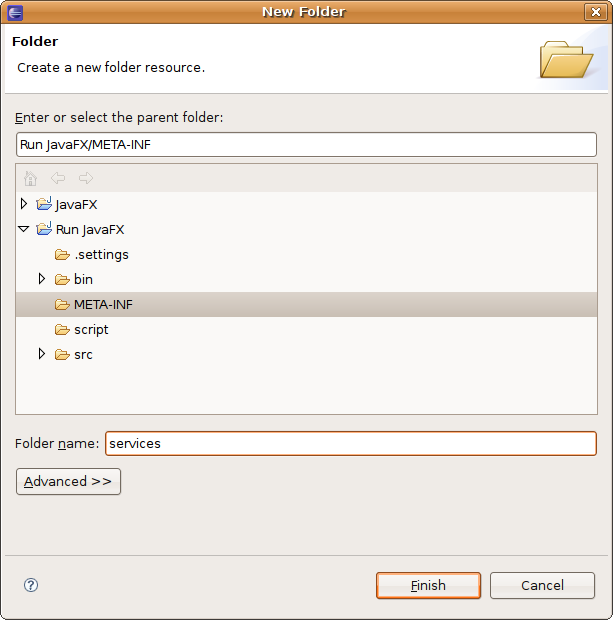
The NullPointerException comes from the ScriptEngine for JavaFX that could not be found. We can fix this as follows: create a new folder named services under META-INF, and copy the javax.script.ScriptEngineFactory file from the JavaFX project to it. See the Service Provider section in the Jar File Specification for an explanation.


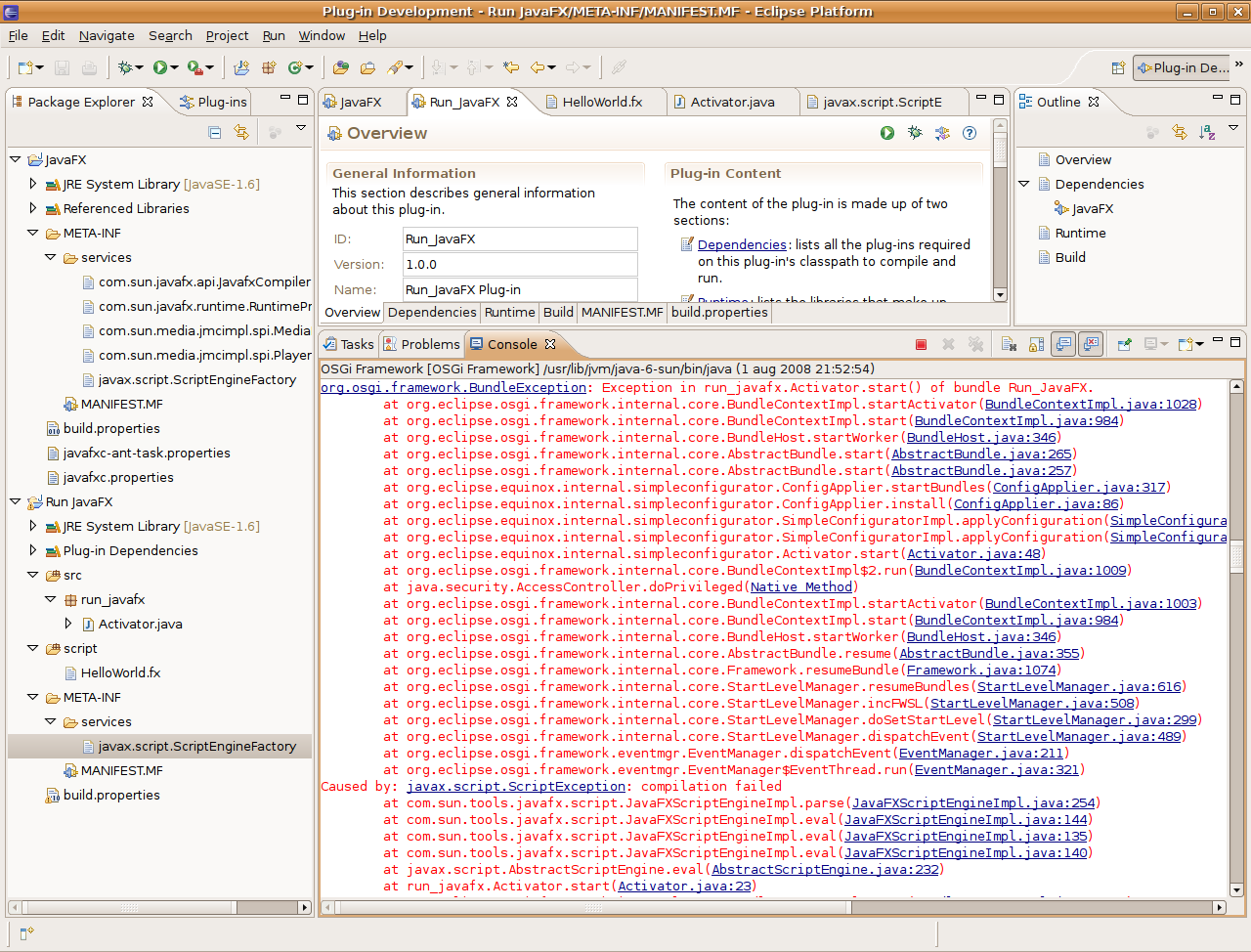
Now when you run the plug-in, you will get

org.osgi.framework.BundleException: Exception in
    run_javafx.Activator.start() of bundle Run_JavaFX.
[...]
Caused by: javax.script.ScriptException: compilation failed
	at com.sun.tools.javafx.script.JavaFXScriptEngineImpl.parse(JavaFXScriptEngineImpl.java:254)
	at com.sun.tools.javafx.script.JavaFXScriptEngineImpl.eval(JavaFXScriptEngineImpl.java:144)
	at com.sun.tools.javafx.script.JavaFXScriptEngineImpl.eval(JavaFXScriptEngineImpl.java:135)
	at com.sun.tools.javafx.script.JavaFXScriptEngineImpl.eval(JavaFXScriptEngineImpl.java:140)
	at javax.script.AbstractScriptEngine.eval(AbstractScriptEngine.java:232)
	at run_javafx.Activator.start(Activator.java:24)
[...]

There is nothing wrong with the JavaFX script, though. You can test this yourself by running the command line tools (javafxc and javafx) against it.

Fixing the class path

The problem is in the JavaFXScriptEngineImpl class. It passes the class path to the JavaFXScriptCompiler. But this class path is not the actual class path that is used by the class loader, it is taken from the java.class.path system property. You can override this by either setting the com.sun.tools.javafx.script.classpath system property, or by setting the classpath attribute on the ScriptContext.

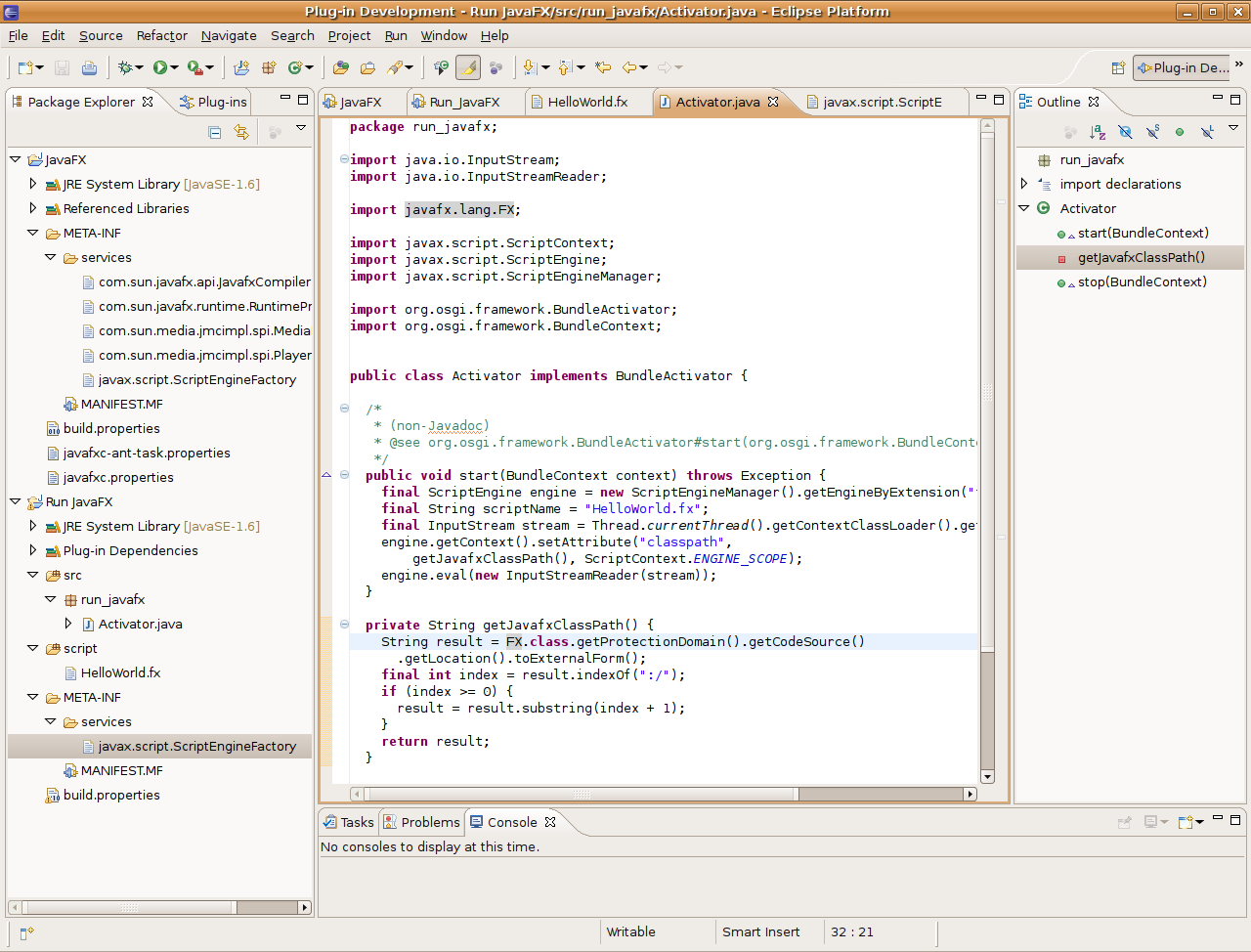
I will take that last approach. Just before the engine.eval(...) line, add the following:

engine.getContext().setAttribute("classpath", 
    getJavafxClassPath(), ScriptContext.ENGINE_SCOPE);

Implementing the getJavafxClassPath() method is a bit tricky:

private String getJavafxClassPath() {
  String result = FX.class.getProtectionDomain()
      .getCodeSource().getLocation().toExternalForm();
  final int index = result.indexOf(":/");
  if (index >= 0) {
    result = result.substring(index + 1);
  }
  return result;
}

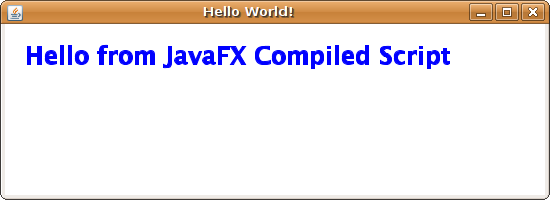
Now finally, when you run the plug-in, it will show the Hello world window:

System dependencies

I’m so happy to be developing in Java. It takes away the drudgery of software development, like memory management. And it frees you of worrying about how certain features are implemented on different platforms: Write Once, Run Anywhere!

You do feel the but coming, don’t you? 😉

Well, sometimes I do run into system dependencies. And since I’m no longer used to it, I don’t expect it anymore. Ah well, this happens only once in a very, very little while. Let me tell you about one such event.

I described in my previous post how I used reflection to extract common code into a base class. I used Class.getMethods(), for which the JavaDoc reads:

public Method[] getMethods() throws SecurityException

Returns an array containing Method objects reflecting all the public member methods of the class or interface represented by this Class object, including those declared by the class or interface and those inherited from superclasses and superinterfaces. Array classes return all the (public) member methods inherited from the Object class. The elements in the array returned are not sorted and are not in any particular order. This method returns an array of length 0 if this Class object represents a class or interface that has no public member methods, or if this Class object represents a primitive type or void.

The interesting part is in italic. This is one of those sentences that you can easily overlook. I know I did.

What does it mean? Nothing more than that the order is undefined in the spec, and so depends on the system (in this case the particular JVM implementation) that you use. We use both Windows and GNU/Linux to test our stuff, but on both we have a Sun JVM. I guess most people will use this one too, since it’s from the makers of Java and it’s free (as in beer and now also as in speech).

But not IBM. For their AIX platform, they have built a custom JVM. And you guessed right: that JVM uses a different order for the methods in the array. Whereas the Sun implementation always gives you methods from the class, then those from it’s base class, etc. the IBM implementation uses the exact reverse order. My code subtly depended on that order, and so it failed on AIX.

BTW, if you want to find out more about which JVM implementation you are using, just issue java -version. This is from my machine at home:

java version "1.6.0_06"
Java(TM) SE Runtime Environment (build 1.6.0_06-b02)
Java HotSpot(TM) Server VM (build 10.0-b22, mixed mode)

The HotSpot part is what gives away that it’s from Sun. This is from our AIX box:

java version "1.5.0"
Java(TM) 2 Runtime Environment, Standard Edition (build
    pap64dev-20080315 (SR7))
IBM J9 VM (build 2.3, J2RE 1.5.0 IBM J9 2.3 AIX
    ppc64-64 j9vmap6423-20080315 (JIT enabled)
J9VM - 20080314_17962_BHdSMr
JIT  - 20080130_0718ifx2_r8
GC   - 200802_08
JCL  - 20080314

Big Refactoring: Separate Domain from Presentation

In his landmark book Refactoring: Improving the Design of Existing Code, Marting Fowler not only presents a catalog of “regular” refactorings, he also mentions some “big” refactorings. These big refactorings are not described as a series of atomic steps to follow, but more as a recipe for using a longer series of regular refactorings. And since they are bigger than regular refactorings, they also take a lot longer to complete, sometimes even months.

I’m in the middle of one of these: Separate Domain from Presentation. Now, we all know that we shouldn’t put business logic in interface code, so why do I find myself in this situation?

Well, technically, I don’t 😉 We use Struts, which has a nice MVC architecture. However, it’s the Controller part that has me worried. In Struts, one writes Action classes to control application flow:

“The goal of an Action class is to process a request, via its execute() method, and return an ActionForward object that identifies where control should be forwarded (e.g. a JSP, Tile definition, Velocity template, or another Action) to provide the appropriate response.”

It is, however, all too convenient to implement the business logic in Action classes as well. The Struts documentation even warns about this danger:

“Perform the processing required to deal with this request (such as saving a row into a database). This can be done by logic code embedded within the Action class itself, but should generally be performed by calling an appropriate method of a business logic bean.”

And that’s exactly what’s happened in our code. So I guess I’m actually in the middle of Separate Domain from Controller 😉

Fixing this is not a trivial task. The Action classes use ActionForm classes that hold data entered in the UI to perform their work. This ties them to Struts, which I don’t like at all. For instance, it makes it very hard for us to switch to a different web framework, should we so choose. It also means that simple solutions like Extract Method won’t work, since the extracted method would get the ActionForm as a parameter.

My solution has been to introduce what I call Service classes. A Service class has one method that implements the service that the Action provides. The method has one parameter, which is a Parameter Object, that contains the same information as the Action‘s ActionForm does. I call them Service classes, since these classes could very well be used to implement web services as well.

Anyway, all the Action class has to do now, is:

  1. instantiate the appropriate Parameter Object
  2. populate it from the ActionForm
  3. instantiate the appropriate Service class
  4. call the appropriate method on the Service class (passing the Parameter Object)
  5. update the ActionForm from the method’s result object
  6. construct an ActionForward (possibly using information from the result object)

Luckily, I could automate all of that in a base class using reflection, so that each Action class now only needs two methods: one for instantiating the Parameter Object, and one for instantiating the Service class.

Still, that leaves a lot of Actions to convert. And to make matters worse, they are organized into class hierarchies, which makes it hard to convert them one by one. So I guess I won’t be sitting idle any time soon…

Log Files to the Rescue

Yesterday I got an email from a client describing a really, really weird situation that had occurred with our product. Of course, they couldn’t provide a way to reproduce the problem. Fortunately, there were only two users on the system at the time (it was in their integration testing environment), so they could tell what each of them was doing.

One person’s actions I could dismiss pretty quickly as the cause of the problem, so it must have been what the other did. However, her actions also seemed unlikely to have caused the problem. I started exercising the system in ways related to her actions, in hope of reproducing the problem. No luck whatsoever.

So I stepped back a little and started reasoning from the code. What could possibly have caused this? I came up with a scenario, tried it, and sure enough, there it was. But the problem was that my actions in no way resembled the description of the client’s actions. And on top of that, my actions seemed rather bizarre. Why would anyone want to do this?

I know debugging isn’t always an exact science, but my hypothesis was in real need of some testing.

Enter log files. Our product is a web application running in Apache Tomcat, for which it’s pretty easy to enable logging. Tomcat’s access log follows the Common Logfile Format, which looks like this (all on one line):

127.0.0.1 8080 - - [27/Jun/2008:08:41:49 +0200] 
"GET /docato-composer/getLoginDialog.do HTTP/1.1" 200 3132

Each HTTP request is logged on a single line, with the IP address of the client first, then some identity information (missing in the example), the time, the kind of request (GET), the URL, the protocol (HTTP/1.1), the result status code, and the result size. (Tools like Webalizer can parse such log files easily to provide statistics for web sites.)

I got the access log from our client, and put on my CSI hat. For each of the steps in my scenario, I looked up the associated URL and searched for it in the log. And yes, bizarre as it may have appeared to me, they were all there: conveniently one after the other, from the same IP address and just before the time the client noticed the problem. Case closed.

The morale of this story is that log files are a Good Idea™. Without them I might have dismissed my scenario as too unlikely, and have spent valuable time chasing alternative hypotheses. Also, while browsing the log files, I stumbled upon two other problems that the client didn’t even report. I fixed these as a bonus 😀