The Registry Pattern

eXtreme Programming Markup Language (XPML) uses several XML documents that are interrelated. For example, releases refer to iterations, which refer to user stories, which might refer to use cases. These objects are referenced by name in the XML documents, and any code that deals with them needs to translate these names into real object references.

This is the situation that the Registry Pattern describes:

Objects need to contact another object, knowing only the object’s name or the name of the service it provides, but not how to contact it. Provide a service that takes the name of an object, service or role and returns a remote proxy that encapsulates the knowledge of how to contact the named object.

It’s the same basic publish/find model that forms the basis of a Service Oriented Architecture (SOA) and for the services layer in OSGi.

In XP Studio, the named objects of interest are the planning objects, e.g. releases, iterations, and such:

public interface PlanningObject {

  /**
   * @return The object's name
   */
  String getName();

  /**
   * Set the object's name.
   * @param name The name to set
   */
  void setName(String name);

  // ...
}

Any code that needs to reference such a planning object, can use the registry:

public class Registry {

  private static Registry instance;

  private final Map registry = new HashMap();

  public static synchronized Registry getInstance() {
    if (instance == null) {
      instance = new Registry();
    }
    return instance;
  }

  public synchronized Reference getReference(
      final String name) {
    final Reference result;
    if (isRegistered(name)) {
      result = registry.get(name);
    } else {
      result = new Reference(name);
      registry.put(name, result);
    }
    return result;
  }

  private boolean isRegistered(final String name) {
    return registry.containsKey(name);
  }

  public synchronized void register(
      final PlanningObject object) {
    final Reference reference = getReference(
        object.getName());
    if (!reference.hasObject() 
        || reference.getObject() != object) {
      reference.setObject(object);
    }
  }

  public synchronized void unregister(
      final PlanningObject object) {
    if (isRegistered(object.getName())) {
      final Reference reference = getReference(
          object.getName());
      if (reference.hasObject()) {
        reference.setObject(null);
      }
    }
  }

}

Note that the actual code uses Java5 generics, but WordPress’ source code formatter can’t handle that.

The planning objects use the registry to register themselves:

public class PlanningObjectImpl 
    implements PlanningObject {

  private String name = "";

  public PlanningObjectImpl(final String name) {
    setName(name);
  }

  public String getName() {
    return name;
  }

  public final void setName(final String name) {
    if (!this.name.equals(name)) {
      Registry.getInstance().unregister(this);
      this.name = name;
      Registry.getInstance().register(this);
    }
  }

  // ...
}

Now any client code can get references to the planning objects:

public class Reference {

  private PlanningObject object;
  private final String name;

  public Reference(final String name) {
    this.name = name;
  }

  public String getName() {
    return name;
  }

  public boolean hasObject() {
    return object != null;
  }

  public PlanningObject getObject() {
    return object;
  }

  public void setObject(final PlanningObject object) {
    this.object = object;
  }

}

One example of using references is with user stories, which may depend on other user stories:

public class UserStoryImpl extends PlanningObjectImpl 
    implements UserStory {

  private final Set dependsOn = new HashSet();

  public UserStoryImpl(final String name) {
    super(name);
  }

  public void addDependsOn(final String userStoryName) {
    dependsOn.add(Registry.getInstance().getReference(
        userStoryName));
  }

  public Set getDependsOn() {
    final Set result = new HashSet();
    for (final Reference reference : dependsOn) {
      if (reference.hasObject()) {
        result.add((UserStory) reference.getObject());
      }
    }
    return result;
  }

  // ...

}

That’s the basic registry pattern implementation.

The actual code in XP Studio employs some enhancements. One of them is the use of namespaces so that objects in different projects can use the same name.

Another neat trick is to override the equals() method of both PlanningObjectImpl and Reference to make sure that references and the objects they refer to are regarded as the same, which can greatly simplify some code.
The Art of Pair Programming

Pair programming (PP) is one of the eXtreme Programming (XP) practices. When doing pair programming, two programmers share a mouse and keyboard while they write code. One of the two, the driver, types, while the other, the navigator, reviews the code, and thinks ahead. The two persons switch roles often. This is another example of XP ‘turning the knobs to 10’: if reviewing code is good, then we should do it all the time.

There is a good post on PP by Rod Hilton. He starts out with

When I first heard I’d be pairing at the new job, I was a bit apprehensive and skeptical.

I can relate to that. At a former company I worked for, I introduced XP. I had just read XP Explained: Embrace Change and thought it could improve our software development process. But pair programming was the one practice I was apprehensive about. The thought of someone watching over your shoulder all day made me feel uneasy. Yet the book made it clear that PP is a foundational practice, so I tried to keep an open mind.

I shouldn’t have worried. Rod explains that PP has nothing to do with “looking over a shoulder”:

The way pair programming works in practice is quite a bit different than I imagined it. […] When doing Test-Driven Development, one of the things we do is called “ping-pong pairing”. So the other developer will write a test, then make it compile but fail. Then he passes the keyboard to me. I implement the feature just enough to make the test pass, then I write another failing test and pass it back.

I didn’t know about ping-pong pairing when we started out doing XP. In fact, Rod’s post introduced it to me. It seems like a really good technique, and I’d love to try it out.

Also, the “all day” part is a misconception:

In reality, you don’t sit down at a desk with another person and work all day with them. You pair up for tasks. […] When the task is done and code is checked in, the pair breaks up. Generally tasks only have 2 hour estimates (sometimes less) so you’re only pairing for the two hours. Then you pair up with someone else to work on another task. […] We take breaks often because getting away from the code for a few minutes helps keep a fresh perspective when you come back to the task.

When I did XP, we paired up for about three hours at a time. We all came in on different times, so PP time generally started at about 9:30 AM, and lasted till lunch. Then we’d switch pairs. Since some of us started early, they also left early (Sustainable Pace), so there was another session of about three hours in the afternoon.

Pairing for about six hours a day is really enough. PP is pretty intense! There is no chance to let your mind wander off a bit, to look out of the window for more than a couple of seconds or to read e-mail. You have to stay focused all the time.

Advantages

So why bother at all with PP? Rod explains:

I see pairing work so well every day that I consider my career prior to my current job to have consisted mostly of wasting time. […] When you have a second person working with you, you find that you try harder to code well. You’re far, far less likely to be willing to apply duct tape to a problem, because someone else is working with you and he or she is more likely to object to the duct tape.

We all know the feeling, I guess. You know that you’re taking a shortcut, that there is a better way. But that would take more effort. When you’re pairing, your partner “keeps you honest”. You don’t want to look like a slouch, so you don’t even consider the shortcut.

This makes a big difference. In fact, while I consider myself a pretty good programmer, I must admit that the code I wrote when pairing was of considerable higher quality than the code written solo. And that is true even when pairing with someone that I knew for sure was a lesser programmer than me!

The “keeping you honest” thingie is one reason for this. “Two brains think of more than one” is another. The interplay between the driver and navigator is a subtle one. When you, as a driver, see the navigator’s eyes go blank, you know you’re code is not as clear as it could be. And you fix it. You either stop to explain, at which point the navigator will likely suggest an improvement (like a better name for a class to better express its purpose), or you switch roles and let the navigator write better code.

Disadvantages

So why isn’t everybody pairing? What’s the catch?

Well, there are downsides. Rod mentions one:

Hygiene can be a serious problem. If one person smells, it’s rough to sit with them. I find myself going back to my desk often and the code suffers for it. If you’re pairing, take a shower, and hold your farts for your next bathroom trip. Just do it, you filthy pig.

I haven’t dealt with this problem much. One guy I paired with was a smoker, so whenever he came back from a smoke outside, I’d smell the smoke. I didn’t like it, but so what. We all have our faults. Pair programming is a partnership, and like in any partnership, you need to give and take a bit 😉 PP takes some time to get good at, but the basics skills should have been acquired at Kindergarten.

Rod also mentions productivity:

there’s no denying that you’re producing fewer lines of code per day since only half your team is coding at any one point. I don’t consider that a bad thing, though (if you have two solutions that equally solve a problem, the solution with fewer lines of code is the superior one) because the QUALITY of the code that IS produced is so, so, so much higher.

This is an important point to stress. Pair programming seems wasteful, but it’s really not. The limiting factor when programming is not the speed with which you type, but the number of bugs you don’t introduce. There hasn’t been much scientific research into this, but there is one nice experiment by Alistair Cockburn and Laurie Williams that finds that PP takes 15% more time, but produces 15% less bugs, while yielding a significantly simpler design. My experiences confirm this.

The long term benefits of these advantages cannot be overestimated. Each bug takes away future coding time, since it needs to be fixed. And more complex designs slow you down as well, because it requires more time to understand the code you’re working on, and increases the chances of introducing bugs because of misunderstandings.

Of course, there will always be nay-sayers. Most of them haven’t actually tried PP, because “that could never work”. Well, if you don’t want to learn, then don’t, but don’t bother me. If you did give PP a try and failed to get good results, I must press you to check whether you did PP properly. If you think you did and still didn’t like PP, then please leave a comment explaining why.

“Refactoring is a law of nature”

Ron Jeffries, one of the three founders of eXtreme Programming, and one of original signatories of the Agile Manifesto states:

We must evolve the infrastructure. It’s not a rule, it’s worse. It’s essentially a law of nature.

Please read his whole excellent post to understand why. And then, if you haven’t already, read Martin Fowler‘s book Refactoring and start applying it.

Introducing XP Studio

At my organization, we use a lot of the tricks from the Agile toolbox, like unit tests (although most of us are not doing TDD), refactoring, continuous integration, collective code ownership. We also write black box tests using Selenium and HtmlUnit, but since the developers think them up and implement them, not the customers, we can’t really call them acceptance tests.

If you look at this list, you probably notice that these are all technical practices. What has been lacking so far are the more management oriented ones. But my team has now embarked on a journey to incorporate some of those.

We’re using user stories to define functionality, and deliver them in iterations. Since we’re building a product, not doing a project, our product manager plays the customer role.

The planning game wasn’t easy, since it was all so new for us. But the first iteration delivered all planned stories, the first ever deadline that the team made! Although it is far too early to declare victory, the start is promising indeed.

We do face some challenges, however. Our customer is in Kentucky, USA, while the development team is in The Netherlands. Also, I work from home about half of the time. So we’re definitely not a co-located team. This means we have to invest more in communication. We use e-mail, instant messaging and conference calls to stay in touch.

The distributed nature of our team makes capturing user stories on index cards difficult. Since we’re pretty XML focused (our department is the R&D department for XML in our company), we decided to capture the stories in XML instead and store them in our source source repository.

I know that many in the Agile community don’t like this formalization (Individuals and interactions over processes and tools), but it does have advantages. The biggest one in my book, after making distributed development possible, is that it opens up a whole lot of possibilities for automation. Remember Ubiquitous Automation?

This was the stimulus I needed to breathe some new life in one of those open source projects I participated in, but neglected lately: XP Studio. Check it out and let me know what you think.

Planning poker

We had some fun today with planning poker. Wikipedia defines it as

… a consensus-based estimation technique for estimating, mostly used to estimate effort or relative size of tasks in software development. It is a variation of the Wideband Delphi method. It is most commonly used in agile software development, in particular the Extreme Programming methodology.

Our process was a little different than standard: we worked on defining the stories on our Wiki in the days leading up to the planning poker game, so that we didn’t have many discussions prior to estimating each feature. But we did have some very good discussions when we saw big deviations in people’s estimates.

Sometimes people assumed that stuff was included in the story that was actually in a different story, leading to much higher estimates. Sometimes people forgot about tasks, leading to lower estimates. But as a team, we think we have come up with some good estimates. We will see how they hold up in real life 😉

To actually play the planning poker game, you’d normally need a deck of cards with values. However, being a distributed team today (I worked from home), we resorted to planningpoker.com. It’s really simple to use and actually fun. Our discussions took place in IM, and although that’s not optimal, it was good enough. So all in all a good experience.

Update: You can also use this site to reach consensus on a story’s risk. For that, agree on a mapping between the planning poker cards and the allowed values for risk. For instance, if you assign risk a value of low, medium, or high, you could pick 0=low, 5=medium, 100=high.

JavaFX plugin for Eclipse patched

A while ago I wrote about how the JavaFX Eclipse plugin has some shortcomings. Luckily, the plugin is released under an Open Source license (BSD). Therefore, the source is available, and anyone can fix problems and supply patches.

So I decided to do just that, and checked out the code from the Subversion repository. I followed the steps described in the Wiki to get the project compiled.

The first thing I ran into, is that the default target didn’t exist. That was easy enough to fix.

Next, it bothered me that I needed to provide several properties on the command line. For instance I needed to specify -DeclipseDir=/opt/eclipse every time. So I patched the build to get this location from the environment variable ECLIPSE_HOME which I set in my .profile.

The same goes for the location of the JavaFX SDK. I introduced a JAVAFX_HOME environment variable to store that location. With these three modifications I could finally issue a build with just a simple ant.

With the build working it was time to tackle one of the problems I encountered during my usage of the plug-in. I figured it would be easy to fix the issue where compilation errors use up three lines in the Problems view, so that’s where I started. Based on information in the book Eclipse, Building Commercial-Quality Plug-ins, I knew I had to look for IMarker. There was only one such place in the code, so the problem was easily fixed. Progress at last!

I took a look at the other issues that were reported against the plug-in. There might be easier ones than the ones I experienced 😉 Indeed, someone noticed that the JavaFX perspective missed an icon. At first I couldn’t reproduce it, but that was because I was starting the plug-in from Eclipse. The official distribution did show the problem. Luckily, the bug reporter also found the cause: the icon used wasn’t part of the jar. A simple addition to build.properties fixed that.

Five patches already! I was feeling pretty good about myself 🙂

Next, someone wanted help with import statements. That was a lot trickier, but probably also a lot more valuable. Having looked at the IMarker code before, I naturally wanted to add a marker resolution.

This turned out to be a lot more work than I anticipated, but I managed to get something working. There were some glitches, and it probably needed a lot more testing for corner cases, but I could add a missing import statement based on the class name. Because I felt that this code wasn’t ready for prime time yet, I didn’t supply a patch, though.

This patching frenzy took place during the holidays. I got no response from Sun during that time, but I guess that was to be expected, given the time of year. So I decided to wait until some time into the new year to see what would happen.

Monday January 5 went by without news, but this morning I started to receive a stream of email notifications about issue tracker updates. Several of my patches were being accepted, and then I even received notification that I was given commit access! Such are the wonders of Open Source…

The Art of the Visitor Pattern (3)

In the previous posts in this series I looked at the basic Visitor design pattern and a couple of variations, like eliminating recursion to make the visitor interruptable. As promised, this time I will make our visitor re-entrant.

Here’s what we have so far:

public class BaseFileSystemVisitor 
    implements FileSystemVisitor {

  public FileSystemNode visit(final FileSystemNode node) {
    int numNodesVisited = 0;
    FileSystemNode current = node;

   while (current != null && numNodesVisited < maxNodes) {
      numNodesVisited++;
      stack.push(current);
      if (current.start(this)) {
        current = current.getNext();
      } else {
        current = current.getNextNoChild();
      }
      while (!stack.isEmpty() 
          && !stack.peek().isAncestorOf(current)) {
        stack.pop().stop(this);
      }
    }
    return current;
  }

First of all, note there is a bug in here: when start returns false, the stop method is called anyway! This is because the folder is still on the stack and therefore will be stopped when it is popped from the stack. Given this analysis, the fix is easy:

  public FileSystemNode visit(final FileSystemNode node) {
    int numNodesVisited = 0;
    FileSystemNode current = node;

    while (current != null && numNodesVisited < maxNodes) {
      numNodesVisited++;
      stack.push(current);
      if (current.start(this)) {
        current = current.getNext();
      } else {
        current = current.getNextNoChild();
        stack.pop();
      }
      while (!stack.isEmpty()
          && !stack.peek().isAncestorOf(current)) {
        stack.pop().stop(this);
      }
    }
    return current;
  }

Now suppose we want to change the order in which children are displayed, e.g. first show all sub-folders, than the others. We could write that as follows:

public class XmlVisitor 
    extends BaseFileSystemVisitor {

  public boolean start(Folder folder) {
    out.println("<folder name='" + folder.getName() 
        + "'>");
  
    Iterator children = folder.getChildren();
    while (children.hasNext()) {
      FileSystemNode child = children.next();
      if (child instanceof Folder) {
        while ((child = visit(child)) != null) { 
          // Repeat, since the visitor may be interrupted
        }
      }
    }
    
    children = folder.getChildren();
    while (children.hasNext()) {
      FileSystemNode child = children.next();
      if (!(child instanceof Folder)) {
        while ((child = visit(child)) != null) { 
          // Repeat, since the visitor may be interrupted
        }
      }
    }

    stop(folder);
    return false;
  }

But this produces the wrong output, and an EmptyStackException on top of that. The problem is that the visit method just iterates until there are no more nodes left. This is wrong for the re-entrant case: it should iterate until the nodes are no longer descendants of the root that is passed into the method:

  public FileSystemNode visit(final FileSystemNode node) {
    final FileSystemNode root;
    FileSystemNode current;
    if (stack.isEmpty() || stack.peek() != node) {
      current = node;
      root = node;
    } else {
      current = (FileSystemNode) stack.pop();
      root = (FileSystemNode) stack.firstElement();
    }
    while (root.isAncestorOf(current) 
        && numNodesVisited < maxNodes) {
      numNodesVisited++;
      stack.push(current);
      if (current.start(this)) {
        current = current.getNext();
      } else {
        current = current.getNextNoChild();
        stack.pop();
      }
      if (root.isAncestorOf(current)) {
        while (!stack.isEmpty() 
            && !stack.peek().isAncestorOf(current)) {
          stack.pop().stop(this);
        }
      }
    }
    
    if (numNodesVisited >= maxNodes) {
      numNodesVisited = 0;
    }

    final FileSystemNode result;
    if (root.isAncestorOf(current)) {
      stack.push(current);
      result = current;
    } else {
      result = null;
    }    
    return result;
  }

Note that numNodesVisited is now a field instead of local variable.

The code has become much more complex, but we are now successfully supporting both interruptability and re-entrancy. Next time, we will make things even more complex by adding support for modification of the data structure being visited.

JavaFX plugin for Eclipse

Being an happy Eclipse user, I’ve always felt sort of a second-rate citizen in the JavaFX world. I get it that Sun wants to promote their own IDE. But let’s face it, there are a lot of us Eclipseans (is that even a word?) out there. Today, my luck has changed with the release of the JavaFX Plugin for Eclipse. Thanks to Jim Weaver for pointing that out to me. BTW, anybody interested in JavaFX should subscribe to his blog.

The first thing I notice, is that, again, there is no support for GNU/Linux. Well, I’m getting used to that by now. I downloaded the Mac version, and it seems to work on my Ubuntu box. So I naturally took it for a spin right away. Here are my first impressions.

Wizards

The plugin doesn’t provide a New Project wizard. Instead, you need to create a new Java project, and then add the JavaFX nature to it. A bit odd, but OK.

I follow the documentation and add a new script using the New Script wizard. Easy as pie. Then I’m supposed to drag a Stage onto the script. The Insert Template: Stage dialog doesn’t work: it just keeps popping back up over and over again. It doesn’t show any errors, but it also doesn’t insert any code. Maybe this is because I’m running on an unsupported platform, I don’t know.

Editor

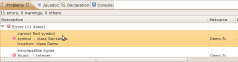
Anyway, who needs these UI builders anyway 😉 Let’s type in some code myself. The plugin provides basic syntax highlighting, which is good. Other than that, it doesn’t seem to provide much value. Error markers in the gutter don’t show the error messages when you hover over them, as the JDT does. The error messages in the Problems view take up three lines, so that I can see only a few of them at once.

Problems view

Speaking of errors, whenever I insert some non-ASCII symbol, like the é in my name, the plugin reports a mysterious error: Sorry, but the character ''. Right.

Also, there is no Code Completion (or I haven’t been able to find it). For someone just learning the language, as I am, this is a serious drawback. And some Quick Fixes are sorely missed as well.

Running a program

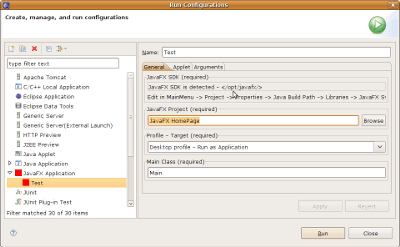
Running a program works using the expected Run As > JavaFX Application menu. The Run Configurations dialog looks like it is not a result of a collaboration between developers and designers:
Run Configurations

What is cool, is the Profile drop down list. It allows you to select the platform on which to run. You can emulate a mobile device, or run on the desktop as an application, as an applet, or with Web Start.

What is not so cool, is that you cannot select a working directory. This means you cannot test real-life deployments all that well. Nor can you specify Virtual Machine arguments. So for memory intensive applications, you’d have to revert to the command line or some build script.

Conclusion

I’m very happy that Sun is finally welcoming Eclipse users into the JavaFX world. But it seems that this plugin is indeed an early release, as there are many rough edges and missing features. Having said that, something is better than nothing. And the BSD license is certainly appreciated.